
3 Ubuntu Variants I Prefer Over the Original
Exploring Ubuntu Flavors That Might Outperform the Original
Ubuntu is often seen as the face of Linux, but it's not always the best choice for every user. Some of its official spin-off flavors offer unique features and tools that can make them more suitable for specific needs. Here are three Ubuntu-based distributions that might outperform the original in certain scenarios.
Xubuntu: A Lightweight Alternative

What makes Xubuntu better than Ubuntu
- Uses far less RAM and CPU than Ubuntu.
- Offers noticeably longer battery life on laptops.
- Provides tons of customization options to tweak its appearance.
Why Xubuntu might not be for you
- It can look outdated compared to modern design standards.
- It might not be worth the trade-offs if your hardware can handle Ubuntu.
Xubuntu is ideal for users with older hardware who want a more efficient system. It uses the Xfce desktop environment (DE), which is significantly lighter on system resources compared to Ubuntu's GNOME desktop environment. This results in faster application launches, smoother multitasking, and better battery life on laptops.
The Xfce DE also uses the GTK3 toolkit, which most Linux apps are built on. This means your installed apps will look like native system apps, unlike some other lightweight desktops where applications can appear unattractive or poorly integrated. Xubuntu offers plenty of customization options and powerful features, making it perfect for power users who need performance without sacrificing functionality.
That said, the main trade-off is aesthetics. Xubuntu has a certain Windows XP-like charm that may feel dated to some users. While you can apply GTK3 themes, it never really looks as modern and polished as the current iterations of Ubuntu. Overall, Xubuntu values function over form, which is excellent if that’s what you're looking for.
Ubuntu Studio: Designed for Creative Professionals

What makes Ubuntu Studio better than the original Ubuntu
- Ships with KDE Plasma instead of GNOME, offering far more customization and power-user features.
- Comes with pre-configured creative apps for audio, video, and graphics work.
- Includes a low-latency kernel optimized for real-time audio and video processing.
Why Ubuntu Studio might not be for you
- The default look isn't particularly appealing, though you can customize it.
- The main selling point—pre-configured creative apps—can be replicated on any Ubuntu-based distro using Ubuntu Studio Installer.
Ubuntu Studio takes Ubuntu's solid foundation and optimizes it for creative professionals. The biggest change is swapping out the GNOME desktop environment for KDE Plasma, one of the most customizable Linux DEs. It also provides better multi-monitor support and powerful window-management features, both of which benefit video-editing and audio-production workflows.
Under the hood, Ubuntu Studio ships with a low-latency custom kernel that improves real-time audio and video processing. There's also the Ubuntu Studio Audio Configuration utility, a graphical tool that gives granular control over your audio settings. The system includes a wide selection of pre-configured creative apps for audio, video, and graphics-related workflows.
If you're a creative professional looking for a distro that's pre-optimized for your workflow, Ubuntu Studio is hard to beat. You don’t need to spend time tweaking or configuring your system—it's already done for you. Just focus on producing your videos, music, or digital artwork.
Kubuntu: A Modern and Feature-Rich Option
What makes Kubuntu better than Ubuntu
- Offers an almost vanilla KDE Plasma experience—which is the best kind.
- Uses less system resources (not less than Xubuntu) while delivering more features and a modern design.
- Boasts a familiar Windows 7-like desktop layout.
Why Kubuntu might not be for you
- The abundance of features can feel overwhelming to Linux newcomers.
- KDE Plasma is built on the Qt framework, whereas many Linux apps are built using the GTK toolkit. As such, if you use certain GTK apps, visually they can look off—albeit functioning as expected!
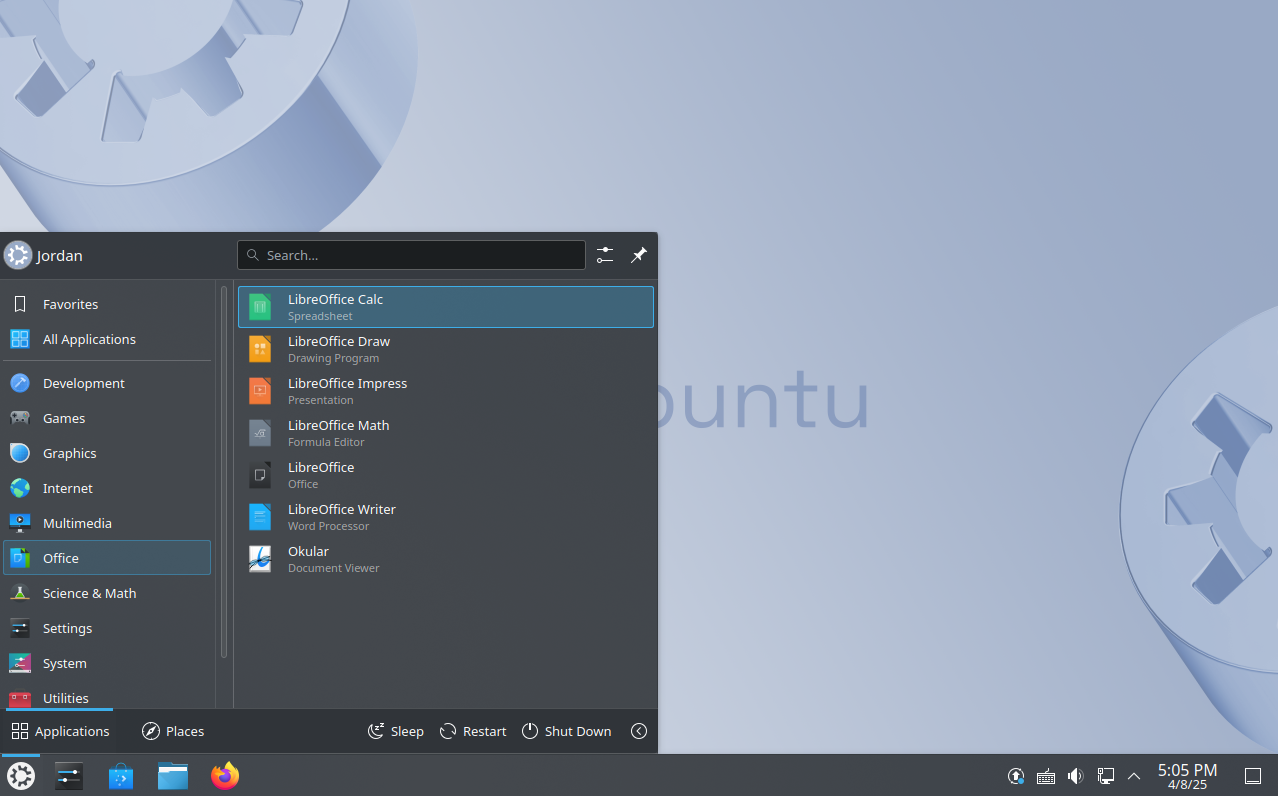
Kubuntu pairs the stable Ubuntu core with the highly customizable KDE Plasma. This makes it a great option for those who aren’t interested in multimedia production and simply want to use Plasma and enjoy all its features and functionalities.
The distro features a familiar, Windows-like layout, which is the default with KDE Plasma. You get a floating taskbar at the bottom for all your pinned and running apps, a Start menu-like app launcher on the left, and a system tray on the right. The overall desktop looks sleek and modern, resembling what Windows 7 could have evolved into if Microsoft hadn’t taken the controversial Metro UI route.
However, once you start exploring the various features—or even the Settings app—Kubuntu can feel a bit complicated. My advice is to give it some time and stick with it. The features themselves are fairly intuitive; it’s just the sheer number of available options that can feel overwhelming.
Which Distro Should You Choose?
For most users who want a modern, customizable, and clean experience that feels like an upgrade over standard Ubuntu, Kubuntu is your best bet. However, if your computer is showing its age—or you simply prefer a minimal, no-nonsense interface reminiscent of the Windows XP era—go with Xubuntu. Lastly, Ubuntu Studio targets creative professionals and is an excellent choice for video editors and music producers, especially if you don’t want to spend time installing plugins or configuring audio servers and just want a system that works out of the box.

Posting Komentar untuk "3 Ubuntu Variants I Prefer Over the Original"
Posting Komentar