
How to Create a TikTok Spark Ads Tutorial: Step-by-Step Guide for 2024
TikTok Spark Ads have become a powerful tool for brands and creators looking to amplify their content while maintaining the authenticity of organic posts. As the platform continues to evolve, understanding how to create a TikTok Spark Ads tutorial is essential for anyone looking to leverage this ad format effectively.
In this guide, we’ll walk you through the entire process of creating a TikTok Spark Ads tutorial, from generating ad codes to optimizing your campaigns for maximum performance. Whether you're a brand or a creator, this step-by-step guide will help you navigate the world of TikTok Spark Ads with confidence.
Understanding TikTok Spark Ads
Before diving into the tutorial creation process, it's important to understand what TikTok Spark Ads are and how they differ from traditional ads. Spark Ads allow brands to promote real, organic TikTok videos from their own accounts or from creators they work with. Unlike standard ads, which require new video content to be created specifically for advertising, Spark Ads retain the original video's engagement metrics, such as likes, comments, and shares.
This feature makes Spark Ads feel more authentic and trustworthy to users, which can lead to higher engagement and better performance. Additionally, Spark Ads are integrated with TikTok Shop and lead generation tools, making them an excellent choice for brands looking to drive conversions directly within the app.
Step 1: Enable Ad Permissions on Your TikTok Account
To generate a Spark Ad code, creators must first enable ad permissions on their TikTok account. This setting is found in the "Settings" section under "Creator settings" and "Ad settings." Once enabled, creators can generate unique codes for each video they want to promote.
Step 2: Select the Video You Want to Promote
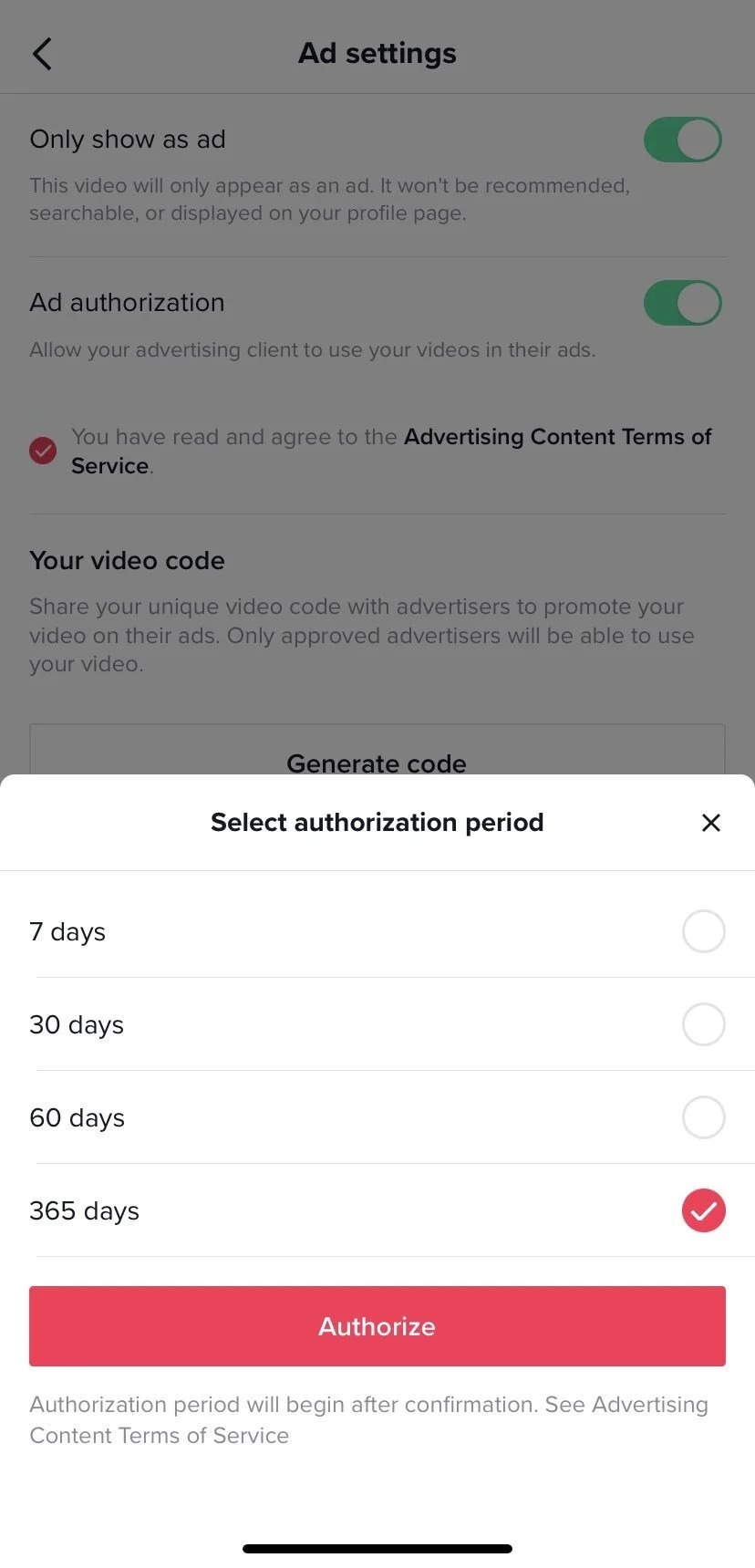
Once ad permissions are enabled, select the video you want to turn into a Spark Ad. Tap the three dots ("...") in the lower right corner of the post and choose "Ad settings." From here, toggle on "Ad authorization" to begin the code generation process.
Step 3: Generate the Spark Ad Code
After toggling on "Ad authorization," you'll see a disclaimer that includes TikTok's advertising terms of service. Below this, you'll find the option to generate a Spark Ad code. You can also adjust the duration of the code by tapping "Extend" and selecting a different timeframe.
Once you've set the duration, tap "Generate" to create the code. TikTok will automatically copy the code to your clipboard, allowing you to paste it into a message or email.
Step 4: Share the Code with the Brand
After generating the code, share it with the brand or advertiser who wants to promote the video. This can be done natively through TikTok DMs (if you follow each other) or via email. The brand can then use the code to run the video as a Spark Ad on TikTok.
Step 5: Set Up the Spark Ad Campaign
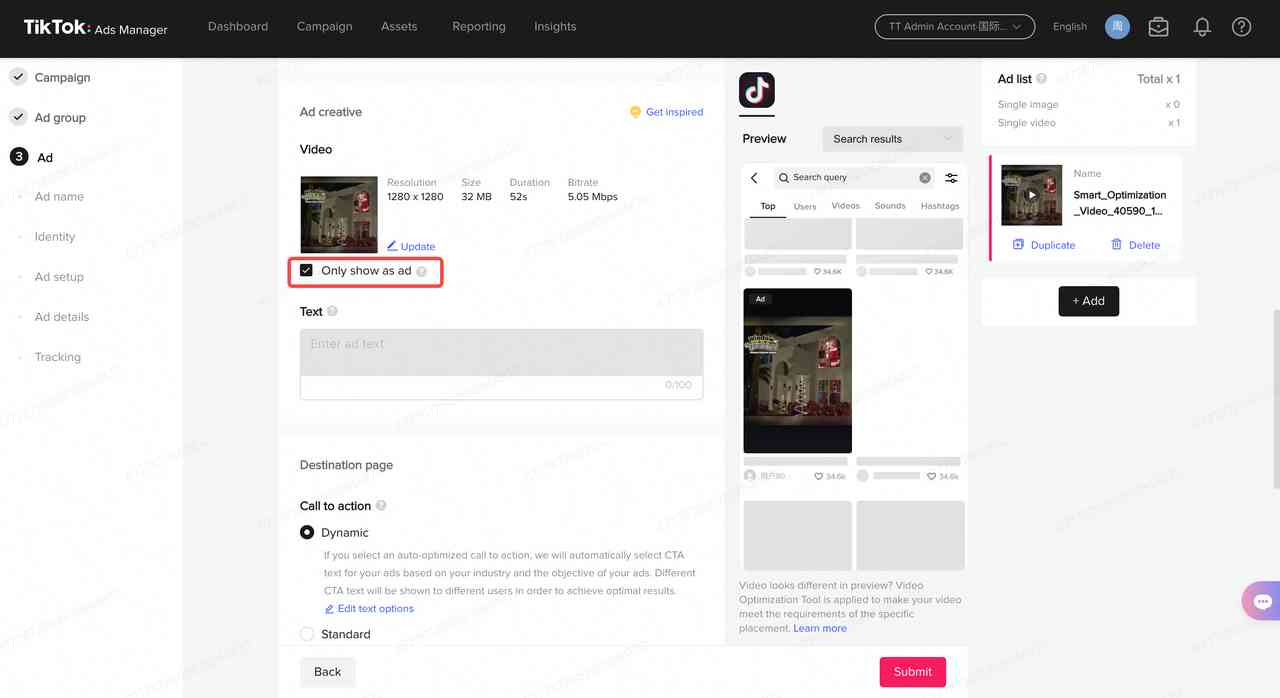
To set up a Spark Ad campaign, the brand should go to TikTok Ads Manager and create a new campaign. Choose the campaign objective (e.g., conversions, traffic, app installs), and in the ad group, select "Use TikTok Post" instead of uploading a new video. Enter the Spark code or select a post from your connected account.
Set your targeting and budget as you would with any other ad campaign, and launch the ad. Once live, monitor performance data such as impressions, views, and conversions to track the success of your campaign.
Best Practices for Creating Effective Spark Ad Tutorials
Creating a successful TikTok Spark Ads tutorial involves more than just generating a code. Here are some best practices to keep in mind:
- Use Creator-Driven Content: TikTok audiences respond best to real people. Partner with creators whose audience aligns with yours, and use their organic posts for Spark Ads.
- Keep the First 3 Seconds Tight: Grab attention quickly with strong hooks, expressive faces, or bold text to stop the scroll early.
- Test Different Objectives and Audiences: Try campaigns with goals like conversions, video views, or app installs. Test cold vs. warm audiences to see what works best.
- Match Your CTA to the Content Style: Make sure the call-to-action (CTA) feels native to the video. A hard sell on a casual creator video can lower performance.
- Refresh Creatives Weekly: Even high-performing posts can lose traction. Rotate Spark Ads regularly to avoid ad fatigue or test new ones alongside proven content.
Common Mistakes to Avoid
While Spark Ads are relatively simple to launch, there are a few common mistakes that can hurt your results. These include:
- Not Getting Creator Permission: If you're boosting a video from a creator, you need their official ad code. Without it, you won’t be able to run Spark Ads, or you risk violating platform rules.
- Making Videos Too Polished: TikTok users don’t expect slick, commercial-looking videos. Spark Ads work best when they feel native, like someone genuinely sharing something they love.
- Ignoring Mobile Behavior: If your message doesn’t land in the first few seconds or your text is hard to read, people will scroll right past. Keep it quick, clear, and vertical-first.
Final Thoughts
TikTok Spark Ads offer a unique opportunity for brands and creators to amplify their content while maintaining the authenticity of organic posts. By following the steps outlined in this tutorial, you can effectively create and manage Spark Ad campaigns that drive engagement, build trust, and deliver real results.
Whether you're a brand looking to scale your TikTok marketing efforts or a creator seeking to monetize your content, mastering the art of Spark Ads is essential in today’s digital landscape. With the right strategy and execution, TikTok Spark Ads can become a powerful asset in your overall marketing plan.

Posting Komentar untuk "How to Create a TikTok Spark Ads Tutorial: Step-by-Step Guide for 2024"
Posting Komentar