
How to Manage Billing Settings in TikTok Ads Manager: A Complete Guide
TikTok has become a powerful platform for businesses looking to reach new audiences and drive sales. As more companies integrate TikTok into their marketing strategies, understanding how to manage billing settings in the TikTok Ads Manager becomes essential. Whether you're a small business owner or a digital marketer, knowing how to navigate these settings ensures that your ad campaigns run smoothly and efficiently.
Understanding TikTok Ads Manager
Before diving into billing settings, it's important to understand what the TikTok Ads Manager is. This tool allows users to create, manage, and track advertising campaigns on TikTok. It provides insights into campaign performance, audience demographics, and budget allocation. To access the Ads Manager, you first need to set up a TikTok Business Center account, which serves as the central hub for all your advertising activities.
Setting Up Your TikTok Business Center
Creating a TikTok Business Center is the first step in managing your ads. Here’s how you can do it:
- Create Your TikTok Business Center: Click on the "Create Your TikTok Business Center" button. This will take you to the TikTok Business Center page.
- Account Setup: Enter your email address and create a password. Make sure to agree to the terms of service and opt out of email subscriptions if desired.
- Email Verification: Check your email for a verification code and enter it on the verification screen.
- Select Your Industry: Choose "e-commerce" from the list of industries and select a specific category like home decor or accessories.
- Business Information: Fill in your business name, telephone number, country, state, time zone, and currency.
- Billing Information: Provide accurate billing details, including your address and primary contact name.
Once you complete these steps, your TikTok Ads Manager account will be created, and you can proceed to set up your ad account.
Managing Billing Settings in TikTok Ads Manager
After setting up your TikTok Business Center and Ads Manager account, you’ll need to manage your billing settings to ensure that your campaigns are funded properly. Here’s how to do it:
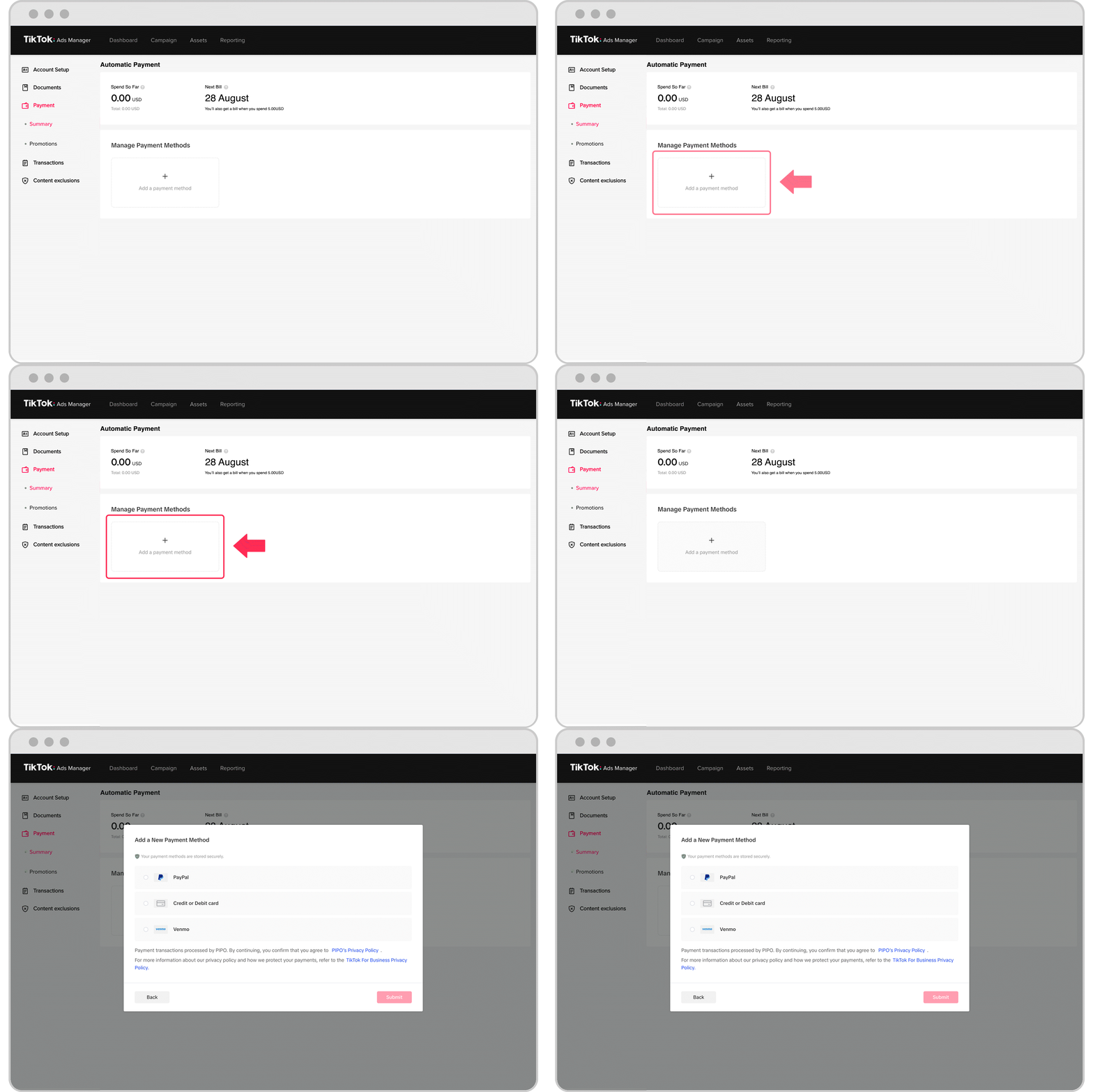
- Navigate to Payment Settings: In the TikTok Ads Manager dashboard, go to the "Payment" section.
- Add Payment Method: You can add a credit card or any other payment option supported by TikTok. Make sure the information is accurate to avoid any issues with payments.
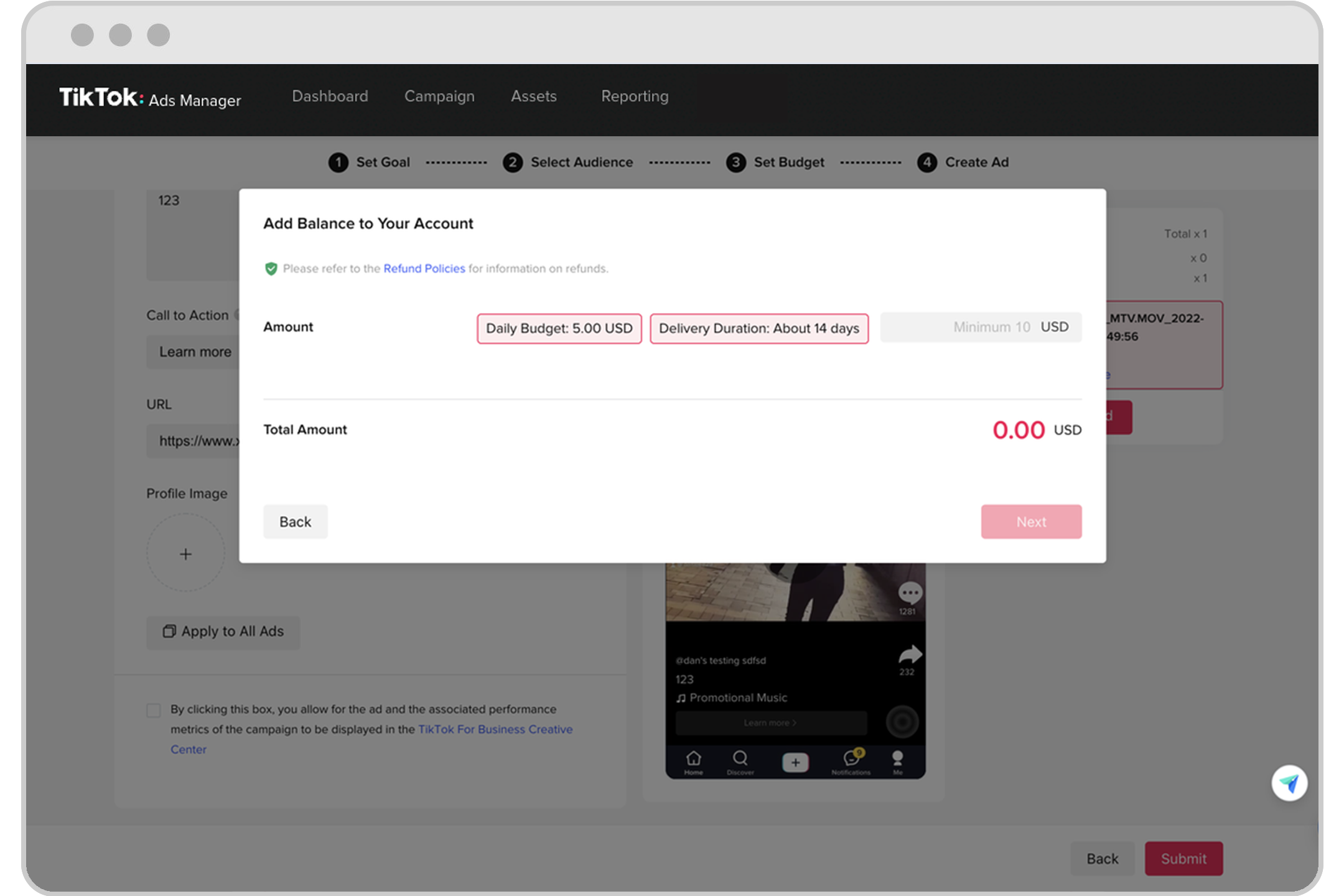
- Set Budget Limits: Define your daily or total campaign budget to control your spending. This helps in managing your advertising costs effectively.
- Review Billing History: Check your billing history to see past transactions and ensure that all charges are accurate.
- Update Billing Information: If there are any changes to your billing details, update them promptly to avoid disruptions in your ad campaigns.
Tips for Effective Billing Management
To make the most of your TikTok Ads Manager billing settings, consider the following tips:
- Monitor Campaign Performance: Regularly review your campaign performance to ensure that your budget is being used effectively.
- Set Realistic Budgets: Based on your business goals, set realistic budgets that align with your advertising objectives.
- Use Auto-Refill: Enable auto-refill to ensure that your account never runs out of funds during critical campaign periods.
- Track Expenses: Keep track of your expenses to stay within your budget and avoid unexpected charges.
Common Questions About TikTok Ads Manager Billing
Here are some frequently asked questions about managing billing settings in TikTok Ads Manager:
- Is creating a TikTok Business Center account free? Yes, creating an account is free, but you will need to add a payment method to run ads.
- Can I use my phone to manage billing settings? While you can use your phone to access the TikTok Ads Manager, it's recommended to use a computer for easier navigation and management.
- What happens if my payment method fails? If your payment method fails, your campaigns may be paused until the issue is resolved. Ensure that your payment information is up to date to avoid this.
Conclusion
Managing billing settings in TikTok Ads Manager is a crucial aspect of running successful ad campaigns on the platform. By understanding the process and following best practices, you can ensure that your advertising efforts are both effective and cost-efficient. Whether you're just starting out or looking to optimize your current strategy, taking the time to set up and manage your billing settings properly can make a significant difference in your overall success on TikTok.

Posting Komentar untuk "How to Manage Billing Settings in TikTok Ads Manager: A Complete Guide"
Posting Komentar