
How to Navigate the TikTok Ads Manager Interface: A Complete Guide
Introduction to TikTok Ads Manager
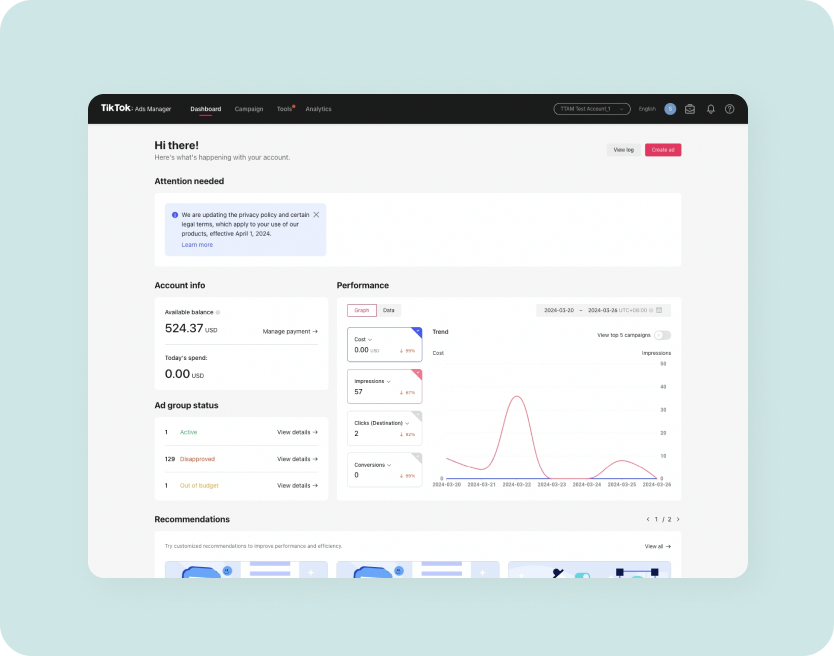
TikTok has become a powerful platform for businesses and marketers looking to reach a vast and engaged audience. With its dynamic content and high user interaction, TikTok offers a unique opportunity for brands to connect with their target market. One of the essential tools for leveraging this potential is the TikTok Ads Manager interface. This tool allows users to create, manage, and optimize their advertising campaigns directly on the platform. Understanding how to navigate this interface is crucial for maximizing the effectiveness of your TikTok ad strategy.
Getting Started with TikTok Ads Manager
Before diving into the intricacies of the TikTok Ads Manager, it's important to set up an account. To start using TikTok Ads Manager, you first need to create an ad account. If you're a self-serve customer, you can refer to the Business Help Center article for detailed instructions. For those managing multiple ad accounts, your sales representative will guide you through the process. It's recommended to follow the comprehensive onboarding guide provided by TikTok to ensure a smooth setup experience.
Key Sections of the TikTok Ads Manager Interface
Once you have an account, you'll be greeted by the TikTok Ads Manager interface. This dashboard is designed to be user-friendly, but it's essential to understand its key sections to make the most of your advertising efforts.
-
Campaign Overview: This section provides a summary of all your active campaigns. You can view metrics such as impressions, clicks, and engagement rates. It's a great place to monitor the performance of your ads at a glance.
-
Ad Creation: Here, you can create new ads. The process involves selecting your campaign objective, setting your budget, choosing your target audience, and uploading your creative content. The interface guides you through each step, making it easy to set up your first ad.
-
Audience Targeting: TikTok allows for precise targeting based on demographics, interests, and behaviors. This section enables you to define your ideal audience, ensuring your ads reach the right people.
-
Performance Analytics: After launching your ads, this section becomes your go-to resource for tracking results. You can analyze various metrics, such as click-through rates, conversion rates, and return on ad spend (ROAS). These insights help you refine your strategies and improve future campaigns.
-
Settings and Preferences: Customize your experience by adjusting settings related to notifications, payment methods, and account preferences. This ensures that you receive relevant updates and maintain control over your ad management.
[IMAGE: TikTok Ads Manager interface navigation]
Navigating the Interface: Step-by-Step Guide
Navigating the TikTok Ads Manager interface can seem overwhelming at first, but following these steps will help you get started:
-
Log In: Access the TikTok Ads Manager by logging into your account. If you don't have one, follow the setup instructions provided earlier.
-
Dashboard Overview: Once logged in, take a moment to familiarize yourself with the dashboard. Look for the main sections mentioned above.
-
Create a New Campaign: Click on the "Create Campaign" button to start a new ad. Choose your campaign objective, such as brand awareness or conversions.
-
Set Your Budget: Define your budget for the campaign. TikTok offers both daily and lifetime budgets, allowing you to control your spending.
-
Target Your Audience: Use the targeting options to specify who will see your ad. Consider factors like age, gender, location, and interests.
-
Upload Your Creative: Add your video or image content. Ensure it aligns with your campaign goals and resonates with your target audience.
-
Review and Launch: Before launching your ad, review all the details. Once satisfied, click "Launch" to start your campaign.
-
Monitor Performance: Regularly check the performance analytics to track your ad's success. Use this data to make informed decisions and adjust your strategy as needed.
[IMAGE: TikTok Ads Manager interface navigation]
Tips for Effective Ad Management
To maximize the impact of your TikTok ads, consider the following tips:
- Test Different Creatives: Experiment with various video styles, music, and captions to see what resonates best with your audience.
- Optimize for Mobile: Since most TikTok users access the app on mobile devices, ensure your ads are optimized for mobile viewing.
- Engage with Your Audience: Encourage interaction by asking questions or prompting users to engage with your content.
- Stay Updated: Keep an eye on TikTok's updates and changes to the Ads Manager interface. Staying informed helps you adapt your strategies effectively.
By mastering the TikTok Ads Manager interface, you can unlock the full potential of your advertising efforts on this vibrant platform. With careful planning, strategic targeting, and continuous optimization, your TikTok ads can drive meaningful results for your business.

Posting Komentar untuk "How to Navigate the TikTok Ads Manager Interface: A Complete Guide"
Posting Komentar