
How to Set Up TikTok Ads for Your Product Catalog: A Complete Guide
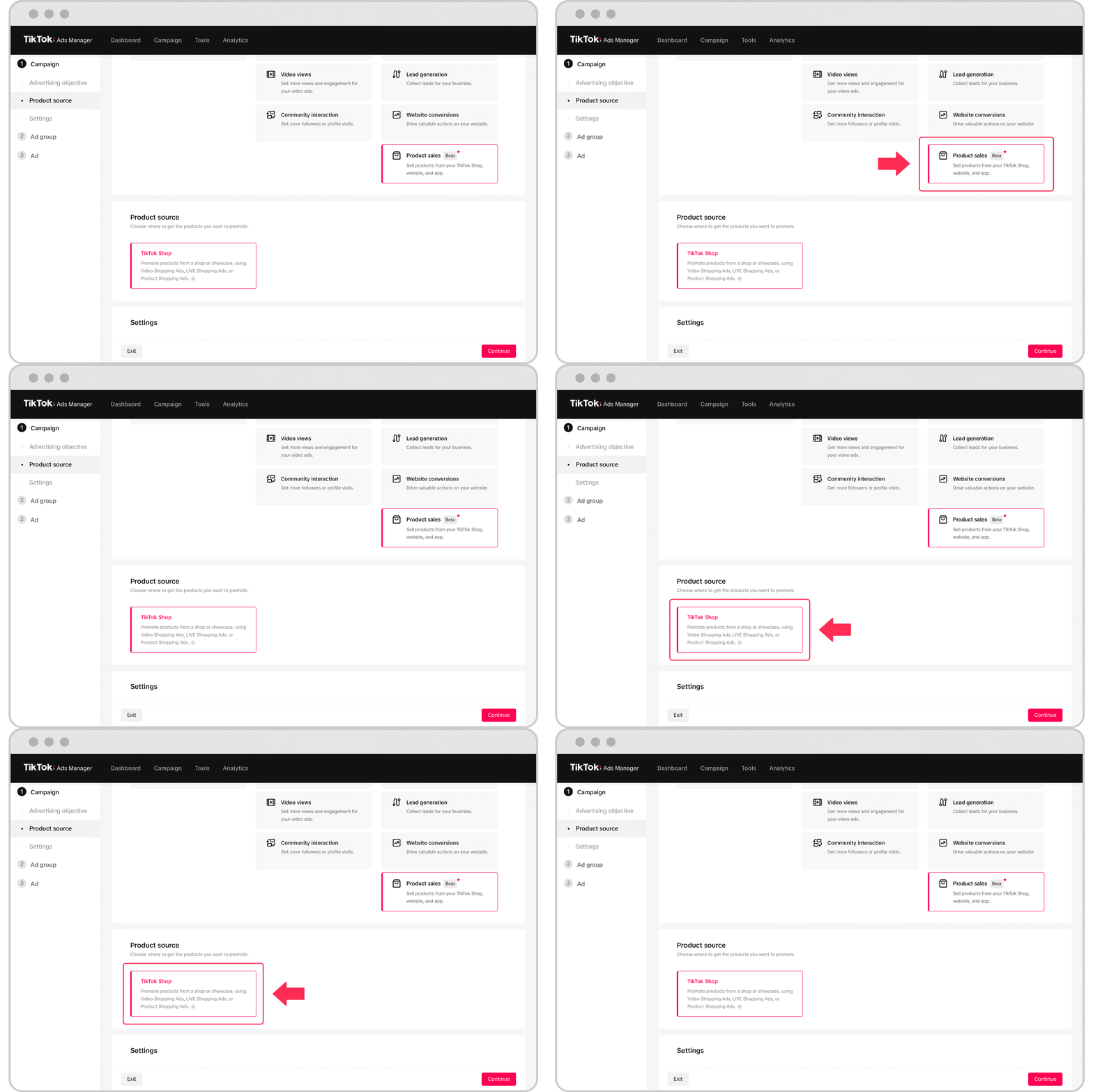
TikTok has evolved from a social media platform into a powerful e-commerce engine. With over 1.5 billion monthly active users globally, including 150 million in the United States, it's no surprise that brands are eager to tap into this massive, engaged audience. One of the most effective ways to do this is through TikTok Catalog Ads. These dynamic ads allow you to showcase your entire product inventory directly to potential customers, leveraging TikTok’s AI and personalization algorithms to deliver the right products to the right people.
If you're looking to set up TikTok ads for your product catalog, this guide will walk you through the process step by step, ensuring you maximize your ad performance and ROI.
Why TikTok Catalog Ads Matter
Catalog Ads are a game-changer for e-commerce brands because they automate the ad creation process. Instead of manually creating separate ads for each product, you upload a product catalog, and TikTok takes care of the rest. The platform uses your product feed to automatically match users with the products they’re most likely to buy, based on their browsing behavior and interests.
This format is particularly effective in today’s fast-paced, scroll-heavy environment. With attention spans shrinking, dynamic ads help you reach your audience more efficiently while maintaining high levels of personalization.
Step-by-Step Guide to Setting Up TikTok Catalog Ads
1. Create a Product Catalog and Connect Your Product Feed
The first step in setting up TikTok Catalog Ads is to create a product catalog in the TikTok Ads Manager:
- Log in to your TikTok Ads Manager.
- Navigate to Assets > Catalog.
- Click Create and fill in the required details:
- Catalog Name
- Default Currency (must match your product prices)
- Targeting Location (the region where your ads will be shown)
Once your catalog is created, you’ll need to add your products. TikTok follows similar requirements to Google and Facebook, so if you already have a product feed, it should work seamlessly.
You can either: - Use a tool like Confect to automatically format your catalog for TikTok. - Import your product feed directly from platforms like Google Merchant Center.
This ensures that your product information stays up-to-date, reflecting any changes in your inventory or pricing.
2. Install TikTok Pixel and Configure Conversion Events
To track user interactions and optimize your ad performance, you’ll need to install the TikTok Pixel:
- In TikTok Ads Manager, go to Tools > Events.
- Click Connect Data Source and choose Web.
- Enter your website URL and select your preferred setup method:
- Partner Integration (e.g., Shopify, Google Tag Manager)
- Manual Setup
For manual setup: - Create and name your pixel (ideally matching your website or domain name). - Install the base code on every page of your website. - Configure standard events such as: - ViewContent (when a product page is viewed) - AddToCart (when a product is added to the cart) - Purchase (when a transaction is completed)
Use the TikTok Pixel Helper Chrome extension to verify that your pixel is working correctly. Also, use the Test Events feature in the Events Manager to simulate user actions and ensure accurate tracking.
3. Launch Your First TikTok Catalog Ad Campaign
With your catalog and pixel set up, you're ready to create your first catalog ad:
- In TikTok Ads Manager, click Campaign > Create.
- Choose the Sales objective and select Website as your conversion location.
- Under Campaign Type, select Smart+.
- In the Product Source Details section, toggle on Use Catalog and select the catalog you previously created.
- Define your target audience, budget, and schedule.
- Choose your ad format (e.g., single video, carousel).
- Customize your ad creative, ensuring it aligns with TikTok's 9:16 vertical format.
By following these steps, you'll be able to launch dynamic, personalized ads that showcase your products to the right audience at the right time.
Tips for Optimizing Your TikTok Catalog Ads
Show Just Enough Product Info to Drive Clicks
Your Catalog Ad should answer the most important question for your audience: Why should I buy this product right now? Avoid overwhelming users with too much information. Instead, highlight key details depending on your product and customer needs:
- If price drives conversions → Make the savings or final price clear and bold.
- If brand matters → Call out the brand name or logo in the design.
- If features sell your product → Highlight one or two key specs (e.g., "Waterproof," "Vegan Leather," "Limited Edition").
Use Time-Limited Campaigns to Create Urgency
Limited-time offers, exclusive drops, and flash sales can create a sense of urgency that drives conversions. For example, Power uses campaigns that:
- Highlight product savings (e.g., “Save $40”).
- Use brand colors and urgency accents (e.g., yellow).
- Clearly show the campaign’s end date or time-sensitive nature.
Design High-Performing TikTok Product Ads
TikTok is a visual-first platform, so high-quality images and additional product visuals can enhance engagement. Ensure your designs:
- Use a 9:16 vertical layout (a must for TikTok).
- Have a resolution of 1080x1920 pixels.
- Include short, bold, and readable text—don’t hide key info behind tiny fonts.
Optimize Your Product Feed for the TikTok Algorithm
A well-structured product feed helps TikTok’s algorithm match your products with the right buyers. At a minimum, include:
- Brand
- Model Name
- Category
- Price
Keeping your feed updated daily ensures that product availability and pricing are always accurate.
Final Thoughts
TikTok Catalog Ads are a powerful tool for e-commerce brands looking to scale their reach and drive conversions. By following the steps outlined above and optimizing your strategy, you can create compelling, data-driven ads that resonate with your audience and boost your bottom line.
Remember, the key to success lies in design, urgency, and continuous testing. As TikTok continues to evolve, staying ahead of the curve with dynamic, platform-specific ads will be crucial to your long-term success.
[IMAGE: TikTok ads for product catalog setup in a digital marketing context]

Posting Komentar untuk "How to Set Up TikTok Ads for Your Product Catalog: A Complete Guide"
Posting Komentar