
How to Set Up a TikTok Ads Retargeting Campaign: A Step-by-Step Guide
TikTok has become a powerful platform for brands looking to connect with their audience. With over 1 billion active users, it's no wonder that marketers are turning to TikTok ads retargeting campaigns to drive engagement and conversions. Retargeting is a strategy that allows you to reach users who have previously interacted with your brand, such as visiting your website or engaging with your content. This guide will walk you through the process of setting up a TikTok ads retargeting campaign, helping you maximize your marketing efforts.
Understanding TikTok Ads Retargeting
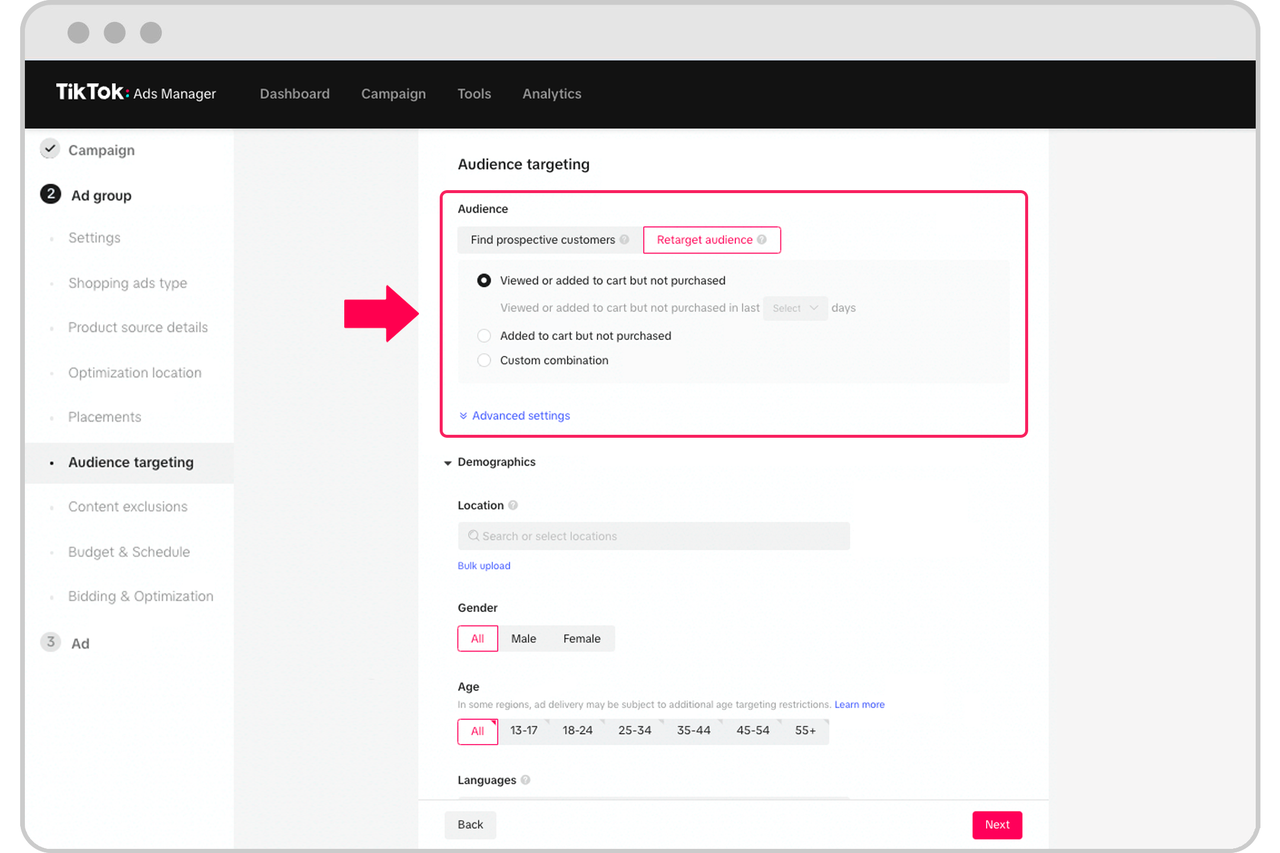
Before diving into the setup process, it's essential to understand what TikTok ads retargeting entails. Retargeting involves showing ads to users who have already visited your website or engaged with your content on TikTok. This approach helps keep your brand top of mind and encourages users to take further action, such as making a purchase or signing up for a newsletter.
Why Use TikTok Ads Retargeting?
Retargeting is an effective way to increase conversion rates by focusing on users who have already shown interest in your products or services. According to industry studies, retargeted ads have a higher conversion rate compared to non-retargeted ads. Additionally, retargeting can help reduce cart abandonment by reminding users of items they left in their shopping carts.
Step-by-Step Guide to Setting Up a TikTok Ads Retargeting Campaign
1. Define Your Campaign Objective
The first step in setting up a TikTok ads retargeting campaign is to define your objective. Common objectives include increasing sales, generating leads, or boosting brand awareness. Clearly defining your goal will help you create more targeted and effective ads.
2. Set Up a TikTok Business Account
To run ads on TikTok, you'll need a business account. If you don't have one, you can create it by following these steps: - Go to the TikTok app. - Tap on your profile icon. - Select "Settings and Privacy." - Choose "Switch to Business Account." - Follow the prompts to complete the setup.
Once your business account is set up, you can access the TikTok Ads Manager to start creating your campaign.
3. Install the TikTok Pixel
The TikTok Pixel is a tracking code that allows you to monitor user interactions on your website. To install the pixel: - Log in to your TikTok Ads Manager. - Navigate to the "Pixels" section. - Create a new pixel and follow the instructions to install it on your website.
The pixel will track user behavior, such as page views and conversions, which is essential for retargeting.
4. Create Custom Audiences
Custom audiences allow you to target users based on their interactions with your website. To create a custom audience: - In the TikTok Ads Manager, go to the "Audiences" section. - Select "Custom Audience." - Choose the type of audience you want to create, such as website visitors or app users. - Define the parameters for your audience, such as the time frame and specific actions taken on your site.
Creating custom audiences ensures that your ads are shown to users who have already engaged with your brand.
5. Design Your Ad Creative
Creating compelling ad creative is crucial for the success of your retargeting campaign. Consider the following tips: - Use high-quality images or videos that showcase your product or service. - Include a clear call-to-action (CTA) to encourage users to take action. - Keep your message concise and relevant to the user's previous interactions.
[IMAGE: TikTok Ads Retargeting Campaign Setup]
6. Set Your Budget and Schedule
Determine how much you're willing to spend on your campaign and set a budget accordingly. TikTok allows you to choose between daily or lifetime budgets. Additionally, decide on the schedule for your ads, considering when your target audience is most active.
7. Launch and Monitor Your Campaign
Once your campaign is set up, launch it and monitor its performance regularly. Use the TikTok Ads Manager to track key metrics such as click-through rate (CTR), conversion rate, and return on ad spend (ROAS). Adjust your campaign as needed based on the data you collect.
Tips for Optimizing Your TikTok Ads Retargeting Campaign
1. Test Different Ad Formats
Experiment with different ad formats, such as video ads, carousel ads, and image ads, to see which performs best. Testing can help you identify the most effective ways to engage your audience.
2. Use A/B Testing
A/B testing involves creating two versions of an ad and comparing their performance. This can help you determine which elements, such as headlines or visuals, resonate most with your audience.
3. Leverage User Behavior Data
Use the data collected from the TikTok Pixel to gain insights into user behavior. This information can help you refine your targeting and improve the effectiveness of your retargeting campaign.
4. Retarget High-Value Users
Focus on retargeting users who have shown a higher likelihood of converting, such as those who have made a purchase or added items to their cart. These users are more likely to engage with your ads and convert into customers.
Conclusion
Setting up a TikTok ads retargeting campaign can significantly enhance your marketing efforts by focusing on users who have already shown interest in your brand. By following the steps outlined in this guide, you can create a targeted and effective campaign that drives engagement and conversions. Remember to continuously monitor and optimize your campaign based on performance data to achieve the best results.
[IMAGE: TikTok Ads Retargeting Campaign Setup]

Posting Komentar untuk "How to Set Up a TikTok Ads Retargeting Campaign: A Step-by-Step Guide"
Posting Komentar