
How to Set Up TikTok Pixel for Conversions: A Complete Guide
In the ever-evolving digital marketing landscape, TikTok has emerged as a powerful platform for businesses to reach new audiences and drive conversions. As more brands turn to TikTok for advertising, setting up the TikTok Pixel for conversions becomes essential. This guide will walk you through the process of installing and configuring the TikTok Pixel, ensuring accurate tracking of user interactions and maximizing your ad ROI.

Understanding the TikTok Pixel
The TikTok Pixel is a tracking tool that allows you to monitor user behavior on your website and measure the effectiveness of your TikTok ad campaigns. It helps track key conversion events such as purchases, sign-ups, and form submissions. By integrating the TikTok Pixel into your website, you can gain valuable insights into how users interact with your content and optimize your ad strategies accordingly.
Why Use the TikTok Pixel?
- Track Conversions: Monitor user actions like purchases, sign-ups, and form submissions.
- Optimize Ad Campaigns: Use data from the pixel to refine targeting and improve ad performance.
- Retarget Users: Reach out to users who have engaged with your ads or visited your site.
- Enhance Audience Targeting: Create custom audiences based on user behavior.
Step-by-Step Guide to Setting Up TikTok Pixel

1. Access Your TikTok Business Manager
To begin, log in to your TikTok Business Manager account. This is where you'll manage your ad campaigns and set up the pixel.
2. Create a TikTok Pixel
Once logged in, navigate to the "Events" section under "Tools." Click on "Web Events" and then select "Set Up Web Events." You'll be prompted to enter a name for your pixel and choose the type of pixel you want to install.
3. Choose Manual Installation
For maximum flexibility, select "Manually Install Pixel Code." This option allows you to add the pixel code directly to your website's codebase or through a tag management system like Google Tag Manager.
4. Copy the Pixel Code
After setting up your pixel, you'll receive a unique pixel code. Copy this code and install it on your website. Ensure that the "Allow first-party cookie" option is enabled, as well as the "Automatic advanced matching" option for better tracking accuracy.
5. Enable Advanced Matching
Advanced matching allows you to send encrypted customer data to TikTok, helping to identify users more accurately. Enable both manual and automatic advanced matching to maximize the effectiveness of your tracking.
Tracking Key Conversion Events

TikTok supports several standard events for tracking conversions. Here are some of the most important ones:
- ViewContent: Track when a user views a specific page on your site.
- AddToCart: Monitor when users add products to their shopping cart.
- InitiateCheckout: Track when users start the checkout process.
- PlaceOrder: Record when a purchase is completed.
- CompletePayment: Verify that payment information is valid.
- Contact: Track when users submit contact forms or initiate consultations.
To track these events, use the ttq.track method in your code. For example:
ttq.track('PlaceOrder');
Customizing Event Parameters
Some events allow for additional parameters to provide more detailed insights. Refer to TikTok's documentation for specific parameters and best practices.
Server-Side Events API Integration
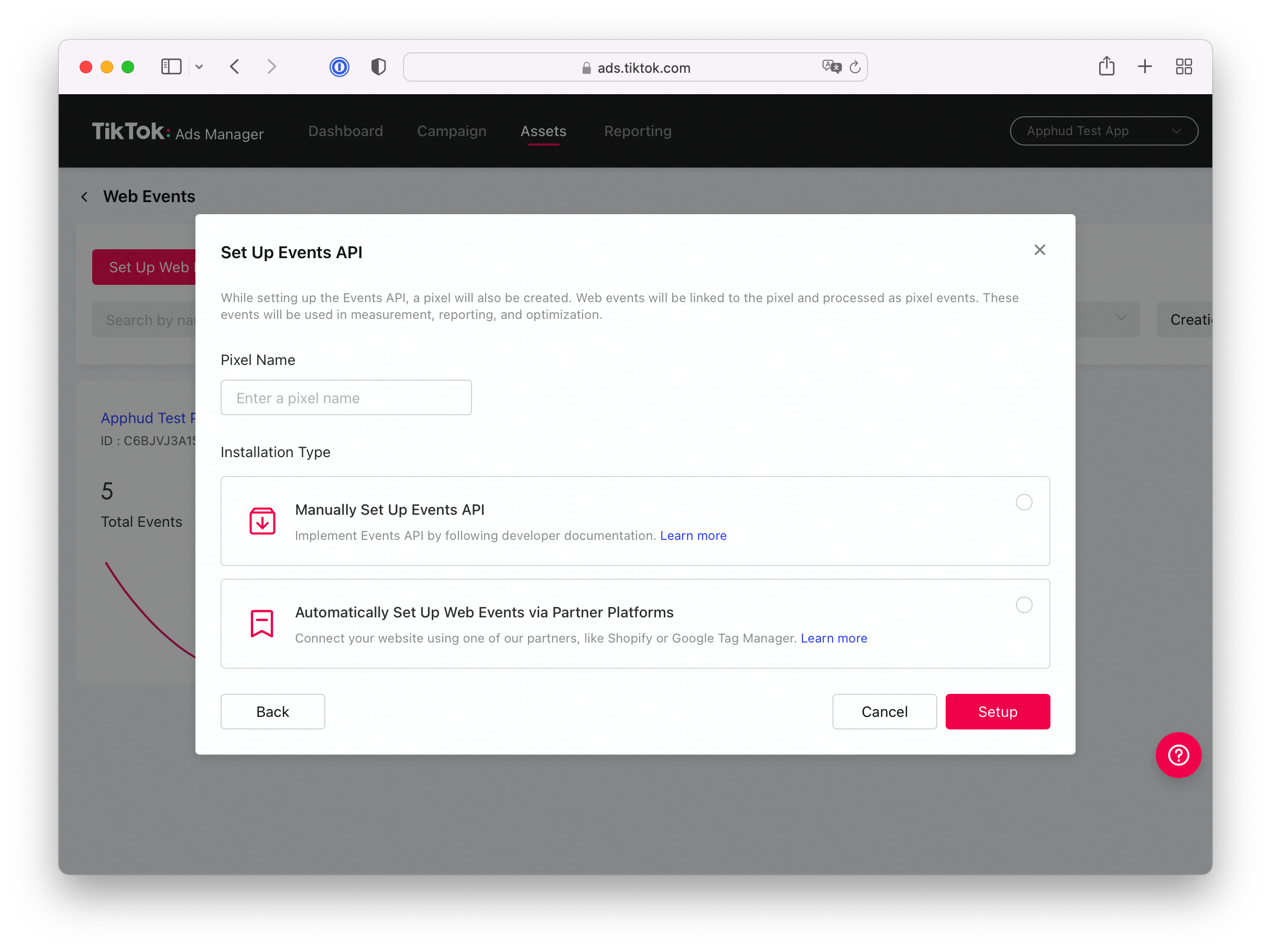
For more reliable tracking, especially in environments with ad blockers or privacy protections, consider using the TikTok Events API. This server-side approach ensures that conversion events are tracked even if browser-based tracking is blocked.
How to Implement the Events API
- Generate a Unique Event ID: Create a unique ID for each event to ensure consistency between client and server tracking.
- Send Data to the Events API: Use the provided endpoint to send event data, including the event ID, timestamp, and relevant user information.
- Encrypt Sensitive Data: Ensure that sensitive data such as email and phone numbers are encrypted using SHA256 hashing.
Here’s an example of a JSON payload for the Events API:
{
  "pixel_code": "{PIXEL-ID}",
  "event_id": "{UUID}",
  "timestamp": 1670353390,
  "event": "PlaceOrder",
  "context": {
    "page": {
      "url": "https://yourwebsite.com/thank-you"
    },
    "user": {
      "email": "{SHA256-EMAIL}",
      "phone_number": "{SHA256-PHONE}"
    }
  }
}
Verifying Your Pixel Installation

After setting up the TikTok Pixel, it's crucial to verify that it's working correctly. Use the TikTok Pixel Helper browser extension to check for any errors and ensure that events are being tracked as expected.
Testing Events
Navigate through your website and perform actions such as adding items to your cart, initiating checkout, and completing purchases. The Pixel Helper will show you which events are firing and help identify any issues.
Best Practices for TikTok Pixel Setup

To get the most out of your TikTok Pixel setup, follow these best practices:
- Enable Advanced Matching: This improves audience targeting and enhances the accuracy of your tracking.
- Use UTM Parameters: Add UTM tags to your ad links to analyze traffic sources and campaign performance.
- Set Up Retargeting Audiences: Create custom audiences based on user behavior to retarget potential customers.
- A/B Test Ads: Experiment with different ad formats and creatives to determine what resonates best with your audience.
Conclusion

Setting up the TikTok Pixel for conversions is a critical step in optimizing your digital marketing strategy. By following the steps outlined in this guide, you can ensure accurate tracking of user interactions, improve ad performance, and ultimately drive more conversions. Whether you're a small business owner or a large enterprise, leveraging the power of the TikTok Pixel can significantly enhance your online presence and marketing efforts.

Posting Komentar untuk "How to Set Up TikTok Pixel for Conversions: A Complete Guide"
Posting Komentar