
How to Set Up Your TikTok Business Center: A Complete Guide for 2024
In the ever-evolving digital landscape, TikTok has emerged as a powerful platform for businesses to connect with their target audience. With over 1 billion active users, it's no surprise that many brands are turning to TikTok to boost their online presence and drive sales. Setting up a TikTok Business Center is an essential step in leveraging this platform effectively. This guide will walk you through the process of setting up your TikTok Business Center, ensuring you're well-equipped to grow your brand on this dynamic platform.
Understanding the TikTok Business Center
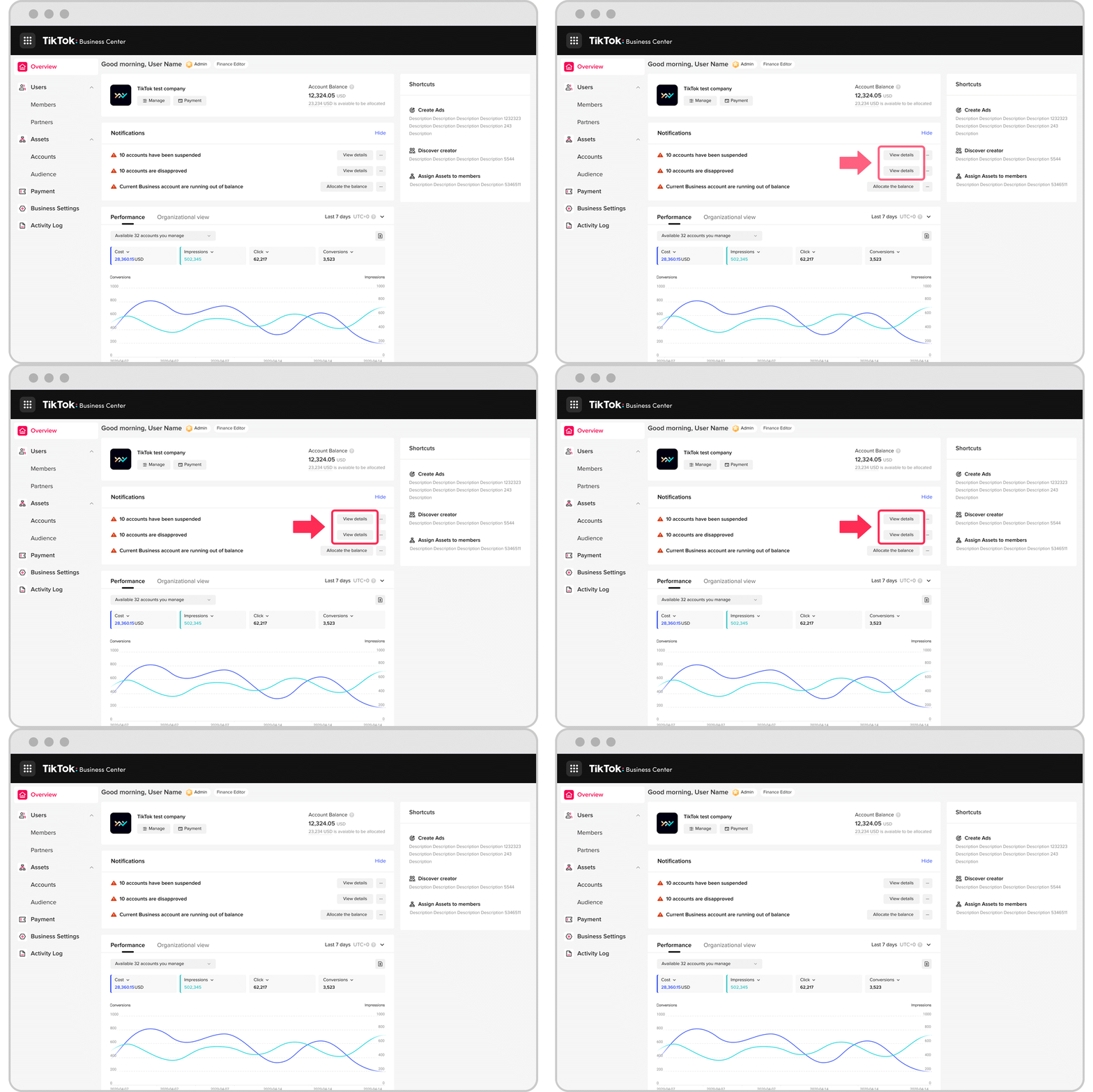
The TikTok Business Center is a dedicated space within the TikTok app designed for businesses to manage their accounts, access analytics, and create targeted ads. It offers a range of tools and features that help businesses streamline their marketing efforts and engage with their audience more effectively. Whether you're a small business owner or a large corporation, the TikTok Business Center provides the necessary resources to succeed on the platform.
Step-by-Step Guide to Setting Up Your TikTok Business Center
1. Create a TikTok Business Account
Before you can access the TikTok Business Center, you need to create a business account. Here’s how:
- Download the TikTok App: If you haven't already, download the TikTok app from the App Store or Google Play.
- Sign Up: Tap on "Sign Up" and enter your email address or phone number.
- Choose Business Account: During the sign-up process, select the option to create a business account. You'll be prompted to provide your business name, website, and other relevant details.
[IMAGE: TikTok Business Center setup for 2024]
2. Verify Your Business Account
Once you've created your business account, it's important to verify it to unlock additional features and tools. To verify your account:
- Go to Your Profile: Tap on your profile picture and select "Edit Profile."
- Verify Your Business: Follow the prompts to verify your business. This typically involves providing a government-issued ID and confirming your business information.
3. Customize Your Business Profile
A well-crafted profile is crucial for attracting followers and building brand recognition. Here’s how to customize your profile:
- Profile Picture: Use a high-quality image of your logo or a professional headshot if you're a solo entrepreneur.
- Bio: Write a concise and engaging bio that highlights your business and what you offer. Keep it under 80 characters.
- Links: Add links to your website, social media profiles, and any other relevant pages. This helps drive traffic to your other platforms.
[IMAGE: TikTok Business Center setup for 2024]
4. Access the TikTok Business Center
After setting up your business account, you can access the TikTok Business Center by following these steps:
- Open the TikTok App: Launch the TikTok app and navigate to your profile.
- Tap on the Menu Icon: The menu icon is usually located at the top right corner of your profile page.
- Select "Business Center": From the menu, select "Business Center" to access the tools and features available for your business account.
5. Explore the Features of the TikTok Business Center
The TikTok Business Center offers a variety of features to help you manage your business effectively. Some key features include:
- Analytics: Track the performance of your videos, understand your audience demographics, and gain insights into your content's reach.
- Ad Creation: Create and manage targeted ads to promote your products or services. The ad creation tools allow you to set budgets, choose targeting options, and track the performance of your campaigns.
- Content Management: Organize and schedule your content to maintain a consistent posting schedule. This feature helps you stay ahead of trends and keep your audience engaged.
- Customer Engagement: Respond to comments, messages, and reviews to build relationships with your followers and foster a sense of community around your brand.
[IMAGE: TikTok Business Center setup for 2024]
Tips for Maximizing Your TikTok Business Center
To make the most of your TikTok Business Center, consider the following tips:
- Leverage Trends: Stay updated with the latest trends on TikTok and incorporate them into your content. This helps increase your visibility and engagement.
- Engage with Your Audience: Regularly interact with your followers by responding to comments, participating in challenges, and creating content that resonates with your audience.
- Analyze Performance: Use the analytics tools provided by the TikTok Business Center to track the performance of your content and adjust your strategy accordingly.
- Collaborate with Influencers: Partner with influencers who align with your brand to expand your reach and credibility. Influencer collaborations can significantly boost your visibility on the platform.
Conclusion
Setting up your TikTok Business Center is a crucial step in establishing a strong presence on this popular platform. By following the steps outlined in this guide, you can effectively manage your business account, create engaging content, and leverage the tools provided by the TikTok Business Center to grow your brand. Remember, consistency, creativity, and engagement are key to success on TikTok. Start today and take advantage of the opportunities this platform offers for your business.
[IMAGE: TikTok Business Center setup for 2024]

Posting Komentar untuk "How to Set Up Your TikTok Business Center: A Complete Guide for 2024"
Posting Komentar