
How to Use TikTok Ads Manager Reporting Tools for Effective Campaign Analysis
TikTok has become a dominant force in the digital advertising landscape, offering brands a unique opportunity to connect with a massive and engaged audience. As more businesses invest in TikTok ads, the need for effective campaign analysis becomes increasingly important. This is where TikTok Ads Manager reporting tools come into play. These tools provide valuable insights that help advertisers optimize their strategies, improve ROI, and make data-driven decisions.
Understanding TikTok Ads Manager Reporting Tools
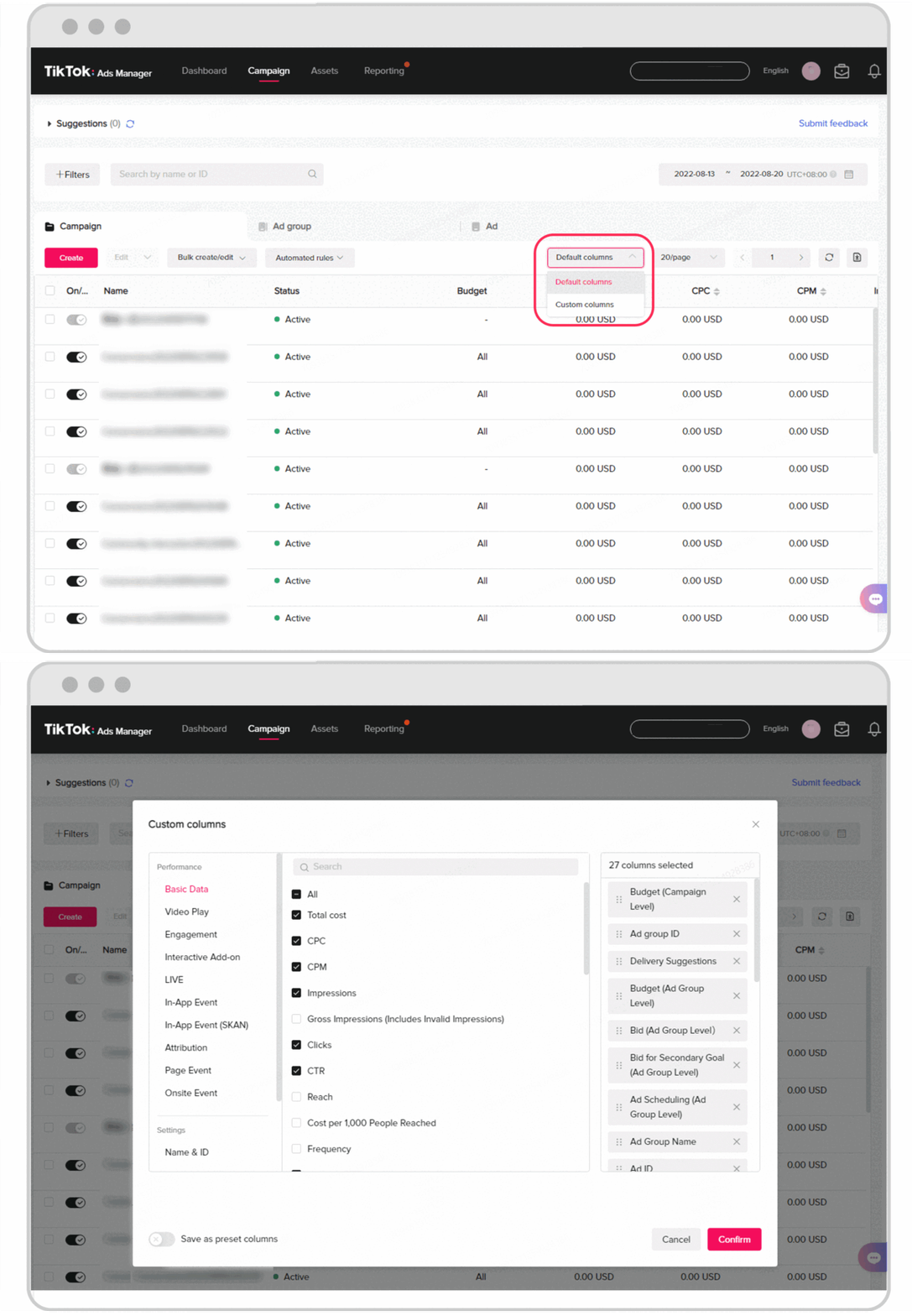
TikTok Ads Manager is the platform where advertisers can create, manage, and analyze their ad campaigns. The reporting tools within this system are essential for tracking performance metrics, understanding audience behavior, and refining ad strategies. Whether you're a seasoned marketer or just starting out, mastering these tools can significantly enhance your ability to measure and improve your TikTok ad performance.
Key Features of TikTok Ads Manager Reporting Tools
- Performance Metrics Dashboard
- This dashboard provides an overview of your campaign's performance, including key metrics like impressions, clicks, conversions, and engagement rates.
-
You can track how your ads are performing over time and compare different campaigns to identify what works best.
-
Audience Insights
- Gain detailed information about your target audience, such as demographics, interests, and behaviors.
-
Use this data to refine your targeting strategies and ensure your ads reach the right people.
-
Ad Group and Campaign Analysis
- Analyze individual ad groups and campaigns to understand which elements are driving success.
-
Identify underperforming ads and make necessary adjustments to improve their effectiveness.
-
Conversion Tracking
- Track conversions from your TikTok ads to measure the impact on your business goals.
-
Understand which ads are leading to sales, sign-ups, or other desired actions.
-
A/B Testing Results
- Compare different versions of your ads to see which performs better.
- Use A/B testing to experiment with various creatives, headlines, and calls to action.
Step-by-Step Guide to Using TikTok Ads Manager Reporting Tools
1. Accessing the Reporting Tools
To start using the reporting tools, log in to your TikTok Ads Manager account. Once logged in, navigate to the "Reports" section. Here, you'll find a variety of pre-built reports and the option to create custom reports tailored to your specific needs.
2. Selecting the Right Metrics
Choose the metrics that are most relevant to your campaign objectives. For example, if your goal is to increase brand awareness, focus on metrics like impressions and reach. If you're aiming for conversions, track clicks, conversions, and cost per conversion.
3. Customizing Reports
Customize your reports by selecting the time frame, campaign type, and other filters. This allows you to focus on specific aspects of your campaign and gain deeper insights.
4. Analyzing Data
Use the data provided by the reporting tools to identify trends and patterns. Look for areas where your campaigns are performing well and areas that need improvement. Pay attention to metrics like click-through rate (CTR), engagement rate, and conversion rate.
5. Making Data-Driven Decisions
Based on your analysis, make informed decisions to optimize your campaigns. This could involve adjusting your targeting, refining your ad creatives, or reallocating your budget to higher-performing campaigns.
[IMAGE: TikTok Ads Manager reporting tools for campaign analysis]
Best Practices for Effective Campaign Analysis
1. Regularly Review Performance
Make it a habit to review your campaign performance regularly. This helps you stay on top of any changes in audience behavior or market trends that may affect your ads.
2. Track Key Performance Indicators (KPIs)
Identify and track KPIs that align with your business goals. Common KPIs include return on ad spend (ROAS), cost per acquisition (CPA), and customer lifetime value (CLV).
3. Use A/B Testing
Continuously test different elements of your ads to see what resonates with your audience. This includes variations in ad copy, visuals, and targeting strategies.
4. Leverage Audience Insights
Use the audience insights provided by the reporting tools to refine your targeting strategies. Understand who your audience is and tailor your ads to their preferences and behaviors.
5. Stay Updated with Platform Changes
TikTok frequently updates its platform and features. Stay informed about these changes to ensure your campaigns remain effective and compliant with the latest guidelines.
[IMAGE: TikTok Ads Manager reporting tools for campaign analysis]
Conclusion
TikTok Ads Manager reporting tools are invaluable for anyone looking to maximize the effectiveness of their TikTok ad campaigns. By leveraging these tools, you can gain deep insights into your campaign performance, make data-driven decisions, and continuously optimize your strategies. Whether you're new to TikTok advertising or an experienced marketer, mastering these reporting tools will help you achieve better results and drive meaningful growth for your business.
[IMAGE: TikTok Ads Manager reporting tools for campaign analysis]

Posting Komentar untuk "How to Use TikTok Ads Manager Reporting Tools for Effective Campaign Analysis"
Posting Komentar