
How to Use the TikTok Ads Pixel Event Debugger for Effective Campaigns

In the world of digital marketing, especially on platforms like TikTok, accurate data tracking is essential. The TikTok Ads Pixel Event Debugger is a powerful tool that helps advertisers ensure their pixel events are firing correctly, which is crucial for optimizing ad campaigns and measuring return on ad spend (ROAS). This article will guide you through the process of using the TikTok Ads Pixel Event Debugger effectively.
What is the TikTok Ads Pixel?
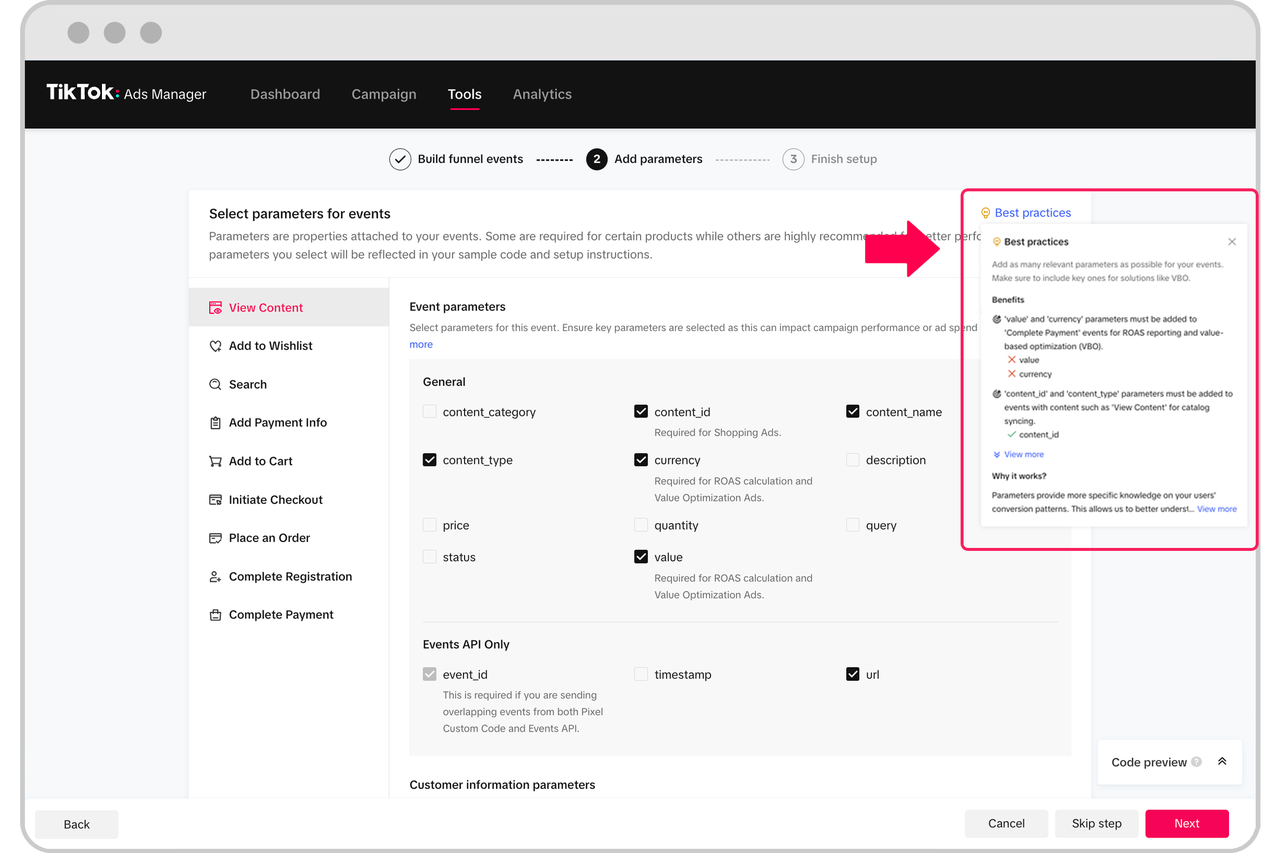
The TikTok Ads Pixel is a snippet of code placed on your website or app that tracks user interactions with your ads. It allows you to monitor key actions such as clicks, conversions, and other important events. By setting up the pixel correctly, you can gain valuable insights into how users engage with your content and optimize your campaigns accordingly.
Why Use the TikTok Ads Pixel Event Debugger?
The TikTok Ads Pixel Event Debugger is a tool designed to help you verify that your pixel events are being tracked accurately. It provides real-time feedback on whether events are firing correctly and can help identify any issues that may be affecting your campaign performance. Here are some reasons why this tool is essential:
- Real-time Monitoring: Get instant feedback on event triggers.
- Error Detection: Identify and fix issues with your pixel setup.
- Improved Accuracy: Ensure that your data reflects actual user behavior.
Setting Up the TikTok Ads Pixel
Before you can use the TikTok Ads Pixel Event Debugger, you need to set up the pixel on your website. Here’s a step-by-step guide:
- Generate the Pixel Code:
- Log in to your TikTok Business account.
- Navigate to the "Ads" section and select "Pixels."
-
Create a new pixel and copy the generated code.
-
Install the Pixel Code:
- You can install the pixel code using various methods, such as Google Tag Manager (GTM), directly in your website's HTML, or through a developer.
-
Ensure that the pixel is placed in the
<head>section of your website for optimal performance. -
Define Events:
- Determine which events you want to track, such as "Purchase," "Add to Cart," or "Page View."
- Customize these events based on your business goals and audience behavior.
Using the TikTok Ads Pixel Event Debugger
Once your pixel is set up, you can use the TikTok Ads Pixel Event Debugger to test and verify its functionality. Follow these steps:
- Access the Debugger:
- Go to the TikTok Business platform and navigate to the "Ads" section.
-
Select "Pixels" and then choose the pixel you want to debug.
-
Test Events:
- Simulate user interactions on your website to trigger the events you've defined.
-
Use the debugger to check if the events are being recorded correctly.
-
Analyze Results:
- Review the data provided by the debugger to identify any discrepancies or errors.
-
Make necessary adjustments to your pixel setup based on the findings.
-
Optimize Campaigns:
- Use the insights gained from the debugger to refine your ad campaigns.
- Focus on the events that drive the most value for your business.
Common Issues and Solutions
Even with the best setup, issues can arise. Here are some common problems and how to address them:
- Pixel Not Firing: Ensure the pixel code is correctly installed and not blocked by ad blockers or browser settings.
- Missing Events: Double-check your event definitions and ensure they align with user actions on your site.
- Duplicate Events: Monitor for duplicate event triggers and adjust your tracking logic to avoid overreporting.
Benefits of Accurate Tracking
Accurate tracking through the TikTok Ads Pixel Event Debugger offers several benefits:
- Better ROI: Understand which campaigns are performing well and allocate your budget accordingly.
- Improved User Experience: Gain insights into user behavior to enhance your website and marketing strategies.
- Data-Driven Decisions: Make informed decisions based on real data rather than assumptions.
Conclusion
The TikTok Ads Pixel Event Debugger is an invaluable tool for anyone running ads on TikTok. By ensuring your pixel events are firing correctly, you can optimize your campaigns, improve ROAS, and make data-driven decisions. Whether you're a small business owner or a seasoned marketer, taking the time to set up and test your pixel can lead to significant improvements in your advertising efforts.

Posting Komentar untuk "How to Use the TikTok Ads Pixel Event Debugger for Effective Campaigns"
Posting Komentar