
The Ultimate TikTok Business Manager Guide for 2024
TikTok has evolved from a social media platform for short-form videos into a powerful tool for businesses to connect with their audiences. With over one billion users globally, TikTok offers brands a unique opportunity to engage, market, and sell products through creative and viral content. To harness this potential, businesses need to understand how to use TikTok Business Manager effectively. This guide will walk you through the essential steps to set up and manage your business account on TikTok, optimize your profile, create engaging content, and leverage advanced tools like TikTok Ads Manager.

Step-by-Step Guide to Setting Up a TikTok Business Account

1. Download and Install the TikTok App
Begin by downloading the TikTok app from your smartphone’s app store. Ensure your device is compatible and has sufficient storage. Install the app, then open it to start the account creation process.
2. Sign Up for a TikTok Account
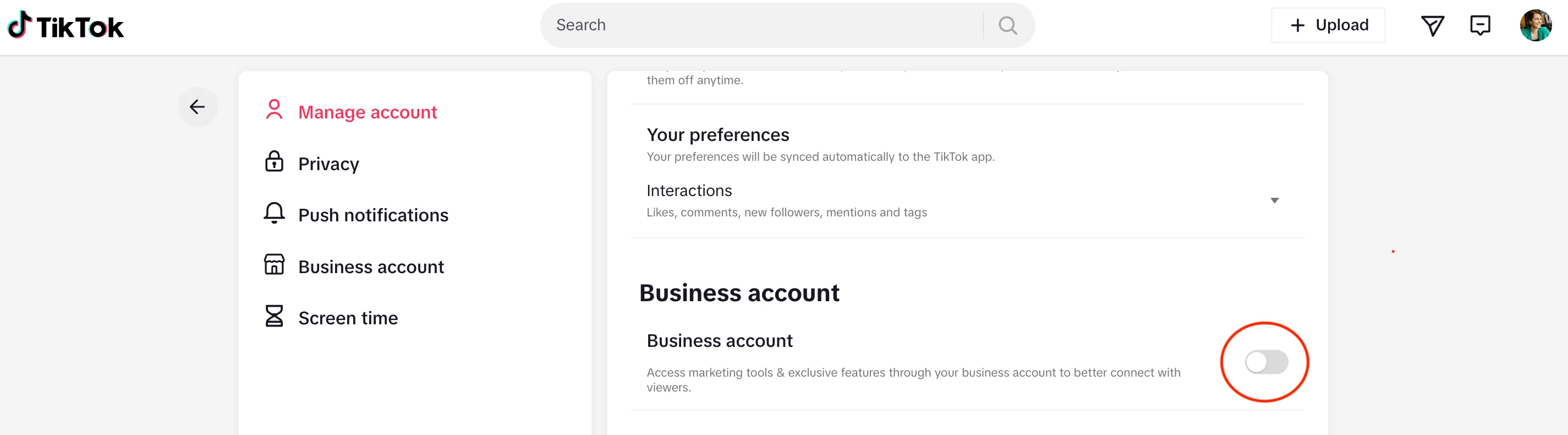
Choose the ‘Sign Up’ option on the app. You can sign up using your email, phone number, or a linked social media account. Follow the prompts, entering the required information accurately to ensure a smooth setup.
3. Switch to a Business Account
Once your personal account is active, go to your profile and access ‘Settings and Privacy’. Here, select ‘Manage Account’, then tap on ‘Switch to Business Account’. This change allows access to business-specific features.
4. Select Your Business Category
After switching, TikTok will prompt you to choose a business category. Select one that best represents your business. This categorization helps TikTok tailor your experience and recommend relevant content.
5. Optimize Your Profile
Finally, optimize your business profile. Add a clear profile picture, a concise bio, and links to your website or other social media. This information is crucial for branding and helps users understand your business at a glance.
How to Use TikTok Business Center
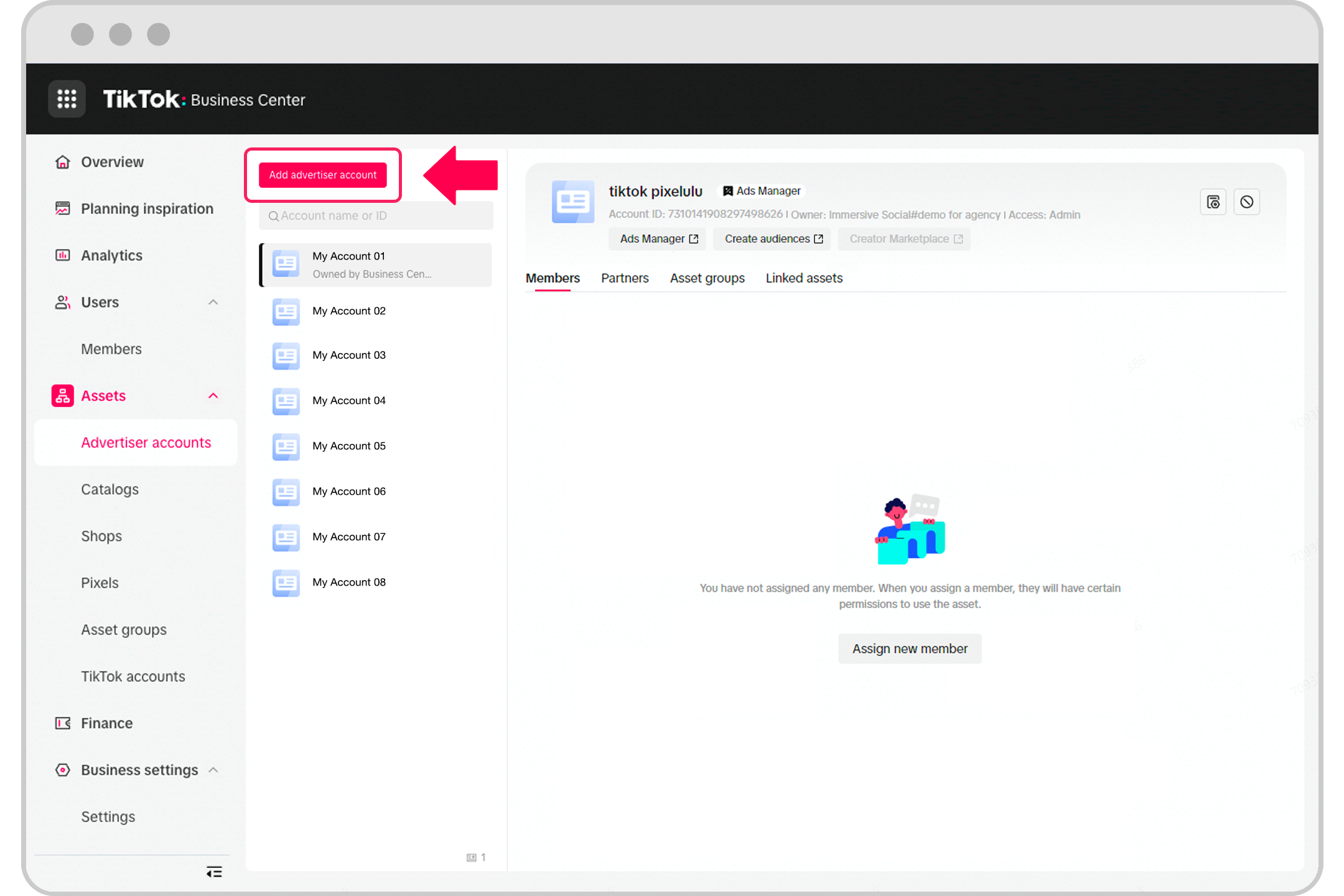
TikTok Business Center is a one-stop hub for managing multiple ad accounts, teams, and assets efficiently. It enables businesses to centralize their marketing activities and collaborate seamlessly.
Step 1: Sign In to TikTok Business Center
Go to the TikTok Business Center homepage. You can access it directly from your browser or via the suitcase icon on the top right-hand corner of the TikTok Ads Manager dashboard.
Step 2: Create a TikTok Business Center Account
After logging in, click ‘Create’ and name your Business Center. Select your time zone. You can create ad accounts for different purposes, such as separate accounts for each brand or line of business.
Step 3: Add Advertiser Accounts
Navigate to ‘Advertiser accounts’ and click ‘Add Advertiser Account’. Choose between creating a new account or requesting access to an existing one. If you’re an agency, you can reuse your clients' Business Certificates to streamline the process.
Step 4: Manage Access and Permissions

You can request access to other ad accounts or share multiple ad accounts with another organization in bulk. Once approved, assign roles and permissions to team members to ensure safe and efficient asset usage.
Step 5: Remove or Modify Ad Accounts
If you no longer need to manage an ad account, click the trash can icon and confirm the removal. Note that you cannot request access to a disapproved ad account.
12 Steps to Use TikTok Business Manager
1. Create a TikTok Business Account
Start by setting up a TikTok Business Account. This account provides access to advanced tools and analytics, which are essential for effective marketing.
2. Set Up Your Business Manager
Access the TikTok Business Manager dashboard and input your business information. Configure settings according to your needs to manage advertising campaigns, assets, and data.
3. Add Assets and Team Members
In the Business Manager, add assets like ad accounts, catalogs, and pixels. Invite team members and assign them roles and permissions to streamline collaboration.
4. Create and Manage Ad Campaigns
Use the TikTok Ads Manager within the Business Manager to create and manage your ad campaigns. Set objectives, target audience, budget, and schedule. Analyze performance data to make informed decisions.
5. Analyze Performance Data
Regularly check the analytics provided by TikTok Business Manager. Track engagement rates, reach, and conversion metrics to understand the effectiveness of your campaigns.
6. Leverage TikTok’s Creative Tools
Utilize TikTok’s creative tools to produce engaging and platform-specific content. These tools help you create eye-catching videos that resonate with your audience.
7. Explore Audience Insights
Dive into the Audience Insights feature to gain detailed information about your audience’s demographics, interests, and behavior. Tailor your content and ads to better match your audience’s preferences.
8. Utilize the Pixel for Website Tracking
Install the TikTok Pixel on your website to track user actions. This allows for more targeted and effective advertising by retargeting visitors who interacted with your site.
9. Manage Your Catalog
If you're an e-commerce business, use the Business Manager to manage your product catalog. Showcase your products directly on TikTok for easier discovery and purchase.
10. Respond to Trends and Adapt Strategies
Monitor the latest trends on TikTok and adapt your marketing strategies accordingly. Use the Business Manager to quickly respond to these trends by updating your campaigns or content.
11. Schedule Content and Campaigns
Plan and schedule your content and campaigns in advance using the Business Manager. Maintain a consistent presence on the platform without daily manual updates.
12. Engage with Your Audience
Use the Business Manager to track comments and messages, and engage with your audience. Responding to comments and messages can build a strong community and increase customer loyalty.
How to Turn Off a TikTok Business Account

If you no longer want to use your business account, you can switch back to a personal account. Here’s how:
- Open TikTok and access your profile.
- Go to ‘Settings and Privacy’.
- Select ‘Manage Account’.
- Switch to a personal account and confirm the change.
Your content and followers will remain, but you’ll lose access to business features like analytics and ad tools.
Frequently Asked Questions (FAQs)
What is a TikTok Business Account?
A TikTok Business Account is a type of profile designed for businesses, offering advanced features like analytics and advertising tools.
What are the benefits of switching to a TikTok Business Account?
Benefits include access to detailed analytics, advertising options, and tools for audience engagement.
Is there a cost associated with creating a TikTok Business Account?
No, creating a TikTok Business Account is free. However, additional costs may apply for advertising.
Can I switch back to a personal account after creating a TikTok Business Account?
Yes, you can switch back at any time through the ‘Manage Account’ section.
Conclusion
Creating a TikTok Business Account is a straightforward process that unlocks a wealth of features beneficial for businesses. From detailed analytics to targeted advertising, TikTok Business Manager provides essential tools for modern digital marketing. By following this guide, you can effectively set up, manage, and grow your business on TikTok, leveraging its massive user base to drive engagement and sales.

Posting Komentar untuk "The Ultimate TikTok Business Manager Guide for 2024"
Posting Komentar