
TikTok Ads Full Course for Beginners: Learn How to Create Effective Ad Campaigns
TikTok has emerged as a powerful platform for digital marketers, offering a unique blend of engagement, affordability, and reach. With over 1.94 billion monthly active users globally, it's no surprise that businesses are turning to TikTok ads to connect with their target audience. For beginners, navigating the world of TikTok advertising can seem daunting, but with the right guidance, anyone can create effective ad campaigns that drive results.
Understanding TikTok Ads

TikTok Advertising is a paid marketing channel that allows brands to display video ads to targeted users within the TikTok app. Managed through the TikTok Ads Manager, advertisers can bid on specific goals, such as website clicks, app installs, or product sales, targeting audiences based on demographics, interests, and viewing behavior.
Why TikTok Ads?
- Low CPM: TikTok offers extremely low costs compared to more established platforms like Facebook and YouTube.
- Targeted Audience: While still developing, TikTok's targeting options are comparable to Facebook’s, allowing you to reach your desired demographic effectively.
- Engaged Users: TikTok users are often ready to purchase, making them ideal prospects for high-ticket sales.
Step-by-Step Guide to Creating TikTok Ads
Step 1: Define Your Target Audience
Before diving into the TikTok ad platform, understand who your target customer is. Create a detailed profile that includes:
- Demographics: Age, gender, income level, marital status, and occupation.
- Interests and Hobbies: Understand what your audience enjoys doing and what are their pain points.
- Fears and Aspirations: Identify what keeps your potential customers up at night and what dreams they desire to achieve.
Use this customer avatar to guide your ad content and strategy.
Step 2: Set Up Your TikTok Ad Account

Create your TikTok ad account by visiting the TikTok Ads Manager and signing up. Look for promotional credit to maximize your advertising budget—usually around $300 to $2300 depending on the promotion.
Step 3: Install TikTok Pixel
To track user interactions on your website, download the TikTok Pixel Helper Chrome extension. This allows you to track conversions and retarget visitors effectively:
- Go to the TikTok Ads Manager.
- Navigate to "Assets" and then "Events."
- Create a pixel by following the installation instructions and placing it on your website or funnel.
Step 4: Create Your First TikTok Ad
To set up your ad campaign:
- Ad Objectives: Choose between Traffic and Conversion. If you need to track leads, pick Conversion.
- Campaign Setup: Name your campaign and set a budget.
- Ad Group: Define your target audience with demographics and interests, choose placements, and add your pixel for tracking.
- Video Ads: Create engaging 15-25 second videos. Use TikTok itself for video creation to ensure they look native to the platform.
Step 5: Monitor and Optimize Your Ads
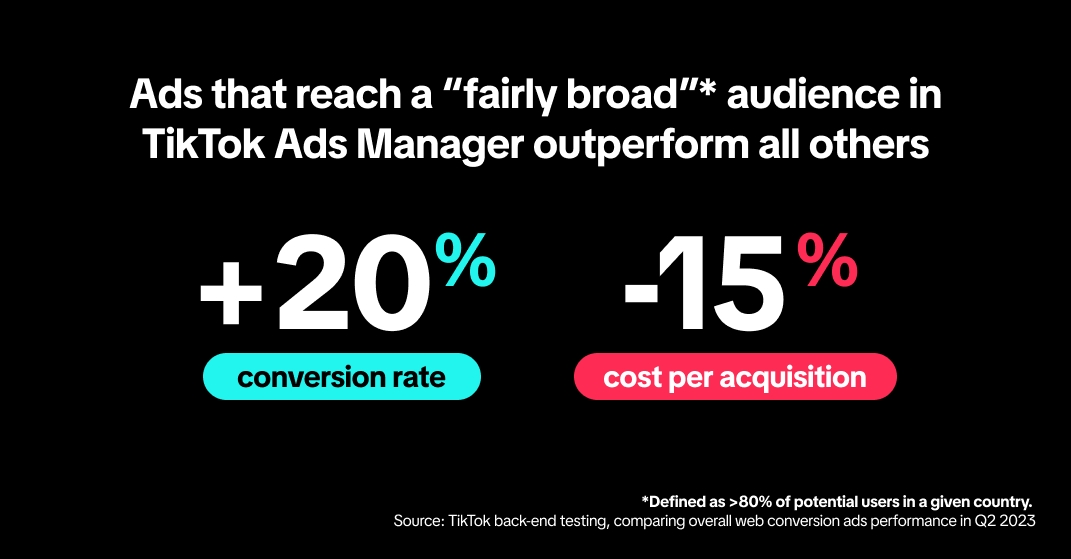
Once your ad is live, monitor performance metrics like CPM, Click Through Rate (CTR), and Conversion Rate. Use this data to optimize by tweaking your targeting options or adjusting your ad creative.
Key Tips for Successful TikTok Ads
Creative is Priority
UGC-style (User Generated Content) videos often outperform expensive, polished commercials.
Sound is Mandatory
Unlike Facebook where 85% of users watch on mute, TikTok is a sound-on platform.
The Pixel is Critical
Never run ads without the TikTok Pixel installed; it tracks who buys and helps the algorithm find more buyers.
Hook in 3 Seconds
You have less than 3 seconds to grab attention before a user scrolls away.
Safe Zones Matter
Keep text and logos away from the edges to avoid being covered by buttons and captions.
Common Mistakes to Avoid
- Ignoring Safe Zones: Keep all important text and your product visuals in the center of the screen.
- Recycling Instagram Reels: Create fresh content instead of reusing existing videos.
- Selling Too Hard: Entertain or educate first. Show the product in use.
Conclusion
TikTok ads offer a massive opportunity in 2026 to reach an engaged audience at a lower cost than legacy platforms. Success comes down to respecting the platform’s culture: keep it authentic, use sound, and track everything with your Pixel. Start with a simple conversion campaign, test 3-4 creative hooks, and let the algorithm do the heavy lifting.
Ready to launch? Open your TikTok Business Center today, install the Pixel on your site, and film your first 15-second video using the Hook-Body-CTA formula. With the right approach, you can create effective TikTok ad campaigns that drive real results.

Posting Komentar untuk "TikTok Ads Full Course for Beginners: Learn How to Create Effective Ad Campaigns"
Posting Komentar