
TikTok Ads Manager: The Complete Guide for Beginners and Experts

In the ever-evolving world of digital marketing, TikTok has emerged as a powerful platform for businesses to connect with their target audience. With over a billion active users globally, TikTok offers an unparalleled opportunity for brands to showcase their products and services through engaging short-form video content. At the heart of this advertising ecosystem is the TikTok Ads Manager, a comprehensive tool that allows advertisers to create, manage, and optimize their ad campaigns. Whether you're a beginner or an experienced marketer, understanding how to effectively use TikTok Ads Manager is essential for maximizing your return on investment.
Step-by-Step Guide to Setting Up Your TikTok Ads Account
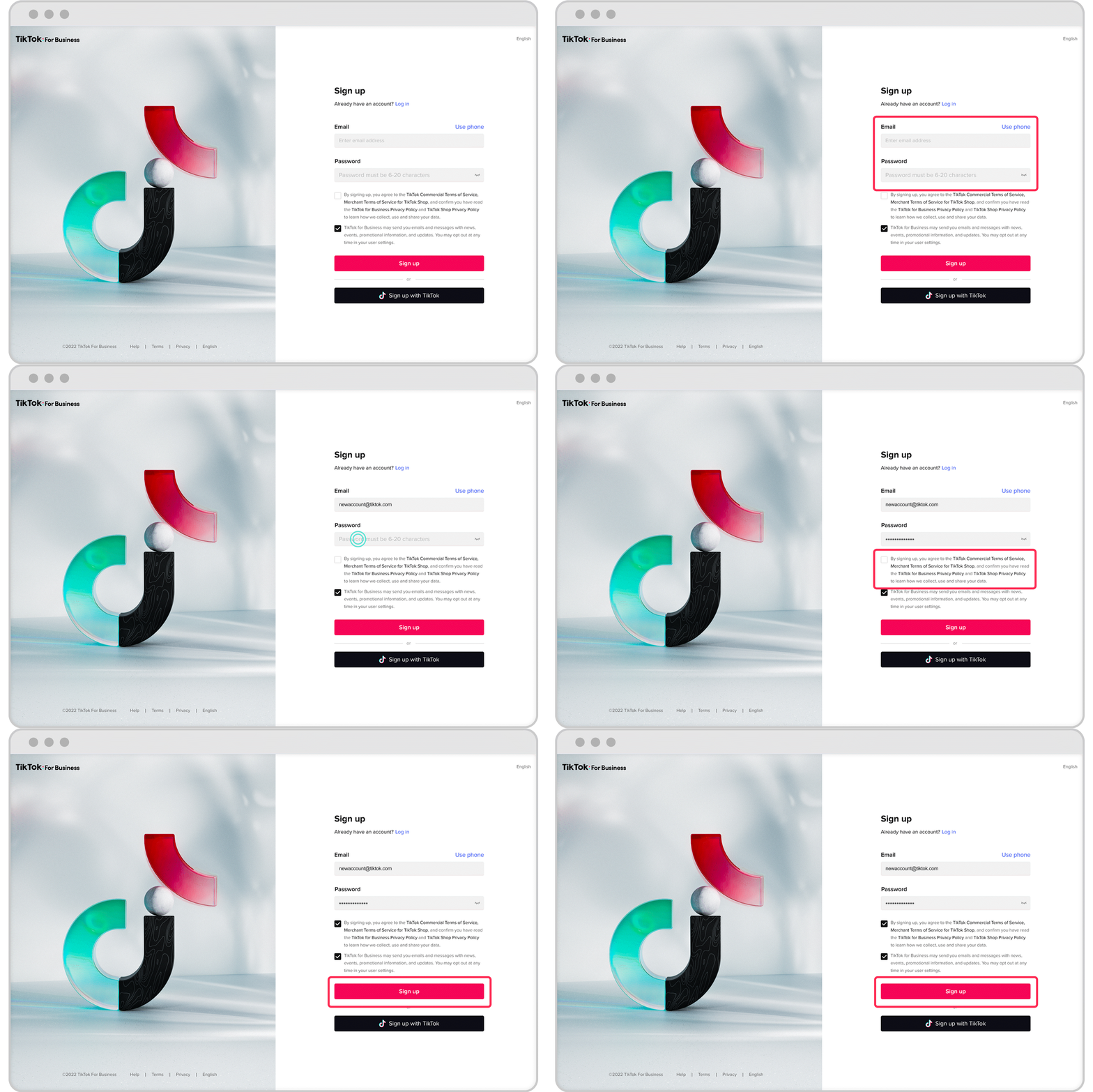
Setting up your first TikTok Ads account is the first step in leveraging this powerful platform. To begin, visit the TikTok Ads Manager and sign up for an account. You'll need to provide your business details, including your country, time zone, and business name. Once you've verified your email and set up a payment method, you're ready to create your first campaign.
Choosing the Right Campaign Objective

Once you're logged into the TikTok Ads Manager, navigate to the "Campaign" tab and click "Create." TikTok offers several campaign objectives tailored to different business goals:
- Reach: Maximize the number of people who see your ad.
- Traffic: Drive clicks to your website or landing page.
- App Installs: Promote downloads for your mobile app.
- Video Views: Boost views on your TikTok video content.
- Conversions: Encourage specific actions on your website, such as purchases or sign-ups.
Select the objective that best aligns with your desired outcome. This choice will guide the rest of your campaign setup.
Setting Your Campaign Budget
After selecting your campaign objective, the next step is to set your budget. TikTok allows you to choose between a daily budget or a total budget for your campaign. While there is a minimum campaign budget requirement, you have full control over how much you spend. This flexibility is especially useful if you're just testing the waters or want to experiment with different strategies.
Creating an Ad Group
Within your campaign, you can create one or multiple ad groups. Each ad group allows you to define targeting, placement, schedule, bidding, and optimization preferences:
- Placement: Choose whether TikTok automatically places your ads across TikTok and its partner apps or manually select where your ads appear.
- Targeting: Narrow down your audience based on gender, age, location, language, interests, and device type. You can also upload custom audiences or use lookalike audiences.
- Schedule: Determine if you want your ads to run continuously or during specific times and days.
- Bidding & Optimization: Choose your bid strategy based on your campaign objective. Options include CPC (cost per click), CPM (cost per thousand impressions), or oCPC (optimized cost per click).
Designing Your TikTok Ad
Next, move on to creating your actual ad. TikTok supports various ad formats, but the most common for first-time advertisers is the In-Feed Ad. These ads appear in the user's For You feed and blend in with natural content.
You can either upload your own video or use TikTok’s Video Creation Kit, which offers templates, stock music, and editing tools. Ensure your ad is visually compelling, has clear branding, and features a strong call to action (CTA) like "Shop Now," "Download," or "Learn More."
Submitting and Monitoring Your Ad
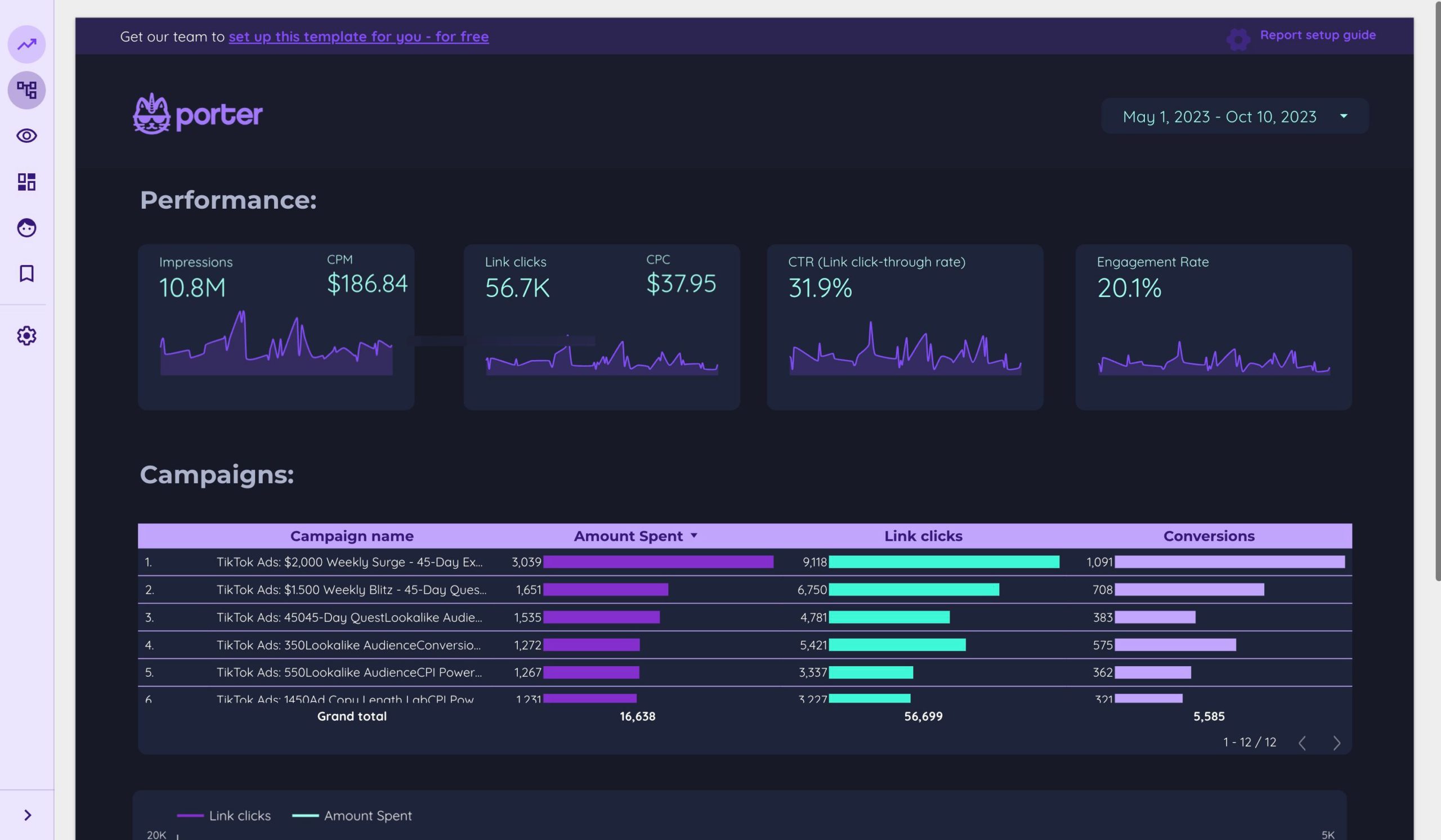
After uploading your creative and filling out the final ad details, click "Submit." TikTok will review your ad to ensure it meets community guidelines and advertising policies. Once approved, your campaign will go live.
Use the Ads Manager dashboard to monitor performance metrics such as impressions, clicks, CTR (click-through rate), and conversions. This data helps you understand what's working and where you might need to make adjustments.
Bonus Tips for TikTok Ad Success
To maximize the effectiveness of your TikTok Ads, consider the following tips:
- Keep It Quick and Snappy: TikTok is fast-paced. Aim for 9–15 second videos with rapid hooks.
- Be Authentic: Avoid overly polished content. Users prefer native-looking ads that feel natural to the platform.
- Use Trending Sounds and Hashtags: Tapping into TikTok trends can enhance ad performance and engagement.
- Test Multiple Creatives: Run A/B tests with different ad variations to see what resonates best with your audience.
By following these steps and tips, you can confidently launch your first TikTok Ads campaign and start tapping into one of the most dynamic advertising platforms today.

Posting Komentar untuk "TikTok Ads Manager: The Complete Guide for Beginners and Experts"
Posting Komentar