
TikTok Ads Step-by-Step Guide: How to Create and Launch Effective Ads in 2024
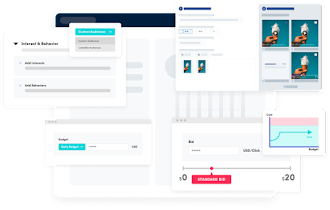
In today's digital landscape, TikTok has emerged as a powerful platform for businesses to connect with their target audience. With over 1.9 billion registered users as of 2026, the platform offers a unique opportunity for brands to engage with consumers through creative and interactive content. This guide will walk you through the process of creating and launching effective TikTok ads, helping you leverage the platform's features to achieve your marketing goals.
Understanding TikTok Ads
TikTok ads are paid videos that businesses use to reach their target audience on TikTok. They usually appear as full-screen videos between user-generated content. You can customize these ads based on your advertising goals, audience preferences, and budget. TikTok ads are organized into three levels: individual ads, ad groups, and campaigns. For instance, if you're launching a new sneaker line, you might have one video ad for a specific sneaker. This could be part of an ad group for different sneaker styles, which would then fit into a larger campaign about your new collection.
Most TikTok ads use an auction system, where you bid for placements and set a daily spending limit. Once you’ve set this up, you’re ready to launch your first campaign and reach your target audience.
Types of TikTok Ads
TikTok offers various ad formats to help you start advertising effectively. Choose the right type to reach your target audience and get your message across. Here are the different types of ads available on the TikTok platform:
-
Video Ads: These ads look like regular TikToks but include a direct link or call-to-action (CTA). They appear in users’ feeds and blend seamlessly with other content. You can use them to drive traffic to your website or promote a product.
-
TopView Ads: TopView ads appear when users open TikTok, taking over the entire screen with sound on. These ads are perfect for making a strong first impression and capturing attention immediately.
-
In-Feed Ads: In-feed video ads appear in the For You page feed. They integrate naturally into the browsing experience—similar to regular TikTok content.
-
Spark Ads: Spark ads let you boost existing TikTok posts, either your own or ads from other creators (with permission). These ads enhance the reach of organic content while retaining all engagement metrics like views and likes. They’re great for leveraging content that already resonates with your audience.
-
Image Ads: Image ads are still images featuring your brand or product. They’re shown through the Global App Bundle and Pangle placements and work well in specific regions.
-
Video Shopping Ads: Video shopping ads integrate product tiles that users can click on to view a shoppable gallery page without leaving TikTok. Perfect for promoting catalogs of products or live shopping events, they keep the shopping experience smooth and engaging.
-
Playable Ads: Playable ads let users interact directly with your game within the ad. These ads are perfect for gaming companies because they give potential players a chance to try the game before downloading. This hands-on experience can boost download rates and engagement.
-
Carousel Ads: Have you ever seen TikTok ads containing multiple images in one frame? Those are carousel ads. These ads work well for showcasing different products or highlighting various features of one item.
-
Branded Effects: Branded effects allow TikTok users to add special filters and effects to their videos. These interactive elements get users engaging with your brand in creative and fun ways.
-
Sponsored Influencer Ads: Sponsored influencer content involves paying influential TikTok creators to promote your product or service. This approach leverages their followers and trust signals to boost your brand’s reach and credibility.
-
Branded Hashtag Challenge: A branded hashtag challenge runs for three to six days and encourages users to create videos based on a branded theme. User-generated content appears on a dedicated hashtag challenge page, driving engagement and brand awareness through widespread participation.
Creating a TikTok Ad from Scratch
You have two options for creating campaigns in the TikTok Ads Manager:
- Simple Ad
- Custom Ad
The custom version has more options, like using a bidding strategy or creating an ad group. But it’s meant for experienced marketers who are familiar with these settings. For a small business/startup, the simplified version is a better choice.
To create your first ad, head over to the TikTok Ads Manager and choose Simplified Mode when prompted.
Step 1: Get a Business Account
Before you can use TikTok’s Ads Manager, you need to have a business account on the platform. The good news is that switching to a business account is free and easy. Open TikTok and tap Settings and Privacy > Manage Account > Switch to Business Account.
This will not only give you access to TikTok’s Ads Manager, but also to valuable analytics like the best time to post on TikTok.
Step 2: Integrate with Shopify
If you have a Shopify store, install the TikTok app to access automated ad creation options. If you’re in select countries, you’ll also be able to launch a shopping tab on your TikTok profile.
Step 3: Open Ads Manager
The TikTok app is designed for mobile use, but for managing ads, you’ll want to use the desktop Ads Manager. Simply go to ads.tiktok.com and log in with your TikTok ads manager account.
Step 4: Set Your Advertising Goal
When you select Simplified Mode in the TikTok ads manager, you can choose one of four campaign goals:
- Traffic: Select this if you aim to bring people to your website. It’s ideal for turning visitors into potential customers by capturing their emails or other soft leads.
- Community Interaction: Choose this if you want to grow your presence on TikTok and build trust with your audience. It’s great for engaging with followers and creating excitement ahead of a product launch.
- Lead Generation: This option is designed to gather information from viewers through a contact form. It helps you target new customers and nurture existing ones, boosting potential for future sales.
- Website Conversions: Opt for this to increase actions on your site, such as purchases. It’s perfect for driving more conversions and ultimately boosting sales on your webpage.
Step 5: Select Your Audience
The next step in your TikTok ads manager account allows you to choose who will see your TikTok ads. You can opt for Automatic Audience and let TikTok pick for you. If you prefer more control, go with Custom Audience and set your own criteria.
You can define your target audience by age, language, gender, and location. A slider on the top right will show the estimated size of your audience as you make your selections.
You can also get specific with interests, such as fashion, food, or pets. For example, if you’re selling coffee, you can target users interested in “coffee.” If you offer skin care products, choose “beauty” as an interest. You can even target users who interact with TikTok content by commenting or liking.
Finally, TikTok will ask if you want to display your ads only on TikTok or also include placements on Pangle, a global publisher network offered by the ads manager.
Step 6: Set Your Budget and Schedule
Determine your daily ad budget, starting at $5 per day, and choose how long you want your campaign to run. You can also select “no end date” to run your campaign indefinitely.
Step 7: Choose Bidding and Optimization
When setting up your TikTok ads, decide if you want to optimize for clicks or views. If you choose clicks, you can set a maximum cost per click to control spending.
TikTok offers four bidding options. Cost per view (CPV) charges for every thousand views when users watch your ad for more than six seconds. Cost per mille (CPM) focuses on impressions, ideal for reaching more people.
Optimized CPM (oCPM) targets users likely to convert, making it great for gaining followers or app installs. Cost per click (CPC) works best for driving sales or app downloads.
For bidding strategies, you can use lowest cost, where TikTok maximizes conversions based on your total budget. Or, you can use cost cap or bid cap, which lets you set a specific bid price for better control over acquisition costs.
Step 8: Create Your Ad
Select an existing TikTok or upload a new one. Write a caption and create a call-to-action button, like Shop Now. Make sure your ad adheres to TikTok’s technical guidelines for vertical video ads and fits in with the look and feel of the platform.
Step 9: Submit
Hit Submit and your ad will go into review before it goes live. Monitor your results and optimize for your next campaign.
Tips for Effective TikTok Ads
Creating effective TikTok ads can be tricky. Here are six best practices to maximize your campaigns:
-
Catch Attention Quickly: Make sure the beginning of your ad is compelling. With so many TikToks viewed daily, you need to grab viewers right away to stop them from scrolling past. Starting with a striking visual or unexpected element can keep them engaged longer and increase your reach.
-
Use Captions for Silent Viewing: Include captions in your ads to ensure your message comes across clearly even without sound. Since many people watch videos silently, captions help maintain the impact of your content and keep viewers interested.
-
Tap Into TikTok’s Music Collection: Incorporate music from TikTok’s commercial sound library. Using familiar tunes can make your ads more appealing and help convey your message effectively. Choose music that aligns with your ad’s tone to draw viewers in and keep them engaged.
-
Keep Ads Fresh: Update your ad creatives every week to avoid them becoming repetitive. Regularly refreshing your ads helps maintain audience interest and prevent them from tuning out. Experiment with different styles and formats to keep your content lively and engaging.
-
Collaborate with TikTok Creators: Partner with popular TikTok creators who resonate with your brand. Creators have established trust with their followers and can present your products in a relatable way. This collaboration can significantly expand your reach and attract new customers.
-
Leverage TikTok Features: Make full use of TikTok’s unique tools like voiceovers, popular challenges, and text overlays. Ads that incorporate these elements feel more integrated into the platform and connect better with users.
Conclusion
TikTok has become a vital platform for businesses looking to connect with their target audience. By understanding the different ad formats, following the step-by-step guide to creating and launching effective TikTok ads, and implementing best practices, you can maximize your marketing efforts on this dynamic platform. With the right strategy and creativity, TikTok can be a powerful tool for driving engagement, building brand awareness, and achieving your business goals.

Posting Komentar untuk "TikTok Ads Step-by-Step Guide: How to Create and Launch Effective Ads in 2024"
Posting Komentar