
What Is TikTok Business Manager? A Complete Overview for Businesses
TikTok has become a powerful platform for businesses to connect with their target audience, drive engagement, and boost sales. As one of the most popular social media platforms, TikTok offers a unique blend of creativity and virality that brands can leverage to grow their presence. Central to this is the TikTok Business Manager, a comprehensive tool designed to help businesses manage their advertising, analytics, and overall strategy on the platform.
What Is TikTok Business Manager?
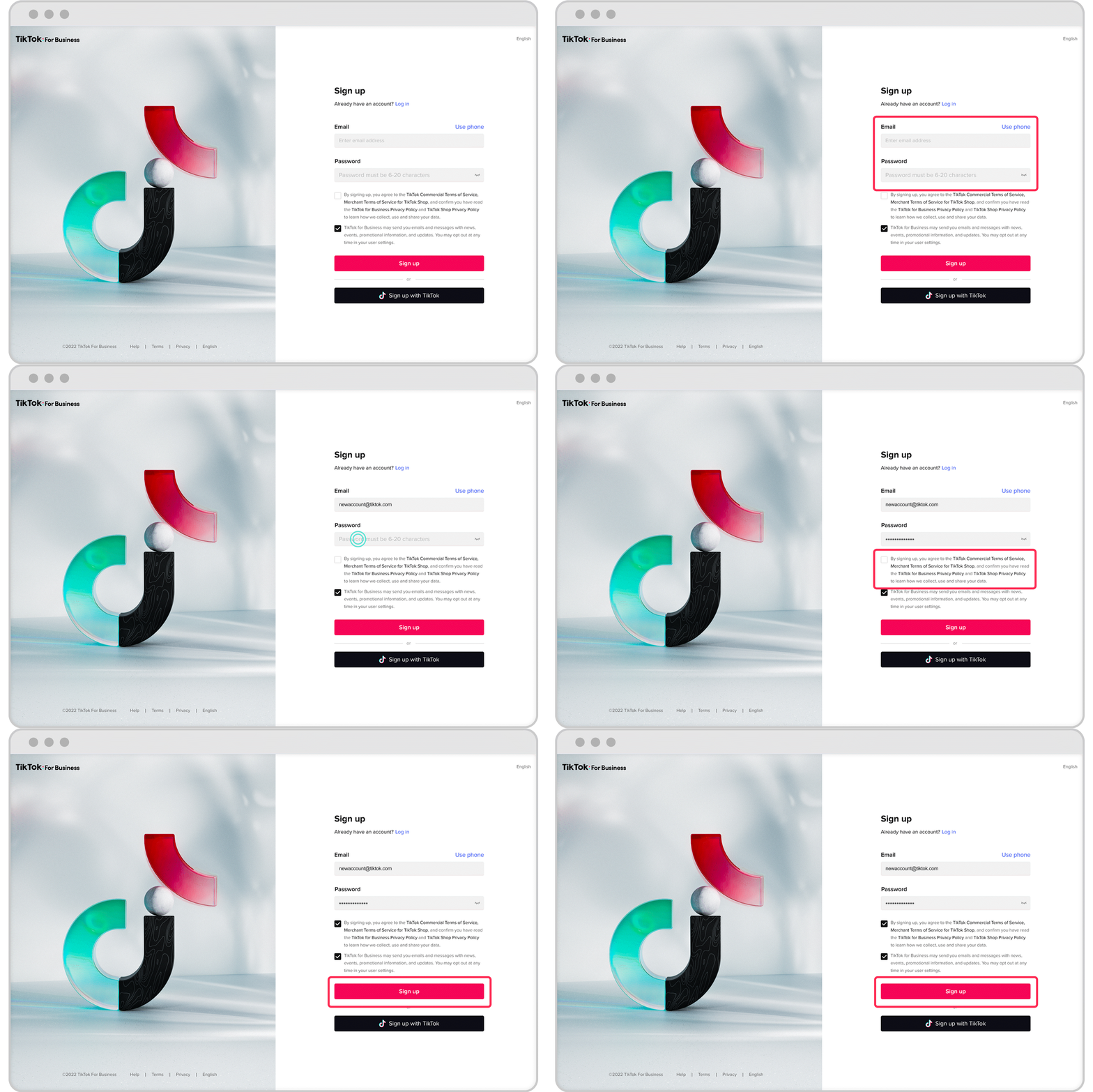
TikTok Business Manager is a centralized dashboard that allows businesses to create, manage, and track their advertising campaigns on TikTok. It provides access to advanced tools such as ad creation, audience targeting, performance analytics, and campaign optimization. This platform is essential for businesses looking to maximize their reach, engage with their audience, and convert views into sales or leads.
By using TikTok Business Manager, businesses can:
- Create and manage ad campaigns
- Analyze audience insights and engagement metrics
- Track conversions and ROI
- Optimize content for better performance
- Collaborate with team members and influencers
This tool is especially useful for businesses aiming to tap into TikTok’s massive user base, which exceeds 1 billion users globally.
How to Create a TikTok Business Account
Creating a TikTok Business Account is the first step in leveraging the full potential of TikTok Business Manager. Here’s how you can set it up:
-
Download and Install the TikTok App
Begin by downloading the TikTok app from your smartphone’s app store. Ensure your device is compatible and has sufficient storage. -
Sign Up for a TikTok Account
Choose the ‘Sign Up’ option on the app. You can sign up using your email, phone number, or a linked social media account. Follow the prompts to complete the setup. -
Switch to a Business Account
Once your personal account is active, go to your profile and access ‘Settings and Privacy’. From there, select ‘Manage Account’ and tap on ‘Switch to Business Account’. -
Choose a Business Category
After switching, TikTok will prompt you to choose a business category. Select one that best represents your business, such as retail, food, or services. -
Optimize Your Profile
Add a clear profile picture, a concise bio, and relevant links to your website or other social media platforms. This helps in branding and ensures users understand your business at a glance.
Once your account is set up, you can access the TikTok Business Manager to start managing your ads and campaigns.
Key Features of TikTok Business Manager
TikTok Business Manager offers a range of features that make it an indispensable tool for businesses:
1. Ad Campaign Creation
- Create and manage ad campaigns tailored to your goals (e.g., brand awareness, engagement, or conversions).
- Choose from various ad formats, including video, image, and augmented reality ads.
2. Audience Targeting
- Use demographic data, interests, and behaviors to target specific audiences.
- Segment your audience based on location, age, gender, and more.
3. Performance Analytics
- Track key metrics such as impressions, clicks, engagement rates, and conversion rates.
- Use real-time data to adjust your strategies and improve campaign performance.
4. Creative Tools
- Access TikTok’s creative tools to design engaging content that resonates with your audience.
- Use trending sounds, effects, and filters to enhance your ads.
5. Pixel Tracking
- Install the TikTok Pixel on your website to track user actions and retarget them with personalized ads.
6. E-commerce Integration
- Showcase your products directly on TikTok through an integrated e-commerce catalog.
- Enable shopping features to allow users to purchase products without leaving the app.
Tips for Optimizing Your TikTok Business Account

To make the most of your TikTok Business Account, consider the following tips:
- Use Clear and Concise Language: Keep your bio simple and easy to understand. Avoid jargon and focus on your brand’s value proposition.
- Incorporate Relevant Keywords: Include industry-specific keywords to improve searchability and attract the right audience.
- Highlight Unique Selling Points (USPs): Emphasize what makes your business stand out from competitors.
- Add a Call-to-Action (CTA): Encourage users to take action, such as visiting your website or following your page.
- Update Regularly: Keep your bio and content fresh with new promotions, events, or product launches.
- Link to Other Platforms: Include links to your website, social media, or online store to drive traffic and increase conversions.
How to Turn Off a TikTok Business Account
If you decide to switch back to a personal account, follow these steps:
-
Open TikTok and Access Your Profile
Launch the TikTok app and navigate to your profile. -
Go to Settings and Privacy
Tap the three dots or lines icon in the top right corner of your profile. -
Select ‘Manage Account’
In the ‘Settings and Privacy’ menu, find and select ‘Manage Account’. -
Switch to a Personal Account
Look for the option to switch back to a personal account. Confirm the switch, and your account will revert to a personal account, retaining your content and followers but losing business-specific features.
Frequently Asked Questions (FAQs)
Q: What is a TikTok Business Account?
A: A TikTok Business Account is a type of profile designed for businesses, offering advanced features like analytics, advertising tools, and audience engagement capabilities.
Q: What are the benefits of switching to a TikTok Business Account?
A: Switching to a Business Account gives you access to detailed analytics, targeted advertising options, and enhanced audience engagement tools, all of which are crucial for effective digital marketing.
Q: Is there a cost associated with creating a TikTok Business Account?
A: No, creating a TikTok Business Account is free. However, additional costs may be incurred for advertising and promotional activities on the platform.
Q: Can I switch back to a personal account after creating a TikTok Business Account?
A: Yes, you can switch back to a personal account at any time through the ‘Manage Account’ section in the ‘Settings and Privacy’ menu.
Conclusion
TikTok Business Manager is a powerful tool that enables businesses to effectively promote their products, engage with their audience, and drive growth on one of the most influential social media platforms. By leveraging its features, businesses can create compelling ad campaigns, analyze performance, and optimize their strategies for maximum impact.
Whether you're a small startup or an established brand, TikTok Business Manager offers the tools and insights needed to succeed in today's digital landscape. With the right approach, your business can harness the power of TikTok to build brand awareness, generate leads, and achieve long-term success.

Posting Komentar untuk "What Is TikTok Business Manager? A Complete Overview for Businesses"
Posting Komentar