
Why Your TikTok Ads Pixel Isn't Firing: Troubleshooting Guide
TikTok has become a powerful platform for businesses to reach a younger, engaged audience. However, with the rise in popularity comes the need for precise tracking and analytics to measure campaign performance effectively. One of the most common issues advertisers face is the TikTok Ads Pixel not firing correctly. This can lead to inaccurate data, missed conversions, and ultimately, poor return on investment (ROI). In this guide, we’ll explore why your TikTok Ads Pixel might not be firing and provide actionable steps to troubleshoot and resolve the issue.
What Is the TikTok Pixel?

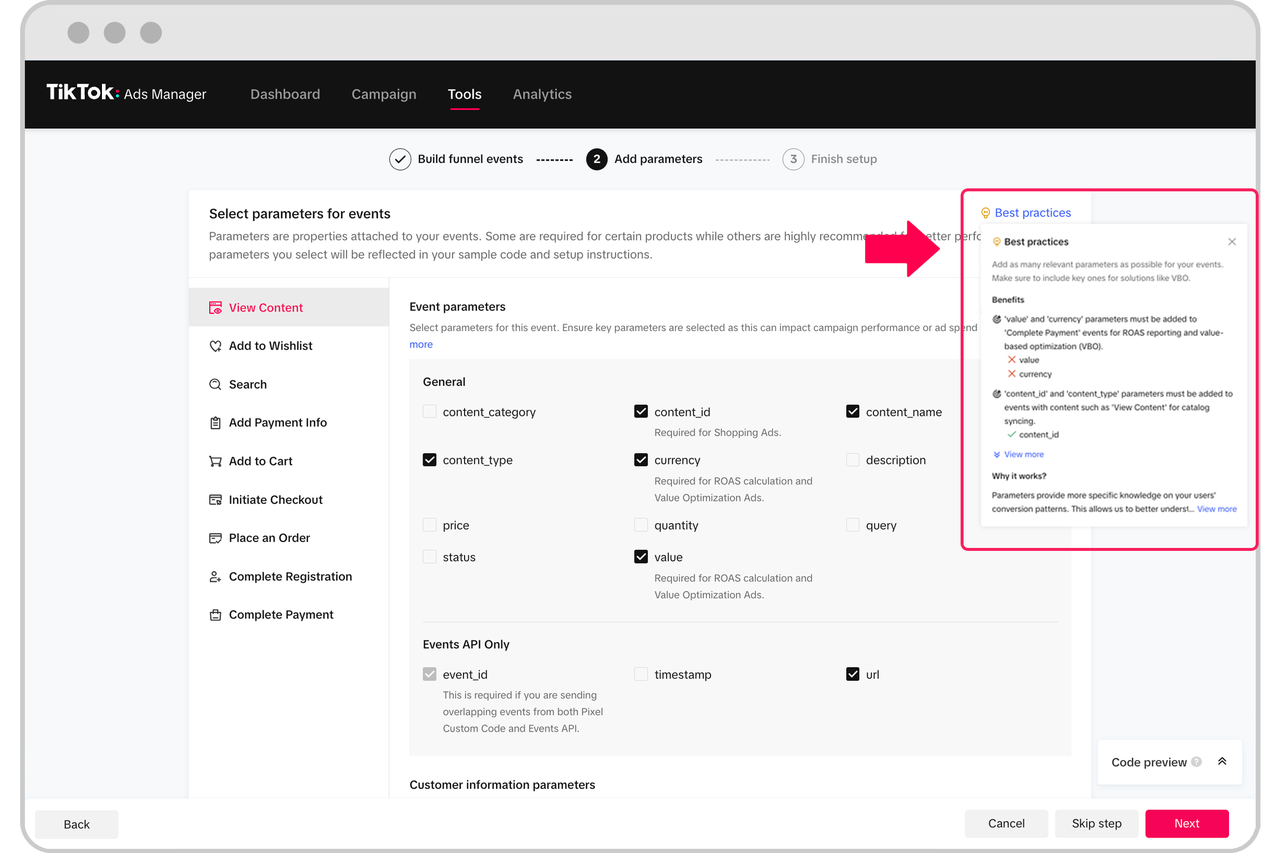
The TikTok Pixel is a piece of code that tracks user interactions on your website or app, such as clicks, conversions, and other key events. It helps you understand how users engage with your ads and optimize your campaigns accordingly. When the pixel isn’t firing, it means that these critical interactions aren’t being recorded, making it difficult to assess the effectiveness of your advertising efforts.
Common Reasons Your TikTok Pixel Might Not Be Firing
There are several reasons why your TikTok Pixel might not be firing correctly. Understanding these issues can help you identify and fix the problem more efficiently.
1. Incorrect Installation
One of the most common causes of a non-firing pixel is incorrect installation. If the pixel code isn’t properly placed on your website or app, it won’t track any events. Double-check that the code is added to all relevant pages and that there are no typos or formatting errors.
2. Domain Mismatch
The TikTok Pixel must be associated with the domain where it’s implemented. If the domain doesn’t match, the pixel won’t fire. Ensure that the domain in your TikTok Ads Manager matches the one on your website.
3. Ad Blockers or Privacy Settings
Some users may have ad blockers or privacy settings enabled that prevent the pixel from loading. While this isn’t something you can control, it’s important to note that these factors can affect the accuracy of your tracking data.
4. Duplicate Pixels
If you’ve accidentally added multiple instances of the TikTok Pixel on your site, it could cause conflicts and prevent the pixel from firing correctly. Use the TikTok Pixel Helper browser extension to check for duplicate pixels and remove them.
5. iOS 14.5+ Privacy Changes
With the introduction of iOS 14.5, Apple implemented new privacy features that limit tracking capabilities. This can impact how the TikTok Pixel functions on iOS devices. Consider using the Conversions API to overcome these limitations and ensure accurate tracking.
How to Troubleshoot Your TikTok Pixel
If you suspect that your TikTok Pixel isn’t firing, follow these steps to diagnose and resolve the issue:
1. Use the TikTok Pixel Helper
The TikTok Pixel Helper is a browser extension that allows you to check if your TikTok Pixel is firing correctly. Install the extension and visit your website to see if the pixel is working as expected. The tool will display real-time feedback on events and conversion tracking, helping you identify any issues.
2. Check for Errors in the TikTok Ads Manager
Log in to your TikTok Ads Manager and navigate to the "Events" section. Look for any errors or warnings related to the pixel. The system may provide specific details about what’s wrong, which can help you pinpoint the issue.
3. Verify Your Pixel Code
Ensure that the pixel code is correctly implemented on your website. You can use tools like Google Tag Assistant or the TikTok Pixel Helper to verify the code’s placement and functionality.
4. Test Your Pixel
Use the TikTok Event Test Tool to simulate user interactions and test whether the pixel is firing correctly. This can help you determine if the issue is with the pixel itself or with the implementation.
5. Consult TikTok’s Documentation
TikTok provides detailed documentation on setting up and troubleshooting the pixel. Review their guidelines to ensure you’re following the best practices for implementation.
Solutions for Common Pixel Issues
If you encounter specific issues with your TikTok Pixel, here are some solutions to consider:
1. Pixel Not Firing
- Solution: Double-check the pixel code and ensure it’s correctly placed on all relevant pages. Use the TikTok Pixel Helper to confirm that the pixel is firing.
- Time Required: 30 minutes
2. Duplicate Events
- Solution: Remove any duplicate pixel codes and use Google Tag Manager (GTM) to manage your tags more efficiently.
- Time Required: 1–2 hours
3. Parameter Mismatch
- Solution: Update event parameters to ensure they match the data you’re trying to track. Test the pixel thoroughly after making changes.
- Time Required: 2–3 hours
4. iOS 14.5+ Tracking Issues
- Solution: Implement the Conversions API for server-side tracking, which works around iOS privacy restrictions.
- Time Required: 4–6 hours
Best Practices for Ensuring Your TikTok Pixel Fires Correctly
To minimize the risk of your TikTok Pixel not firing, follow these best practices:
1. Regularly Audit Your Pixel
Periodically check your pixel setup using the TikTok Pixel Helper to ensure it’s functioning correctly. This can help you catch issues before they impact your campaign performance.
2. Use Server-Side Tracking
Consider implementing server-side tracking with the Conversions API to improve data accuracy and overcome privacy limitations.
3. Keep Your Pixel Updated
As TikTok updates its platform, ensure your pixel code is compatible with the latest features and requirements.
4. Monitor Your Campaigns
Regularly review your campaign performance and track conversions to ensure your pixel is providing accurate data. If you notice discrepancies, investigate the issue promptly.
Conclusion
A non-firing TikTok Ads Pixel can significantly impact your ability to measure and optimize your advertising efforts. By understanding the common causes of this issue and following the troubleshooting steps outlined in this guide, you can ensure your pixel is working correctly and providing reliable data. Remember to regularly audit your setup and stay informed about TikTok’s updates to maintain the effectiveness of your campaigns. With the right approach, you can maximize the value of your TikTok advertising and achieve better results.

Posting Komentar untuk "Why Your TikTok Ads Pixel Isn't Firing: Troubleshooting Guide"
Posting Komentar