
How to Create Effective TikTok Ad Videos: A Step-by-Step Editing Tutorial

TikTok has become a powerful platform for brands and individuals to reach millions of users through engaging and creative content. However, creating effective TikTok ad videos requires more than just a catchy idea—it involves understanding the technical specifications and mastering the right editing techniques. This step-by-step guide will walk you through the process of creating compelling TikTok ad videos that resonate with your audience.
Understanding TikTok Video Specifications
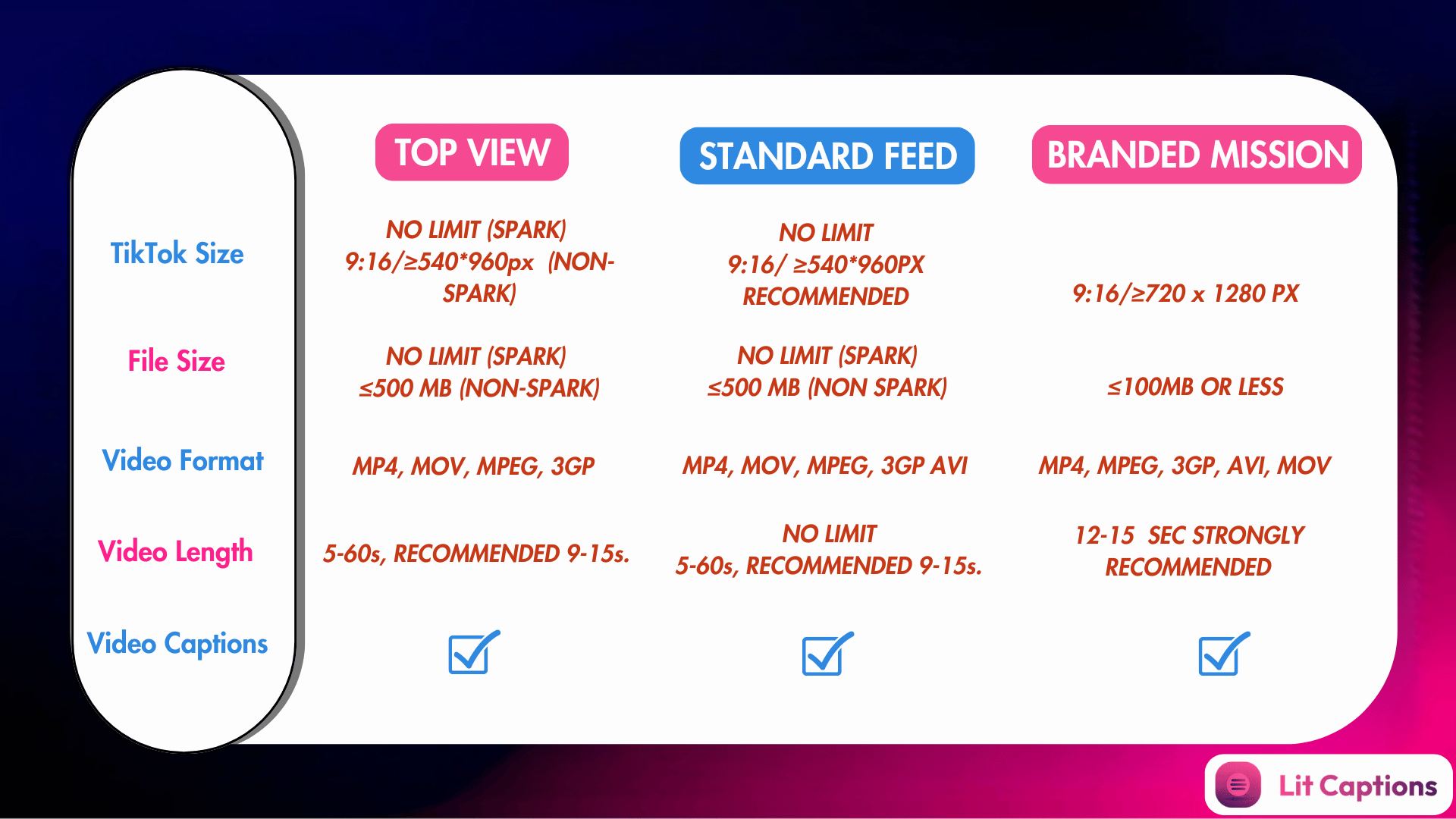
Before diving into the editing process, it's essential to understand the key technical requirements for TikTok videos. These specifications ensure your content looks professional and performs well on the platform.
Aspect Ratio
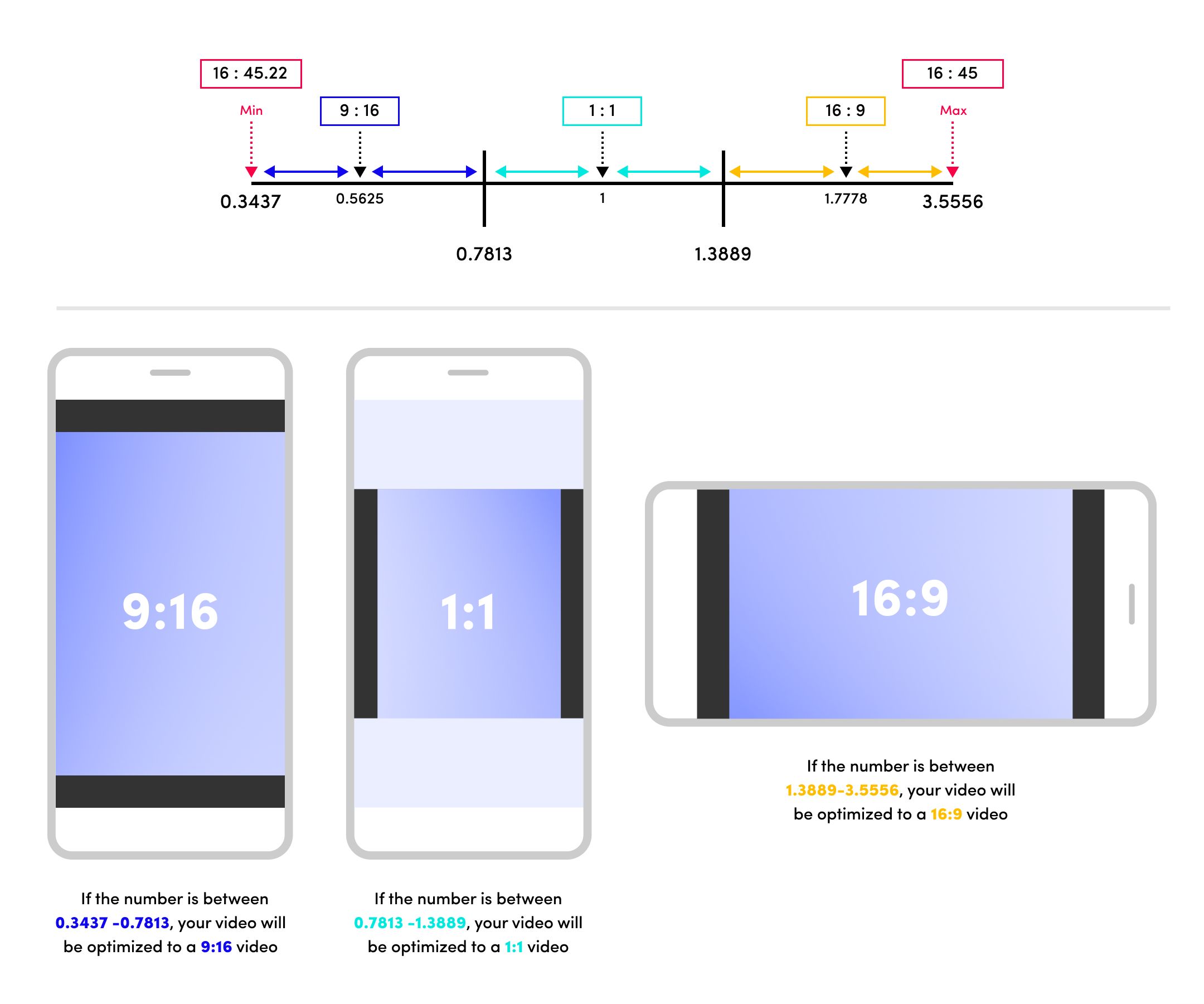
TikTok supports three primary aspect ratios:
- 9:16 (Vertical) – The most commonly used format, ideal for mobile viewing.
- 1:1 (Square) – Less common but suitable for repurposed content from other platforms.
- 16:9 (Horizontal) – Rarely used on TikTok due to the need for device rotation.
For ads, 9:16 is the recommended aspect ratio as it maximizes screen coverage and aligns with TikTok’s vertical-first approach.
Resolution
The recommended resolution for TikTok videos is 1080 x 1920 pixels (1080p). This ensures clarity and sharpness across all devices. Lower resolutions like 720p are also supported but may appear less crisp on larger screens.
File Size
TikTok has specific file size limits depending on your device:
- Android: 72 MB
- iOS: 287.6 MB
- In-feed video ads: Up to 500 MB
Keeping your file size manageable helps improve playback performance and reduces buffering issues.
Video Length
TikTok allows videos up to 60 minutes long, but shorter videos (9–15 seconds) tend to perform better in terms of engagement and algorithm favorability.
File Format
TikTok supports the following formats:
- MP4
- MOV
- MPEG
- 3GP
- AVI (for ads)
Using MP4 or MOV is recommended for optimal compatibility and quality.
Step-by-Step Guide to Editing TikTok Ad Videos
Now that you understand the technical requirements, let's move on to the actual editing process. Here’s how to create an effective TikTok ad video using a video editing tool like Riverside or PowerDirector.
Step 1: Choose Your Content
Start by selecting the content you want to feature in your ad. This could be a product demonstration, a testimonial, or a promotional message. Ensure your content is concise and visually appealing.
Step 2: Record or Upload Your Video
If you’re recording directly on TikTok, make sure your phone is set to 9:16 vertical mode. If you're uploading an existing video, check its dimensions and adjust them if necessary.
Step 3: Adjust the Aspect Ratio
Use a video editor like Riverside or PowerDirector to adjust the aspect ratio of your video to 9:16. This ensures your video fills the entire screen on mobile devices and appears professional.
- On Riverside (Desktop):
- Open the Riverside editor and import your video.
- Click the rectangle button at the top to change the aspect ratio to 9:16.
-
Export the video and download it to your device.
-
On Riverside (Mobile):
- Open the Riverside app and select the video you want to edit.
- Tap the aspect ratio button and choose 9:16.
- Export the video and save it to your device.
Step 4: Optimize Resolution and File Size
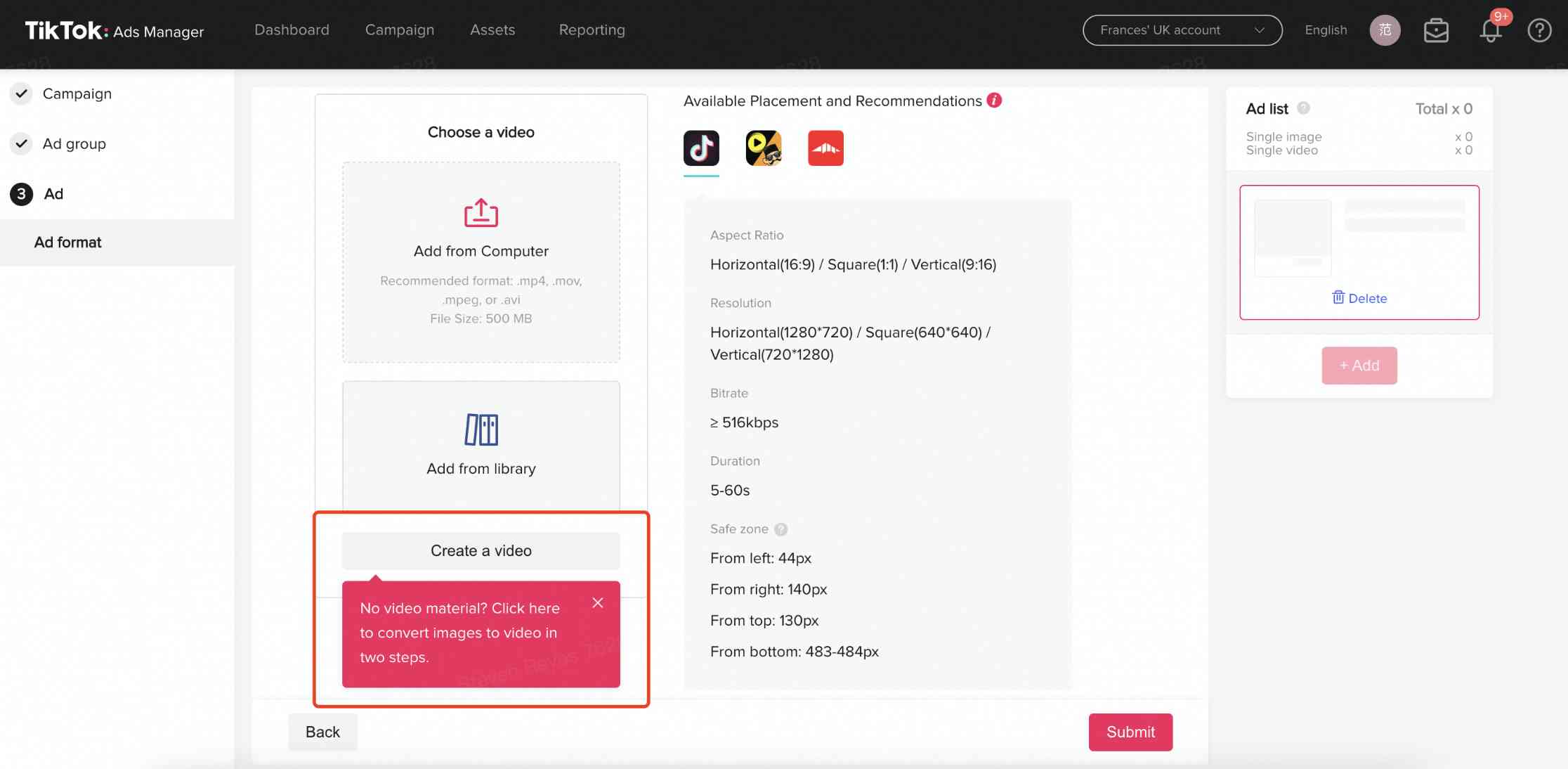
Ensure your video is recorded or edited at 1080p resolution for the best visual quality. Use compression tools to keep the file size within TikTok’s limits without sacrificing quality.
Step 5: Add Text and Captions
Text overlays and captions can significantly enhance the visibility of your ad, especially for viewers watching without sound. Use clear, bold fonts and place text within TikTok’s safe zones to avoid being cut off.
Step 6: Add Music and Effects
Choose trending music or a soundbite that matches your brand’s tone. Add effects, transitions, and filters to make your ad more engaging and visually appealing.
Step 7: Preview and Export
Before uploading, preview your video to ensure it looks good on different devices. Export the video in MP4 format with the correct resolution and aspect ratio.
Best Practices for TikTok Ad Videos

To maximize the impact of your TikTok ad videos, follow these best practices:
- Keep it short and snappy: Aim for 9–15 seconds to maintain viewer attention.
- Use trending sounds: Incorporate popular audio clips to increase discoverability.
- Add captions: Make your content accessible and engaging for silent viewers.
- Optimize for mobile: Ensure your video looks great on both mobile and desktop screens.
- Test different formats: Experiment with vertical, horizontal, and square videos to see what works best for your audience.
Conclusion
Creating effective TikTok ad videos requires a combination of creativity, technical knowledge, and strategic planning. By understanding the platform’s specifications and using the right editing tools, you can produce high-quality videos that engage your audience and drive results. Whether you're a seasoned marketer or a new creator, mastering the art of TikTok ad video editing is a valuable skill that can elevate your brand’s presence on the platform.

Posting Komentar untuk "How to Create Effective TikTok Ad Videos: A Step-by-Step Editing Tutorial"
Posting Komentar