
How to Set Up TikTok Ad Campaigns on Mobile: A Step-by-Step Guide
TikTok has become one of the most powerful platforms for digital marketing, with over a billion active users. For businesses looking to reach this massive audience, setting up TikTok ad campaigns on mobile is an essential strategy. With the right approach, you can create engaging ads that drive conversions and boost brand awareness. This guide will walk you through the process of setting up TikTok ad campaigns on your mobile device.
Understanding TikTok Ads
Before diving into the setup process, it's important to understand what TikTok ads are. TikTok ads are video-based advertisements that appear in users' feeds, often in between organic content. These ads can be in various formats, including in-feed videos, brand takeovers, and Spark Ads. The goal of these ads is to capture attention quickly and drive engagement, whether it's through clicks, views, or conversions.
Step 1: Create a TikTok Business Account
To start running ads on TikTok, you need a business account. Here’s how to create one:
- Open the TikTok app on your mobile device.
- Tap on your profile icon (bottom right).
- Select "Manage Account" and then "Switch to Pro Account."
- Choose the "Business" option and follow the prompts to set up your account.
Once your business account is created, you’ll have access to TikTok Ads Manager, which allows you to manage your ad campaigns.
Step 2: Access TikTok Ads Manager
After creating your business account, you can access TikTok Ads Manager:
- Go to the TikTok app.
- Tap on your profile icon.
- Select "Ads Manager" from the menu.
This will take you to the Ads Manager dashboard, where you can create and manage your ad campaigns.
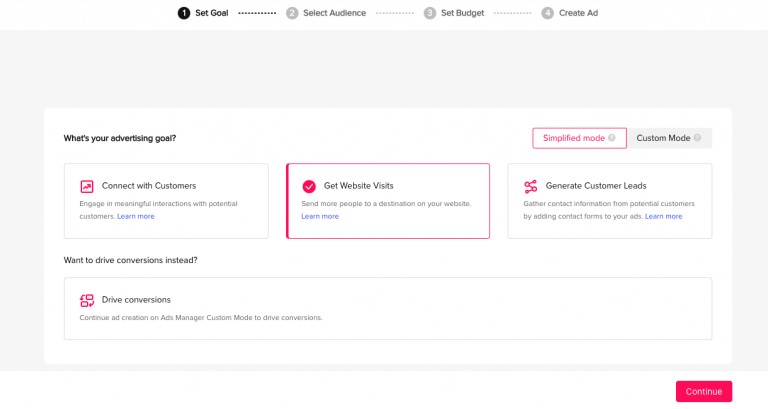
Step 3: Define Your Campaign Objective
When setting up your campaign, you’ll need to define your objective. TikTok offers several campaign objectives, including:
- Conversions: Track actions like purchases or sign-ups.
- Traffic: Drive users to your website or app.
- Engagement: Increase likes, comments, shares, and views.
- Brand Awareness: Boost your brand's visibility.
Choose the objective that aligns with your marketing goals. For example, if you're promoting a new product, "Conversions" might be the best choice.
Step 4: Set Your Budget and Schedule
Next, set your budget and schedule for the campaign:
- Choose a daily or total budget based on your advertising goals.
- Decide on the start and end dates for your campaign.
TikTok allows you to adjust your budget as needed, so you can monitor performance and make changes accordingly.
Step 5: Target Your Audience
One of the key advantages of TikTok ads is the ability to target specific audiences. Here’s how to do it:
- In the Ads Manager, select "Create Campaign."
- Choose your target audience based on demographics, interests, and behaviors.
- Use TikTok's targeting options to narrow down your audience to those most likely to engage with your brand.
For example, if you're targeting young adults interested in fashion, you can use interests related to clothing, shopping, and lifestyle.
Step 6: Create Your Ad Creative
Creating compelling ad creatives is crucial for success on TikTok. Here are some tips:
- Hook in the First 3 Seconds: Capture attention immediately with a strong visual or question.
- Use Trending Sounds: Incorporate popular music or sounds to increase engagement.
- Keep It Short: Aim for 9–15 seconds to maintain viewer interest.
- Add Text Overlays: Use text to highlight key messages and calls to action.
Remember, TikTok users scroll quickly, so your ad needs to be engaging from the start.
Step 7: Review and Launch Your Campaign
Before launching your campaign, review all the details:
- Check your targeting settings to ensure they’re accurate.
- Verify your ad creative meets TikTok’s specifications.
- Confirm your budget and schedule.
Once everything looks good, click "Launch" to start your campaign.
Step 8: Monitor and Optimize
After launching your campaign, it's important to monitor its performance and make adjustments as needed:
- Track Key Metrics: Monitor metrics like click-through rate (CTR), conversion rate, and engagement.
- Test Different Creatives: Experiment with different ad formats and messaging to see what works best.
- Adjust Targeting: Refine your audience targeting based on performance data.
By continuously optimizing your campaigns, you can improve results and maximize your return on investment.
Conclusion
Setting up TikTok ad campaigns on mobile is a powerful way to reach a vast audience and drive business growth. By following these steps and focusing on creating engaging, high-quality ad creatives, you can effectively leverage TikTok’s platform to achieve your marketing goals. Remember to stay updated on trends and continuously optimize your campaigns for the best results. With the right strategy, TikTok can become a valuable asset in your digital marketing arsenal.
[IMAGE: Setting up TikTok ad campaigns on mobile]

Posting Komentar untuk "How to Set Up TikTok Ad Campaigns on Mobile: A Step-by-Step Guide"
Posting Komentar