
How to Set Up TikTok Ad Conversions: A Complete Guide for Marketers
TikTok has become a powerful platform for marketers, offering a unique way to reach a massive and engaged audience. However, simply running ads on TikTok isn’t enough. To truly measure the success of your campaigns, you need to set up TikTok ad conversions effectively. Conversion tracking allows you to understand how users interact with your ads and whether they complete desired actions, such as making a purchase or signing up for a newsletter.
In this guide, we’ll walk you through the process of setting up TikTok ad conversions, including best practices and tips to optimize your campaigns for better results.
Understanding TikTok Ad Conversions

Before diving into the setup process, it's essential to understand what TikTok ad conversions are and why they matter. The TikTok pixel is a tracking tool that helps you monitor user actions after they engage with your ads. This includes actions like adding a product to their cart, completing a checkout, or registering on your website.
By setting up conversion tracking, you can gain valuable insights into your return on ad spend (ROAS) and refine your strategies based on real data. This makes it easier to identify which campaigns are performing well and which ones need adjustments.
Step-by-Step Guide to Setting Up TikTok Pixel
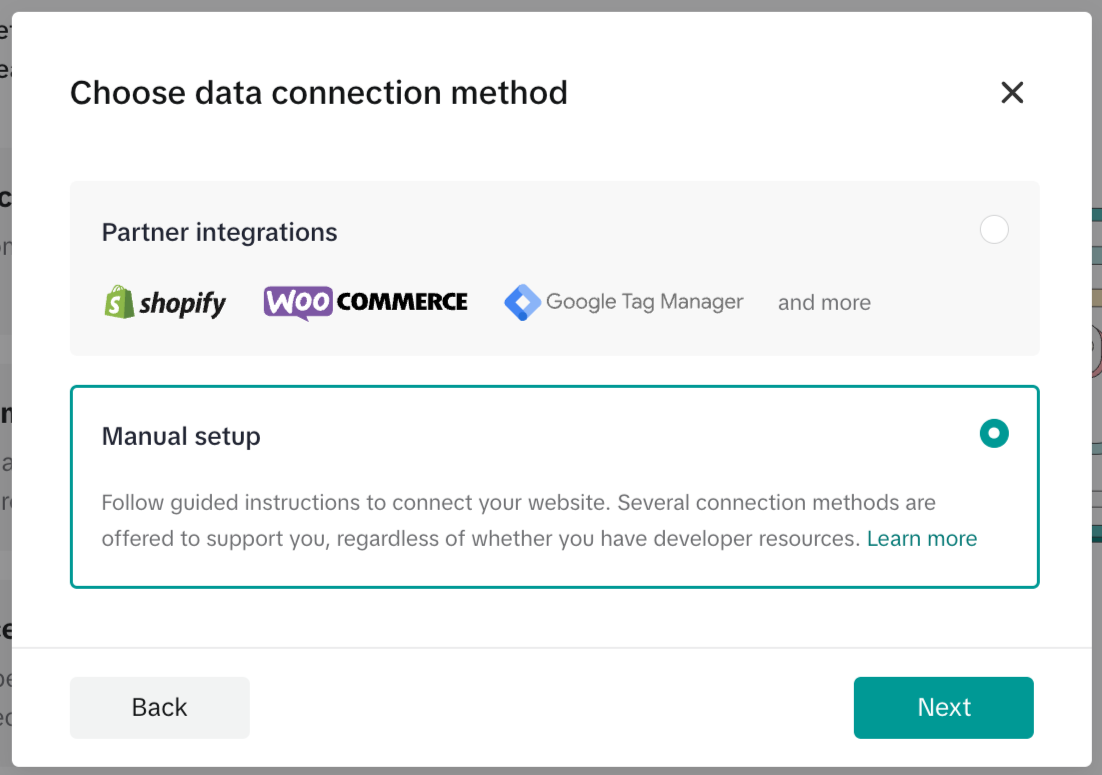
Setting up the TikTok pixel involves several steps. Here’s a detailed breakdown:
-
Log Into Your TikTok Ads Manager Account
Start by logging into your TikTok Ads Manager account. This is where you'll manage all your ad campaigns and track their performance. -
Name Your Pixel and Select Manual Installation
Once logged in, navigate to the pixel section. Name your pixel and choose the option to install the pixel code manually. This gives you more control over the tracking rules. -
Choose Developer Mode
When setting up your event rules, make sure to select Developer Mode. This mode allows you to define specific tracking rules, ensuring accurate data collection. If you choose Standard Mode, you might end up with incorrect tracking data. -
Copy Your Pixel Code
After selecting Developer Mode, copy your pixel code. This code will be used to track user interactions on your website. -
Go to Your Chip Seller Dashboard
Navigate to your Chip seller dashboard. This is where you’ll link your TikTok pixel to your campaign. -
Paste Your TikTok Pixel ID
In the Campaign Details section under Conversion Tracking, paste your TikTok pixel ID. This connects your pixel to your campaign, allowing you to track conversions. -
Install TikTok Pixel Helper
Finally, install the TikTok Pixel Helper to start tracking user actions. This tool helps ensure that your pixel is working correctly and that you’re capturing accurate data.
Common Issues and Solutions

Even after setting up your TikTok pixel, you might encounter issues that affect your conversion rates. Here are some common problems and solutions:
1. Inaccurate Traffic
Many advertisers focus on click-through rates (CTR), assuming high clicks mean successful ads. However, TikTok ad conversion focuses on post-click actions. If your targeting is too broad or your creatives don't match user expectations, you may see high clicks but low conversions.
Solutions: - Refine your targeting to attract users who are more likely to convert. - Ensure your creatives align with the content of your landing page. - Test different ad variations to see what resonates best with your audience.
2. Account or Environment Issues
Operating multiple accounts or using low-quality proxies can trigger TikTok’s browser fingerprint detection mechanisms. This can lead to poor traffic quality and reduced conversions.
Solutions: - Avoid frequently switching accounts on the same device. - Use high-quality proxies or VPS services to maintain a stable environment. - Regularly check your browser fingerprint to ensure it's clean and not flagged.
Optimizing Your TikTok Ad Strategy

Once your pixel is set up and tracking accurately, it's time to optimize your ad strategy for better conversions. Here are some practical methods to consider:
1. Build Ad Structure Backward from Conversion Goals
Instead of starting directly with conversion campaigns, run engagement or traffic campaigns first to test creatives. Identify content with high completion rates and genuine comments, then use these creatives in your conversion campaigns. This helps the system learn real converting audiences, making conversions more stable.
2. Optimize the Landing Page
A poorly optimized landing page can significantly impact your conversion rates. Ensure your page loads quickly, is mobile-friendly, and highlights key selling points within the first few seconds. Conduct A/B tests to see what changes improve your conversion rates.
3. Pay Attention to Browser Fingerprint Environment
TikTok uses browser fingerprint detection to determine if an account is trustworthy. High similarity in fingerprints can lead to traffic limitations or even account bans. Use tools like ToDetect Fingerprint Detection Tool to regularly check your environment and avoid potential issues.
Final Tips for Success
To maximize your TikTok ad conversions, consider the following advanced tips:
- Control Account Quantity and Quality: Focus on fewer, stronger accounts rather than spreading yourself thin across many.
- Maintain Consistent Ad Behavior: Avoid random region changes or inconsistent ad behavior that might raise red flags.
- Localize Creatives: Use realistic language, scenes, and people that resonate with your target audience.
- Scale Budgets Only After Data Accumulates: Wait until you have sufficient data before increasing your budget to ensure your campaigns are effective.
By focusing on a stable environment, the right strategy, and continuous testing, you can improve your TikTok ad conversions and achieve better results. Remember, the key to success on TikTok lies in understanding your audience and optimizing your campaigns based on real data.

Posting Komentar untuk "How to Set Up TikTok Ad Conversions: A Complete Guide for Marketers"
Posting Komentar