
How to Set Up TikTok Ads Conversion Tracking: A Step-by-Step Guide

In the ever-evolving world of digital marketing, TikTok has emerged as a powerful platform for brands looking to connect with their target audience. With its unique algorithm and engaging content, TikTok offers a fantastic opportunity to drive conversions. However, to fully leverage this potential, setting up TikTok Ads conversion tracking is essential. This guide will walk you through the process of setting up conversion tracking for your TikTok Ads campaigns, helping you measure and optimize your ad performance effectively.
Understanding TikTok Ads Conversion Tracking
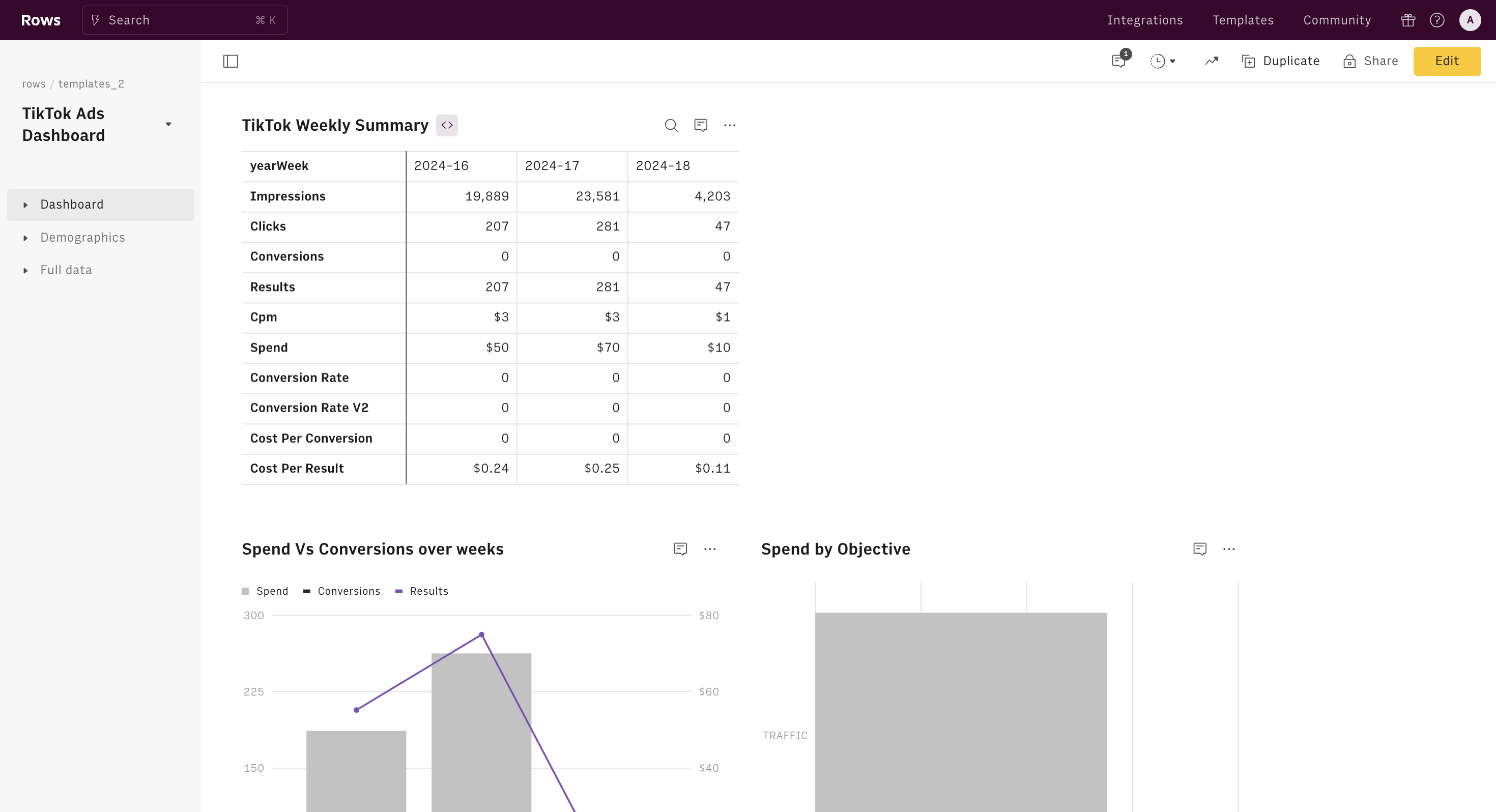
TikTok Ads conversion tracking allows you to monitor the actions users take after clicking on your ads. These actions, known as conversions, can include purchases, sign-ups, or any other desired outcome. By tracking these conversions, you gain valuable insights into the effectiveness of your campaigns and can make data-driven decisions to improve your return on investment (ROI).
Key Benefits of Conversion Tracking
- Measure Performance: Understand which ads are driving the most conversions.
- Optimize Campaigns: Use conversion data to refine your ad strategies and improve targeting.
- Enhance ROI: Allocate your budget more effectively by focusing on high-performing ads.
Prerequisites for Setting Up TikTok Ads Conversion Tracking
Before you begin, ensure you have the following:
- etTracker Analytics Pro or Enterprise Edition with administration rights.
- Access to the TikTok Ads Manager.
- Conversion actions set up in etTracker Analytics, such as orders, purchases, or target achievements.
It's also recommended to use both server-side upload and TikTok Conversion Tag for maximum conversion data. Ensure that the same conversions are recognized as identical to avoid duplication.
Step-by-Step Guide to Setting Up TikTok Ads Conversion Tracking
Step 1: Setting Up a Data Source in TikTok Ads Manager
- Navigate to the TikTok Ads Manager and click on Tools → Events in the menu bar.
- Select Web and then Next.
- Enter the URL of your website in the corresponding field and click Next.
- Choose Manual setup, then select TikTok and Events API.
- Enter a name for the dataset, such as "Conversions," and click Create.
- Click Next several times until you reach the point to create an access token.
- Save the token and pixel ID for later use.
Step 2: Setting Up Conversion Upload in etTracker Analytics
- Go to Configuration → Conversion upload in etTracker Analytics.
- Insert the pixel ID and access token from the data source created in Step 1.
- Click Save to complete the setup.
Step 3: Setting Up TikTok Ads Campaign Tracking
- In the TikTok Ads Manager, click on the parameter field to copy the displayed parameter set.
- Add this parameter set after the target URL of all ads in Ads Manager → Campaign → Level: Ad → Area: Target → Field: Target URL.
- This ensures that all visits via TikTok Ads are recorded in etTracker Analytics with campaign information, allowing conversions to be attributed according to the attribution models.
Optional: Setting Up the TikTok Conversion Tag
If you want to combine the TikTok tag with conversion upload via etTracker Analytics, follow these steps:
- Control the TikTok tag via the etTracker tag manager to ensure deduplication of conversions.
- Set up a trigger that triggers a purchase in the etTracker e-commerce event.
- Create a variable for the order value using the data layer.
- Set up the TikTok conversion tag using the previously created variable and trigger.
- Verify the correct transmission using debug mode on the order confirmation page when executing a test order.
Best Practices for Conversion Tracking
- Use Standard Events: These predefined events help in reporting, optimizing conversions, and building audiences.
- Avoid Sensitive Data: Ensure compliance with TikTok's data terms and policies by not sending sensitive information about visitors.
- Regularly Monitor and Adjust: Continuously review your conversion data and adjust your strategies accordingly.
Conclusion
Setting up TikTok Ads conversion tracking is a crucial step in maximizing the effectiveness of your advertising efforts. By following this step-by-step guide, you can gain valuable insights into your campaign performance and make informed decisions to enhance your ROI. Remember to regularly monitor your data and adjust your strategies to stay ahead in the competitive digital marketing landscape.

Posting Komentar untuk "How to Set Up TikTok Ads Conversion Tracking: A Step-by-Step Guide"
Posting Komentar