
How to Track Conversions in TikTok Ads: Essential Methods for Marketers
Tracking conversions in TikTok Ads is a critical component of any successful digital marketing strategy. It allows you to measure the effectiveness of your campaigns, understand user behavior, and optimize your ad spend for better returns. With TikTok’s growing influence as a social media platform, marketers need to leverage conversion tracking methods to ensure their ads are driving meaningful actions—whether that's website visits, app downloads, or purchases.
Understanding Conversion Tracking on TikTok

Conversion tracking on TikTok involves measuring specific actions users take after interacting with your ads. These actions can include completing a purchase, signing up for a newsletter, or downloading an app. By setting up conversion tracking, you gain insights into which ads are performing well and which need improvement.
Key Steps to Set Up Conversion Tracking
-
Create a TikTok Ads Account: Start by setting up an account on TikTok Ads Manager. This will give you access to all the tools needed for managing and tracking your ads.
-
Install the TikTok Pixel: The TikTok Pixel is a code snippet that tracks user interactions on your website or app. You can install it manually, through a tag manager, or via partner integrations like Shopify or WordPress.
-
Define Your Conversion Events: Choose from predefined events such as "ViewContent" or "Purchase," or create custom events tailored to your business goals. These events help you track specific actions you want users to take.
-
Set Up Your Ad Campaigns: When creating your ad campaigns, select the conversion goals that align with your business objectives. You can also set bid strategies, budgets, and schedules to optimize your campaign performance.
-
Monitor and Analyze Data: Use the TikTok Ads Manager dashboard to view your conversion data, including metrics like conversion rate, cost per conversion, and return on ad spend (ROAS). Regularly analyzing this data helps you make informed decisions to improve your campaigns.
Implementing Conversion Tracking Pixels on Your Website
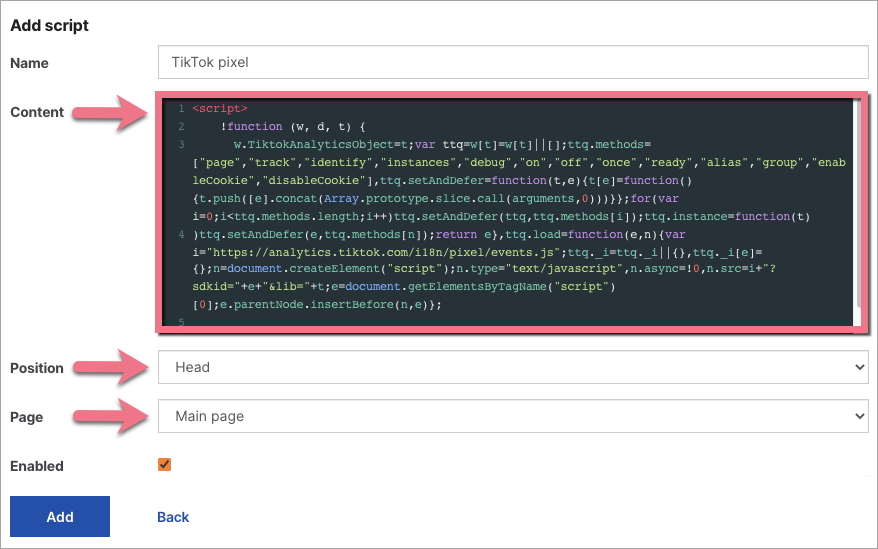
Implementing conversion tracking pixels on your website is essential for accurately measuring the impact of your TikTok ads. Here are the steps to follow:
-
Choose a Pixel Provider: Select a pixel provider that aligns with your tracking needs. TikTok offers its own pixel, but you can also use third-party providers like Google Analytics or Facebook Pixel.
-
Generate the Pixel Code: Once you've chosen a provider, generate the pixel code. This code contains a unique identifier that allows the provider to track conversions on your website.
-
Install the Pixel Code: Copy the generated pixel code and paste it into the header or footer section of your website. Ensure that the code is placed on every page where you want to track conversions.
-
Test the Pixel Implementation: After installing the pixel code, test its functionality by visiting your website and performing the actions you want to track. Check if the pixel fires correctly and registers the conversions in your provider's dashboard.
-
Set Up Conversion Events: Depending on your tracking goals, set up specific conversion events. These can include completed purchases, form submissions, or other desired actions. Configure the conversion events within your pixel provider's dashboard to track them accurately.
-
Monitor and Analyze the Conversion Data: Once the pixel is implemented and conversion events are set up, regularly monitor and analyze the conversion data provided by your pixel provider. Look for patterns, trends, and insights that can help you optimize your TikTok ads and improve your overall marketing strategy.
Best Practices for Effective Conversion Tracking

To ensure effective conversion tracking on TikTok, consider the following best practices:
1. Set Up Your Conversion Events Correctly
Before you can track conversions, define what actions you want to measure as conversions. Use predefined events provided by TikTok or create custom events based on your specific needs. Install the TikTok pixel on your website or app to capture the conversion data.
2. Choose the Right Attribution Window
The attribution window is the time period between when a user sees or clicks on your ad and when they complete a conversion. Choose different attribution windows for different conversion events based on your business model and customer journey.
3. Segment Your Conversion Data
Once you have set up your conversion events and attribution windows, access your conversion data in the TikTok Ads Manager. Use various filters and dimensions to segment your data and analyze it from different angles.
4. Test and Experiment with Your Ads
Conversion tracking is not a one-time process but a continuous cycle of learning and improvement. Test and experiment with different aspects of your ads, such as targeting, bidding, budget, creative, copy, landing page, etc., and measure their impact on your conversion rates and ROAS.
Troubleshooting Common Conversion Tracking Issues
After setting up and using conversion tracking on your TikTok ads, you may encounter some common issues that affect the accuracy and performance of your campaigns. These issues can range from technical errors to strategic errors. Here are some tips to troubleshoot common conversion tracking issues:
-
Pixel Installation Errors: If your pixel is not installed correctly on your website or app, you may not be able to track conversions or attribute them to your TikTok ads. Follow the instructions on how to install the pixel on your website or app, depending on your platform and integration method.
-
Event Mismatch Errors: If your pixel events do not match the events that you have set up in your TikTok ad account, you may not be able to track conversions or optimize your campaigns for the right actions. Ensure that your pixel events are consistent with your ad account events.
-
Conversion Attribution Errors: If your conversion attribution settings are not aligned with your campaign objectives and strategies, you may not be able to measure the impact of your TikTok ads on your conversions. Understand how TikTok attributes conversions to your ads and choose the appropriate attribution window and model for your campaigns.
-
Conversion Goal Errors: If your conversion goals are not realistic or relevant for your campaigns, you may not be able to optimize your campaigns for the desired outcomes. Set SMART (Specific, Measurable, Achievable, Relevant, and Time-bound) goals for your campaigns.
-
Conversion Data Errors: If your conversion data is incomplete, inaccurate, or delayed, you may not be able to analyze the performance of your campaigns and make informed decisions. Ensure that your pixel is sending complete and accurate data to TikTok.
By following these best practices and troubleshooting common issues, you can ensure that your conversion tracking is working properly and that your campaigns are delivering the best results possible. Use the various tools and features that TikTok provides to enhance your conversion tracking and optimization, and gain more insights and control over your campaigns. By doing so, you can leverage the power of TikTok ads to drive more conversions and grow your business.

Posting Komentar untuk "How to Track Conversions in TikTok Ads: Essential Methods for Marketers"
Posting Komentar