
The Ultimate Guide to Scheduling TikTok Posts Like a Pro
In today's fast-paced digital landscape, TikTok has become a powerful platform for brands, creators, and influencers to connect with their audiences. However, managing a consistent posting schedule on TikTok can be time-consuming and challenging without the right tools. This guide will walk you through the best practices, tools, and strategies to effectively schedule your TikTok posts like a pro.
Why Scheduling TikTok Posts Matters
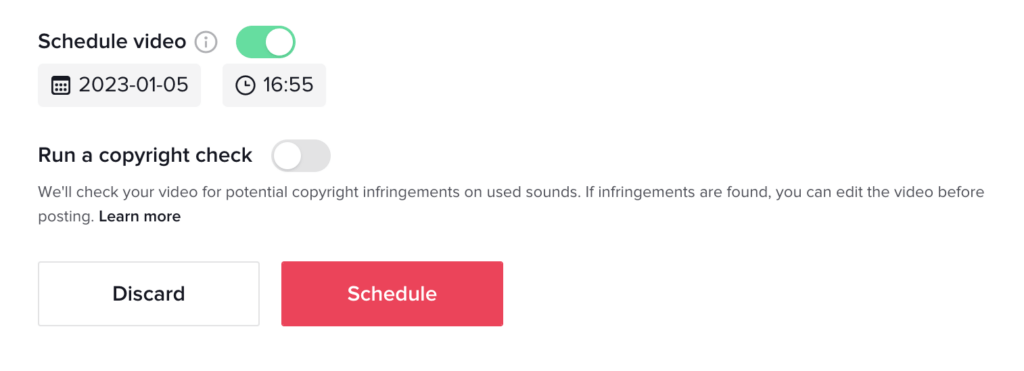
Scheduling TikTok posts is essential for maintaining a consistent presence on the platform. It allows you to plan your content in advance, ensuring that your brand remains visible to your audience even when you're not actively creating new content. By scheduling your posts, you can also take advantage of peak engagement times, which can significantly boost your views, likes, and shares.
Benefits of Scheduling TikTok Posts
- Consistency: Maintains a regular posting schedule, keeping your audience engaged.
- Time Management: Saves time by automating the posting process.
- Peak Engagement: Allows you to post during times when your audience is most active.
- Content Planning: Enables you to plan and organize your content strategy effectively.
How to Schedule TikTok Posts Using TikTok’s Native Tool
TikTok offers a native scheduling tool that allows you to schedule your posts up to 10 days in advance. Here's how to use it:
Step-by-Step Guide to Scheduling TikTok Posts
- Log in to TikTok on a Web Browser: The scheduler is only available on desktop, so make sure you're logged in on your computer.
- Upload and Prep Your Post: In the upload video window, add captions, hashtags, mentions, choose a cover image, run a copyright check, and set your settings.
- Schedule TikTok Posts: Click the toggle next to "Schedule Video" to turn it green. Set your publishing date and time. Double-check your settings to ensure accuracy.
- Double-Check Your Post: Find scheduled posts in the Drafts section of your Profile to review before they go live.
Advanced Scheduling with Third-Party Tools
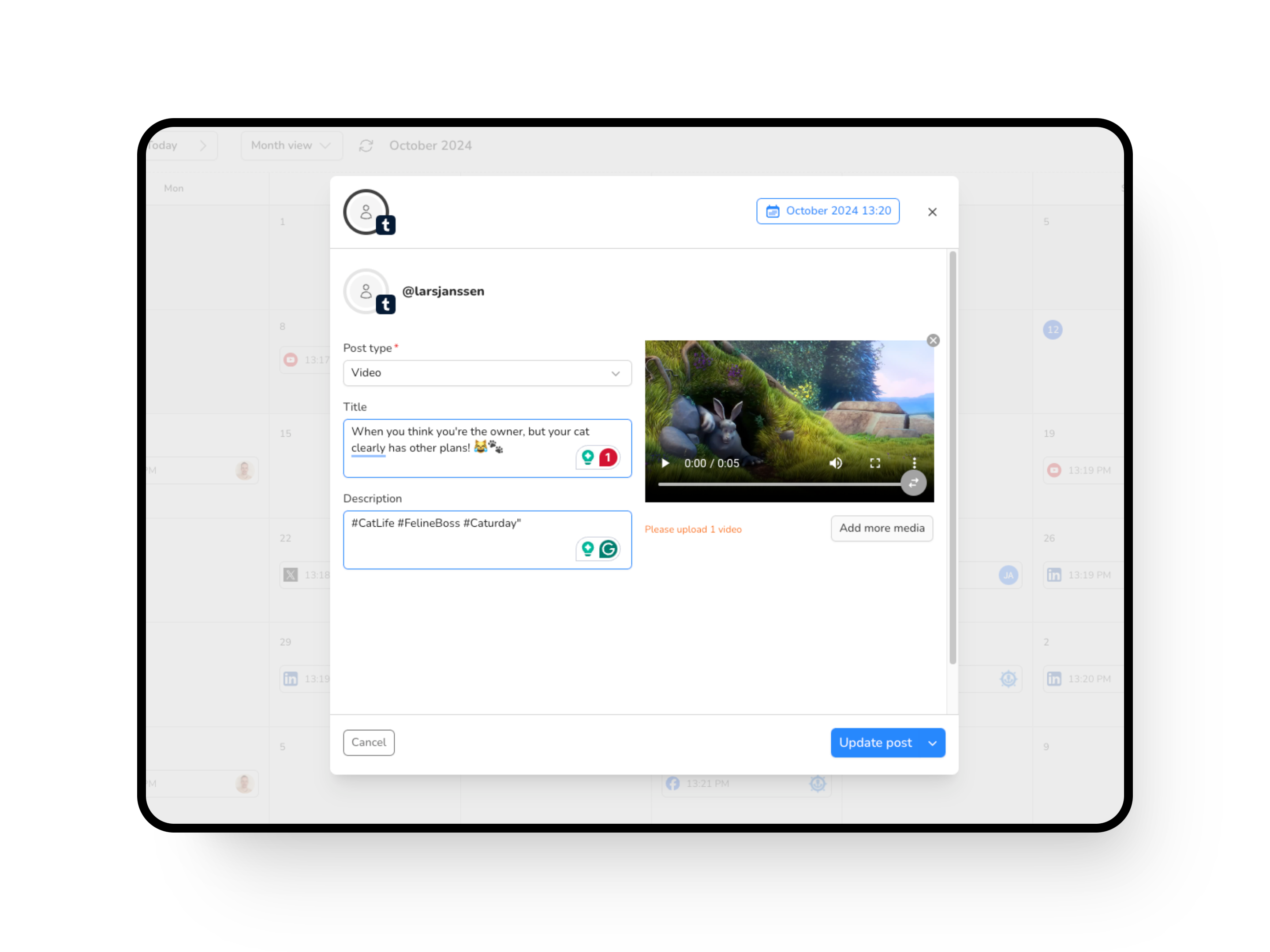
While TikTok's native scheduler is useful, third-party tools like Sprout Social, Later, and Hootsuite offer more advanced features and flexibility. These tools allow you to manage multiple accounts, schedule posts from both mobile and desktop, and track your performance metrics.
Top TikTok Scheduling Tools
- Sprout Social: Offers robust scheduling, collaboration features, and analytics.
- Later: Focuses on turning TikTok views into website traffic with its Link in Bio feature.
- Hootsuite: Provides comprehensive social media management, including TikTok scheduling and analytics.
Tips for Creating an Effective TikTok Schedule

Creating an effective TikTok schedule requires careful planning and consideration of your audience's preferences. Here are some tips to help you get started:
1. Maintain a Unified Content Calendar
Use a centralized content calendar to track all your scheduled posts across different platforms. This helps you stay organized and avoid over-posting or under-posting.
2. Track Your Best Posting Times
Identify the times when your audience is most active on TikTok. Use TikTok's analytics to determine the best times to post and adjust your schedule accordingly.
3. Set a Smooth Approval Process
If you're working with a team, establish a structured review process for your TikTok content. This ensures quality control and aligns your posts with your broader engagement goals.
4. Measure the Success of Your Profile and Posts
Regularly analyze your TikTok performance using analytics tools. Track metrics such as views, likes, shares, and follower growth to understand what works and what doesn't.
5. Engage with Your Audience
Once your posts are live, engage with your audience by responding to comments and messages. This helps build a stronger connection with your followers and encourages more interaction.
Frequently Asked Questions About TikTok Scheduling

Can You Schedule Posts on TikTok?
Yes, you can schedule TikTok posts using TikTok's native scheduler or third-party tools like Sprout Social.
Can You Schedule TikToks for Free?
Yes, TikTok's native scheduler is free, but some third-party tools may require a subscription.
Does Scheduling TikToks Affect the Post’s Video Quality?
No, scheduling TikTok posts does not affect the video quality of your posts.
Can You Make Changes to a Scheduled TikTok Post?
Once a TikTok post is scheduled, you cannot make changes. However, some third-party tools allow you to edit scheduled posts.
Is There a Way to Schedule TikToks?
Yes, you can schedule TikToks using TikTok's native scheduler or third-party tools.
Conclusion
Scheduling TikTok posts is a crucial aspect of managing your social media presence. By using the right tools and strategies, you can maintain a consistent posting schedule, engage with your audience, and grow your brand on TikTok. Whether you're using TikTok's native scheduler or a third-party tool, the key is to plan ahead, track your performance, and continuously refine your strategy to achieve the best results.

Posting Komentar untuk "The Ultimate Guide to Scheduling TikTok Posts Like a Pro"
Posting Komentar