
TikTok Ads Billing and Payments Help: Troubleshooting Common Issues
TikTok has become a powerful platform for businesses to reach their target audience through targeted advertising. However, managing billing and payments for TikTok Ads can sometimes be confusing, especially for new advertisers. Understanding how the billing process works and knowing how to troubleshoot common issues is essential for ensuring your campaigns run smoothly.
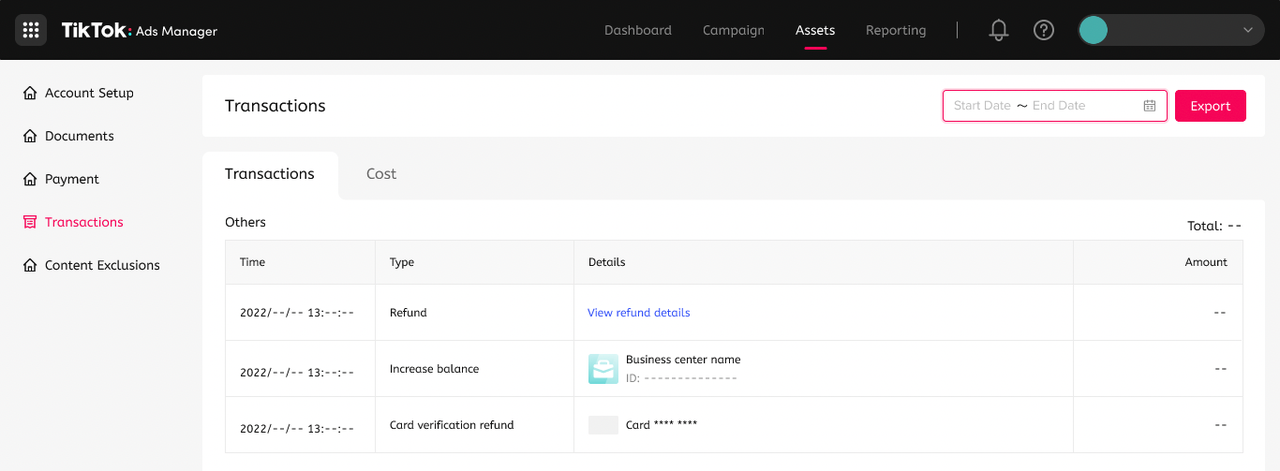
Understanding TikTok Ads Billing
Before diving into troubleshooting, it's important to understand how TikTok Ads billing works. When you set up an ad campaign on TikTok, you'll need to link a payment method to your account. This could be a credit card, debit card, or other supported payment options. TikTok charges your payment method based on the performance of your ads, such as clicks, views, or conversions.
The billing cycle typically runs on a monthly basis, and you'll receive a detailed invoice showing the cost of your ads. It's crucial to monitor your account regularly to ensure that there are no unexpected charges or issues with your payment method.
Common Billing and Payment Issues
While TikTok Ads is generally reliable, several common billing and payment issues may arise. Here are some of the most frequent problems and how to resolve them:
- Payment Method Declined
-
If your payment method is declined, check the following:
- Ensure the card details are correct (including the expiration date and CVV code).
- Verify that the card is active and not reported lost or stolen.
- Confirm that the billing address matches the one on file with your bank.
- Try using a different payment method if possible.
-
Insufficient Funds
-
If your account has insufficient funds, you may see a message indicating that your campaign cannot run. To resolve this:
- Add more funds to your account by linking a new payment method or updating the existing one.
- Check your account balance regularly to avoid running out of funds during a campaign.
-
Billing Address Mismatch
-
A mismatch between the billing address on your TikTok account and the one on file with your bank can cause payment issues. To fix this:
- Update your billing address in your TikTok Ads account settings.
- Contact your bank to confirm that the address on file is correct.
-
Account Suspension
-
If your account is suspended due to billing issues, you may not be able to run any campaigns until the issue is resolved. To reactivate your account:
- Log in to your TikTok Ads account and check for any notifications regarding account suspension.
- Follow the instructions provided to resolve the issue, which may include updating your payment information or contacting TikTok support.
-
Incorrect Invoice Amounts
- If you notice discrepancies in your invoice, such as incorrect charges or missing credits, contact TikTok support immediately. Provide them with the relevant details, including the campaign name, dates, and any supporting documentation.
[IMAGE: TikTok Ads Billing and Payments Help Troubleshooting Common Issues]
Tips for Managing TikTok Ads Payments
To ensure a smooth billing experience, consider the following tips:
- Set Up a Budget: Define a daily or total budget for your campaigns to avoid overspending.
- Monitor Your Account Regularly: Keep an eye on your account balance and billing statements to catch any issues early.
- Use Multiple Payment Methods: Having multiple payment methods linked to your account can help prevent disruptions if one method fails.
- Stay Informed About Billing Cycles: Understand when your billing cycle starts and ends to avoid any surprises.
How to Contact TikTok Support for Billing Issues
If you're experiencing persistent billing or payment issues, reaching out to TikTok support is the best course of action. Here's how to contact them:
- Visit the TikTok Ads Help Center: The help center provides a wealth of resources, including FAQs, guides, and troubleshooting tools.
- Submit a Support Ticket: If you need further assistance, submit a support ticket through the TikTok Ads dashboard. Be sure to provide detailed information about the issue you're facing.
- Use Live Chat: TikTok offers live chat support for users who need immediate assistance. Look for the chat option within the TikTok Ads dashboard.
[IMAGE: TikTok Ads Billing and Payments Help Troubleshooting Common Issues]
Conclusion
Managing TikTok Ads billing and payments is a critical aspect of running successful ad campaigns. By understanding how the billing process works and being aware of common issues, you can ensure that your campaigns run smoothly and efficiently. If you encounter any problems, don't hesitate to reach out to TikTok support for assistance. With the right approach, you can maximize the effectiveness of your TikTok Ads while avoiding unnecessary complications.

Posting Komentar untuk "TikTok Ads Billing and Payments Help: Troubleshooting Common Issues"
Posting Komentar