
How to Build Custom Audiences on TikTok for Effective Targeted Marketing
In the ever-evolving landscape of digital marketing, TikTok has emerged as a powerful platform for brands to connect with their target audience. One of the most effective tools available on TikTok is Custom Audiences, which allows advertisers to retarget users who have already engaged with their brand. This feature is especially valuable for businesses looking to improve conversion rates, increase engagement, and drive more sales.
Whether you're a seasoned marketer or just starting out, understanding how to build custom audiences on TikTok can significantly enhance your advertising strategy. In this article, we'll explore what TikTok Custom Audiences are, how they work, and provide a step-by-step guide to help you create and optimize them effectively.
What Are TikTok Custom Audiences?
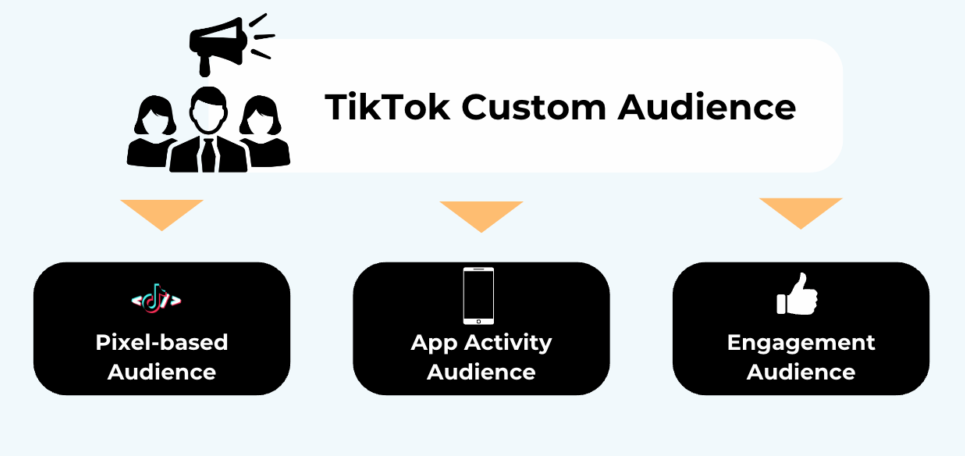
TikTok Custom Audiences are a targeting option that enables advertisers to reach users who have previously interacted with their brand. These audiences can be built using various data sources such as website traffic, app activity, email lists, or engagement with TikTok content.
For example, if someone has visited your website, added an item to their cart, or engaged with one of your TikTok videos, you can upload that information to TikTok and retarget them with personalized ads. This not only helps in re-engaging existing customers but also improves the chances of converting them into loyal buyers.
To use a Custom Audience, you need a minimum of 1,000 matched users. This ensures that your ad campaigns are reaching a significant number of people, increasing the likelihood of success.
Why Use TikTok Custom Audiences?
There are several compelling reasons to leverage TikTok Custom Audiences:
- Retargeting: Re-engage users who have shown interest in your products or services.
- Higher Conversion Rates: Target users who have already interacted with your brand, making them more likely to convert.
- Improved ROI: By focusing on warm audiences instead of cold prospects, you can reduce wasted ad spend and boost your return on investment (ROI).
- Brand Awareness: Increase visibility by targeting users who have already engaged with your content.
- Lookalike Audiences: Custom Audiences serve as the foundation for creating Lookalike Audiences, allowing you to expand your reach to similar users.
9 Sources to Create TikTok Custom Audiences
TikTok offers nine different data sources to build Custom Audiences. Here's a quick overview of each:
1. Customer File
Upload your customer list (e.g., email addresses, phone numbers) to target users who have already purchased from you or signed up for your newsletter.
2. Engagement
Target users who have interacted with your TikTok content, such as liking, commenting, or sharing your videos.
3. App Activity
Create audiences based on user behavior within your app, such as purchases, sign-ups, or cart abandonments.
4. Website Traffic
Track users who have visited your website or taken specific actions, like adding items to their cart or completing a form.
5. Lead Generation
Target users who have engaged with your lead generation ads, such as those who viewed your form page without submitting it.
6. Business Account Audience
Retarget users who have interacted with your TikTok business account, such as following your profile or watching your videos.
7. Shop Activity
Ideal for e-commerce brands, this source allows you to target users who have interacted with your TikTok Shop, such as viewing products or initiating checkout.
8. Challenge
Target users who have participated in your branded hashtag challenges or effects, helping you re-engage those who have shown interest in your brand.
9. Premium Audience
Access third-party data from trusted partners to reach highly segmented audiences based on demographics, purchasing power, or offline behaviors.
Step-by-Step Guide to Creating TikTok Custom Audiences
Creating a Custom Audience on TikTok is a straightforward process. Follow these steps to get started:
Step 1: Log in to TikTok Ads Manager
Start by logging into your TikTok Ads Manager account. This is where you’ll manage all your ad campaigns and audiences.
Step 2: Navigate to the Audiences Section
From the top navigation menu, hover over Assets and select Audiences. This will take you to the Audiences Library, where you can create and manage your Custom Audiences.
Step 3: Click “Create Audience”
Click the Create Audience button and select Custom Audience from the options.
Step 4: Choose Your Data Source
Select one of the nine sources listed above (e.g., Customer File, Engagement, Website Traffic, etc.).
Step 5: Set Up Your Rules
Define your targeting rules: - Select the type of engagement, event, or file format. - Choose a specific time period (e.g., past 30 days). - Use the Add More Rules icon to narrow or broaden your audience. - Optionally, click Exclude People to remove certain users.
Step 6: Name Your Audience and Confirm
Give your audience a name, toggle on Auto-Refresh (highly recommended), and click Confirm. Your audience will now be saved in the library for future use.
Best Practices for Optimizing TikTok Custom Audiences
To get the most out of your Custom Audiences, consider the following best practices:
- Enable Auto-Refresh: This ensures your audience data stays up-to-date with the latest user interactions.
- Maintain Clean Data: Before uploading files, ensure your data is clean, standardized, and formatted correctly.
- Avoid Audience Overlap: Prevent internal competition by excluding users who have already converted or been targeted in other campaigns.
- Use Strong Seeds for Lookalike Expansion: High-intent audiences like Purchasers or Add-to-Cart users make the best seeds for Lookalike Audiences.
- Leverage Custom Audience Enhancement: This feature automatically adds similar users to your Custom Audience, expanding your reach without compromising quality.
Common Issues and Solutions
While building Custom Audiences, you may encounter some common issues:
- Audience Size Not Updating: It can take up to 7 days for TikTok to fully update your audience. Ensure Auto-Refresh is enabled.
- Low Match Rate: Check that your data meets TikTok’s requirements and clean up duplicates.
- Pixel Not Triggering: Use the TikTok Pixel Helper to verify your installation and ensure key events are firing correctly.
- App Activity Not Tracking: Confirm that the TikTok SDK is properly integrated into your app.
Final Thoughts
TikTok Custom Audiences are a powerful tool for marketers looking to refine their targeting and improve campaign performance. By leveraging these audiences, you can re-engage users, boost conversions, and scale your reach effectively.
Whether you're a small business owner or a large enterprise, understanding how to build and optimize Custom Audiences on TikTok can give you a competitive edge in the digital marketing space. With the right strategies and tools, you can turn your TikTok ads into a powerful driver of growth and revenue.
[IMAGE: Building Custom Audiences on TikTok for Effective Targeted Marketing]

Posting Komentar untuk "How to Build Custom Audiences on TikTok for Effective Targeted Marketing"
Posting Komentar