
How to Create Effective Live Stream TikTok Ads: A Step-by-Step Tutorial
TikTok has become a powerhouse for content creators and marketers alike, offering a unique platform to connect with audiences through short-form videos. With the rise of live streaming, businesses and influencers are leveraging this feature to engage their followers in real-time. One of the most effective ways to promote products or services on TikTok is through live stream ads. This article will guide you through the process of creating and executing successful live stream TikTok ads.
Understanding Live Stream TikTok Ads

Live stream TikTok ads allow brands to interact with their audience in real-time, showcasing products, answering questions, and building a sense of community. These ads can be particularly effective for driving sales, increasing brand awareness, and fostering customer loyalty. Unlike traditional video ads, live streams offer a more dynamic and interactive experience, making them ideal for engaging viewers.
Key Benefits of Live Stream TikTok Ads
- Real-Time Interaction: Engage with your audience as they watch, allowing for immediate feedback and responses.
- Increased Engagement: Viewers are more likely to participate in live streams, leading to higher engagement rates.
- Authenticity: Live streams feel more genuine and personal, helping to build trust with your audience.
Preparing for Your Live Stream

Before you start your live stream, it's essential to plan and prepare effectively. Here are some steps to help you get started:
1. Define Your Goals
Determine what you want to achieve with your live stream. Common goals include:
- Launching a new product
- Promoting a sale or event
- Educating your audience about your brand
- Building a community around your brand
2. Choose the Right Time
Timing is crucial for maximizing your audience reach. Consider the following factors:
- Audience Availability: Schedule your live stream when your target audience is most active.
- Time Zone: If your audience spans multiple time zones, choose a time that works best for the majority.
3. Plan Your Content
Create a detailed script or outline for your live stream. Include:
- Introduction and welcome message
- Product demonstrations or explanations
- Q&A session
- Call-to-action (CTA) for viewers
4. Promote Your Live Stream
Promote your live stream in advance to attract a larger audience. Use the following strategies:
- Share teasers on your social media platforms
- Use TikTok's "Live" feature to notify your followers
- Collaborate with other creators to cross-promote your stream
Setting Up Your Live Stream
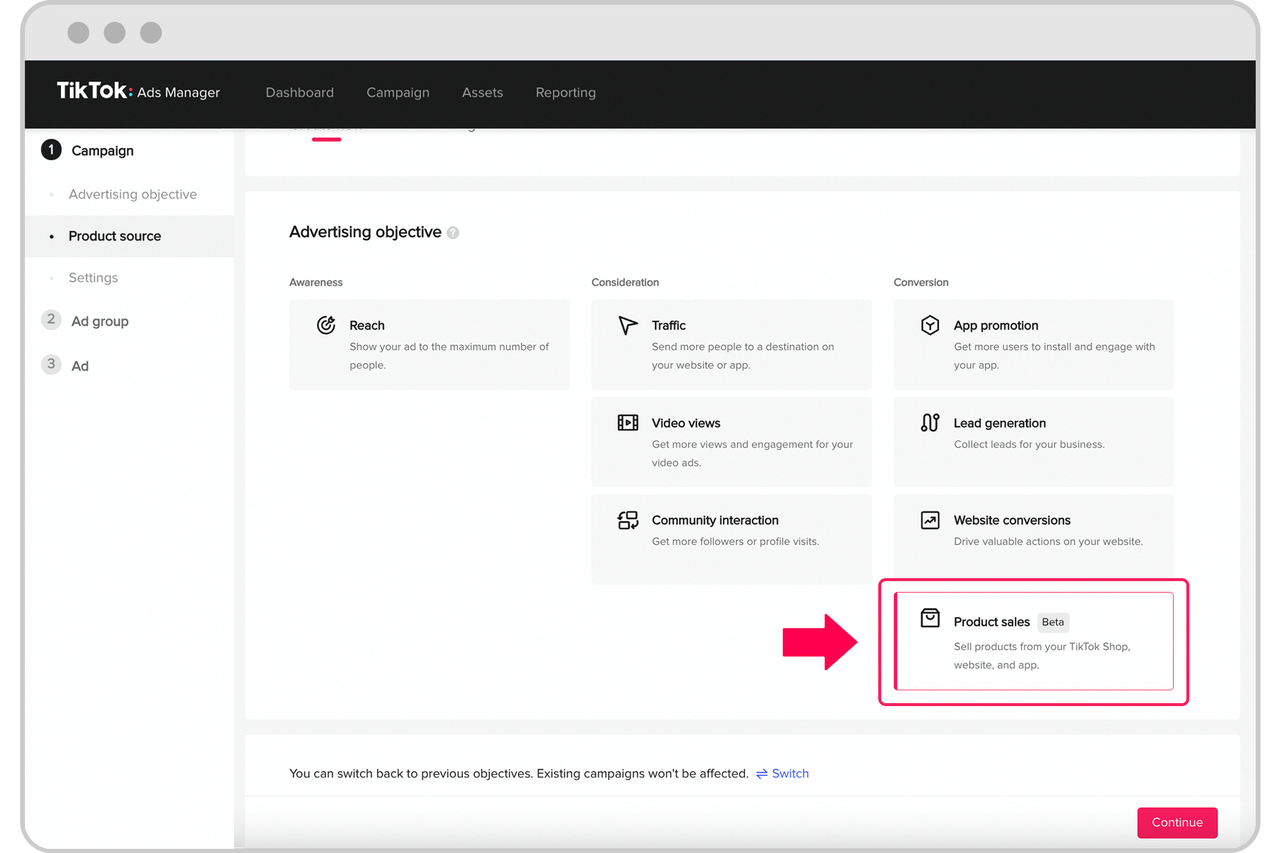
Once you've planned your live stream, it's time to set it up on TikTok. Follow these steps:
1. Access the Live Feature
Open the TikTok app and tap the "+" icon to create a new video. Select the "Live" option from the menu.
2. Customize Your Live Stream
Before going live, customize your stream by:
- Adding a title and description
- Choosing a category (e.g., business, entertainment)
- Setting a password if you want to restrict access
3. Test Your Equipment
Ensure that your device's camera, microphone, and internet connection are working properly. A stable internet connection is essential for a smooth live stream.
4. Invite Your Audience
Use the "Invite" feature to send links to your live stream via messaging apps or social media. This helps to increase your viewer count before the stream starts.
Executing Your Live Stream
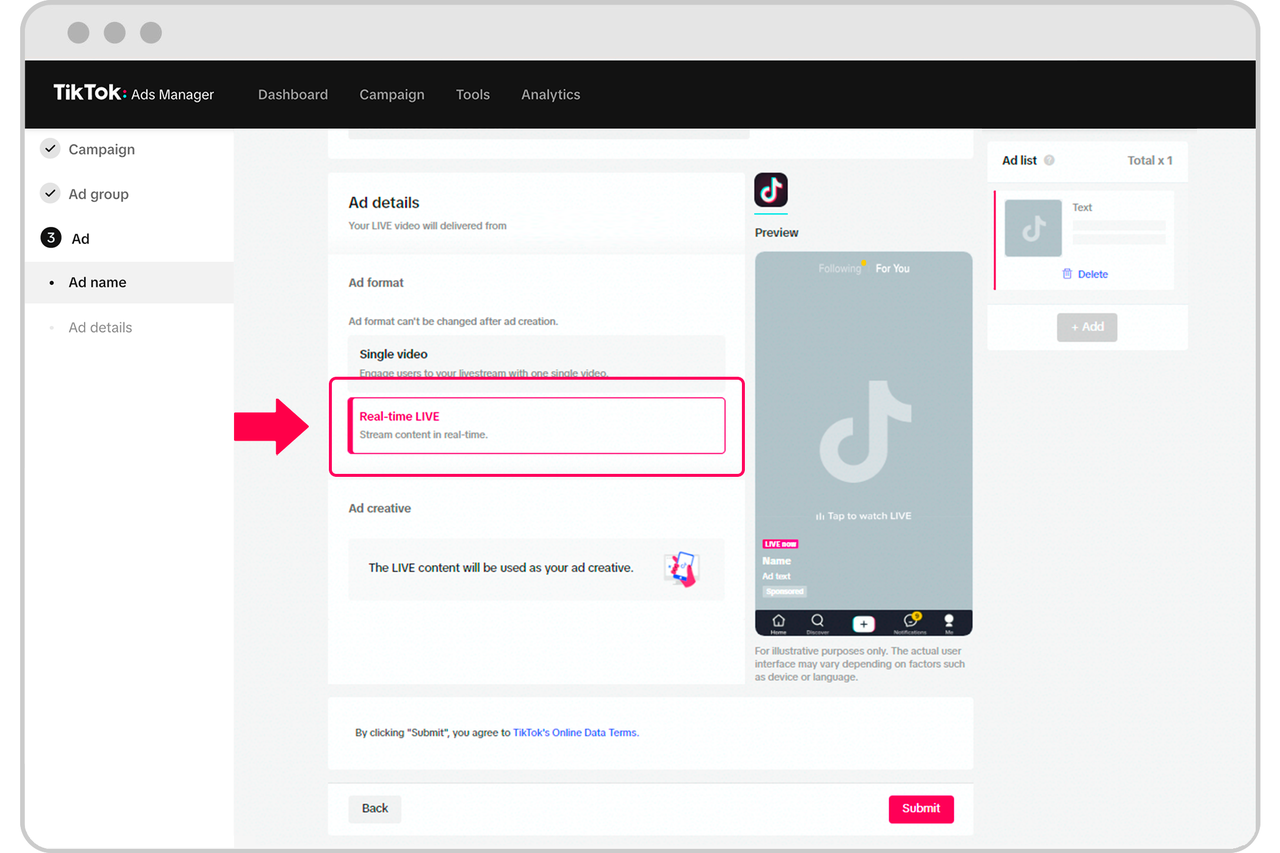
During your live stream, focus on engaging your audience and delivering valuable content. Here are some tips to keep in mind:
1. Be Authentic and Engaging
Interact with your viewers by responding to comments, asking questions, and encouraging participation. This helps to create a sense of community and keeps your audience engaged.
2. Showcase Your Products
Demonstrate your products in action, highlighting their features and benefits. Use visuals and examples to make your presentation more compelling.
3. Encourage Viewer Participation
Ask your audience to share their thoughts, experiences, and questions. This not only increases engagement but also provides valuable insights into your audience's preferences.
4. Use Call-to-Actions
Include clear call-to-actions (CTAs) throughout your stream, such as directing viewers to your website, social media, or online store. This helps to drive traffic and conversions.
Post-Stream Strategies

After your live stream, take the following steps to maximize its impact:
1. Analyze Your Performance
Review your live stream analytics to understand what worked well and what could be improved. Key metrics to consider include:
- Total views
- Average watch time
- Engagement rate
- Viewer demographics
2. Engage with Your Audience
Follow up with your viewers by responding to comments and messages. This helps to build relationships and maintain a loyal audience.
3. Repurpose Your Content
Turn your live stream into a video that can be shared on other platforms, such as YouTube or Instagram. This extends the reach of your content and maximizes its value.
4. Plan for Future Streams
Use the insights from your previous live streams to improve future ones. Experiment with different formats, topics, and times to find what resonates best with your audience.
Conclusion
Creating effective live stream TikTok ads requires careful planning, execution, and follow-up. By understanding your audience, setting clear goals, and engaging with your viewers in real-time, you can leverage the power of live streaming to grow your brand and drive meaningful results. With the right strategies and tools, you can turn your live streams into powerful marketing opportunities that resonate with your audience and deliver tangible outcomes.

Posting Komentar untuk "How to Create Effective Live Stream TikTok Ads: A Step-by-Step Tutorial"
Posting Komentar