
How to Create a TikTok Ad Account: A Step-by-Step Guide
TikTok has become one of the most powerful platforms for brands and businesses to reach a massive, engaged audience. With over 1 billion active users worldwide, it's no surprise that many companies are turning to TikTok advertising to boost their visibility and drive sales. If you're looking to create a TikTok ad account, this guide will walk you through the entire process, from setting up your account to launching your first campaign.
Why Create a TikTok Ad Account?
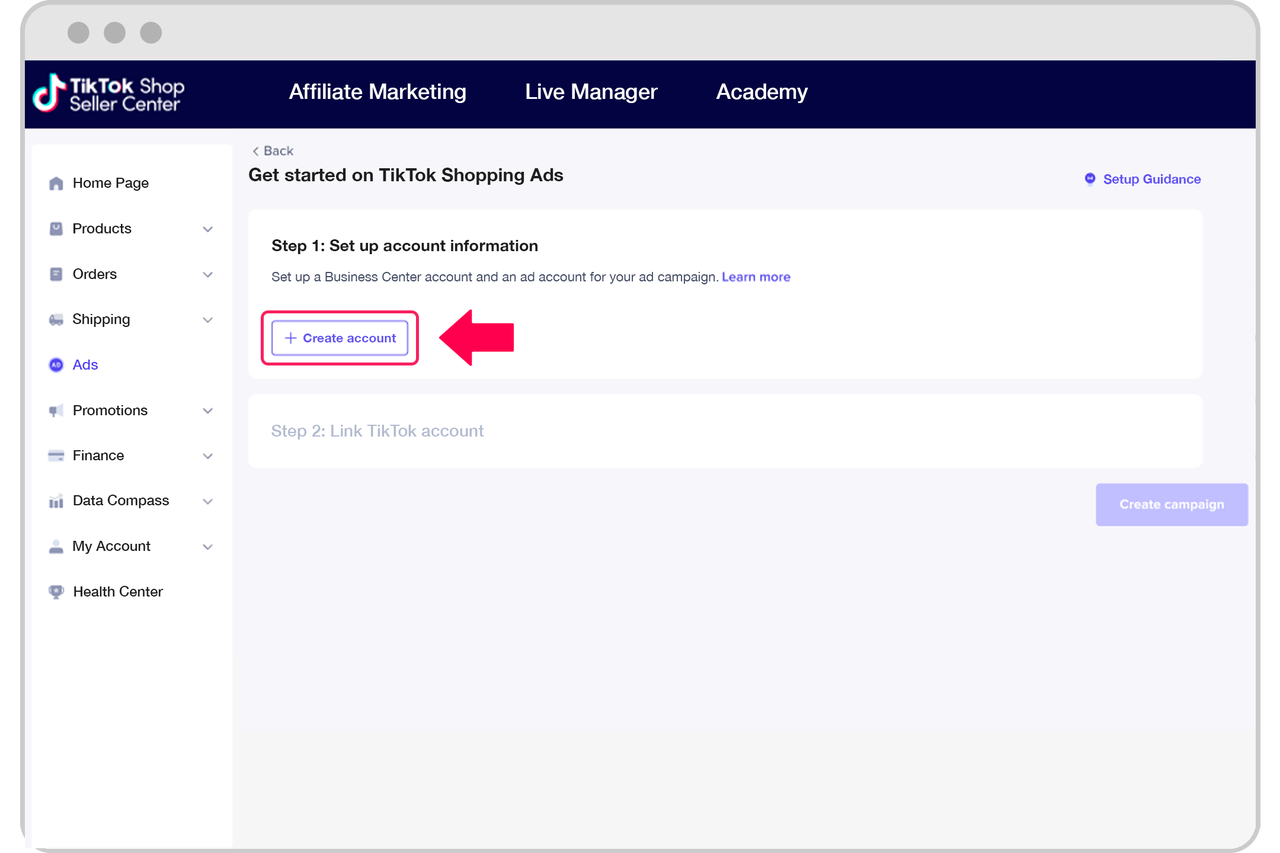
Creating a TikTok ad account allows you to promote your products or services directly to the platform’s vast user base. Unlike organic content, which relies on virality, paid ads offer a more controlled way to reach your target audience. Whether you're looking to increase brand awareness, drive traffic to your website, or boost sales, TikTok ads can be an effective tool in your marketing strategy.
Additionally, TikTok's algorithm prioritizes high-quality, engaging content, so creating a well-crafted ad account can help you stand out in a competitive space. With the right approach, you can maximize your ad performance and achieve your marketing goals.
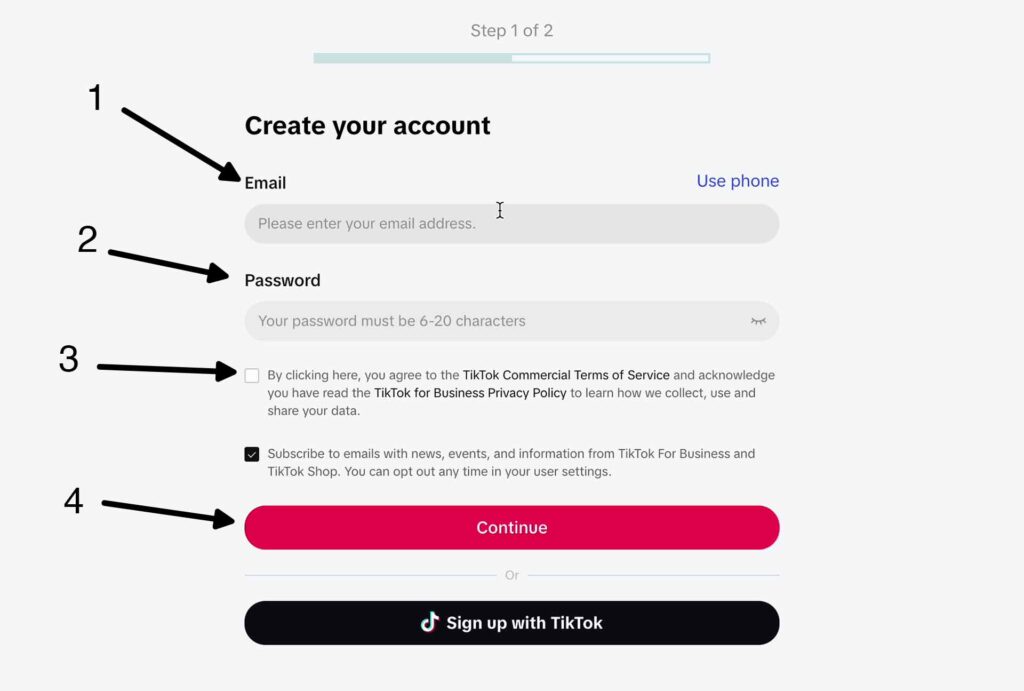
Step 1: Sign Up for a TikTok Ads Account
To begin, you'll need to sign up for a TikTok Ads account. This is different from a regular TikTok account, as it's specifically designed for businesses and advertisers.
How to Sign Up:
- Visit the TikTok Ads Website: Go to https://www.tiktok.com/business/.
- Click "Create an Ad": You'll be prompted to fill out a form with your business details.
- Submit Your Information: Provide your company name, contact information, and other relevant details.
- Wait for a Representative: A TikTok representative will contact you within 48 hours to set up your account.
Note: If you're located in India, Vietnam, Japan, Taiwan, Malaysia, Indonesia, or Thailand, you may be able to sign up directly without needing a representative.
Step 2: Set Up Your Campaign

Once your account is set up, you'll have access to the TikTok Ads Manager, where you can create and manage your campaigns.
Choose Your Campaign Objective
TikTok offers several campaign objectives, including:
- Traffic: Drive more traffic to your website or app.
- App Install: Encourage users to download your app.
- Conversions: Track specific actions, such as purchases or sign-ups.
- Brand Awareness: Increase visibility and engagement with your brand.
Choose the objective that aligns with your marketing goals.
Step 3: Define Your Target Audience
One of the most important aspects of creating a successful TikTok ad is targeting the right audience. TikTok allows you to define your audience based on various factors, including:
- Demographics: Age, gender, and location.
- Interests: Based on the content users engage with.
- Behaviors: Past interactions with your brand or similar content.
- Custom Audiences: Upload your own customer lists for targeted advertising.
You can also use lookalike audiences to reach users similar to your existing customers.
Step 4: Set Your Budget and Schedule
After defining your audience, you'll need to set your budget and schedule. TikTok allows you to choose between:
- Daily Budget: A fixed amount spent each day.
- Lifetime Budget: A total amount allocated for the entire campaign.
You can also set the duration of your campaign and specify when you want your ads to run (e.g., during peak hours).
Step 5: Choose Your Ad Format
TikTok offers several ad formats to suit different marketing goals. Some of the most popular include:
- In-Feed Ads: These appear in users' feeds and can be up to 60 seconds long.
- TopView Ads: Full-screen ads that play at the top of the feed.
- Brand Takeover Ads: These are shown when users open the app.
- Hashtag Challenges: Encourage users to create content using a branded hashtag.
- Branded Effects: Custom filters and lenses that users can interact with.
Choose the format that best fits your campaign goals and creative vision.
Step 6: Create Your Ad Creative
Once your campaign settings are in place, it's time to create your ad. TikTok provides tools to help you design engaging video and image ads, even if you don't have a production team.
Tips for Creating Effective Ads:
- Use High-Quality Visuals: Clear, eye-catching images and videos are essential.
- Add a Call-to-Action (CTA): Encourage users to take a specific action, such as visiting your website or downloading your app.
- Include Relevant Hashtags: Use popular and relevant hashtags to increase discoverability.
- Keep It Short and Sweet: TikTok users tend to engage more with short, punchy content.
Step 7: Review and Submit Your Ad
Before submitting your ad, review it to ensure it meets TikTok's guidelines and policies. Once approved, your ad will go live and start reaching your target audience.
Conclusion
Creating a TikTok ad account is a powerful way to connect with a growing audience and promote your brand. By following these steps, you can set up your account, define your campaign, and create compelling ads that drive results. With the right strategy and creativity, TikTok can become a valuable part of your digital marketing efforts.
Start your TikTok advertising journey today and unlock new opportunities for growth and engagement.

Posting Komentar untuk "How to Create a TikTok Ad Account: A Step-by-Step Guide"
Posting Komentar