
How to Create TikTok Custom Audiences: Step-by-Step Guide
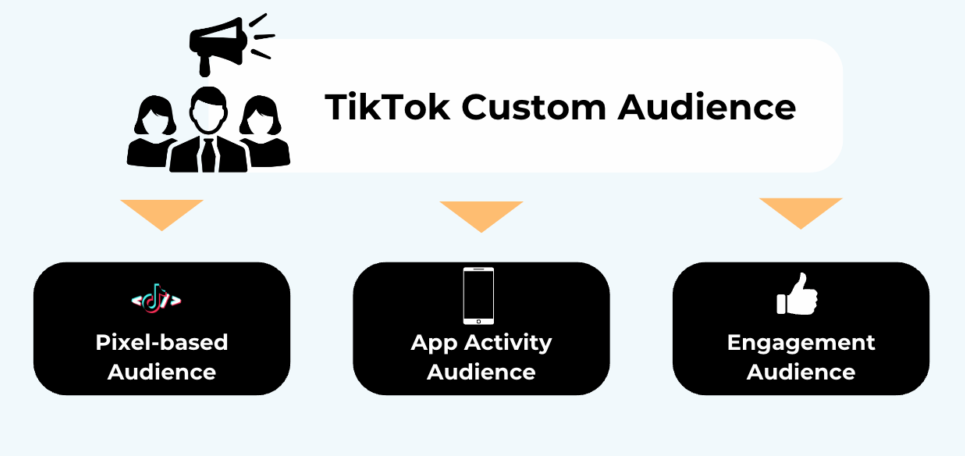
In today's digital marketing landscape, leveraging social media platforms like TikTok is essential for brands looking to connect with their target audience effectively. One of the most powerful tools available on TikTok is the ability to create custom audiences. This feature allows businesses to tailor their advertising efforts based on specific user data, ensuring that their messages reach the right people at the right time. If you're looking to enhance your TikTok marketing strategy, this guide will walk you through the steps to create custom audiences.
Understanding TikTok Custom Audiences
Before diving into the process, it's important to understand what custom audiences are and why they matter. A custom audience on TikTok is a group of users who have been identified based on specific criteria such as email addresses, phone numbers, or other identifiers. These audiences can be used to target ads more precisely, increasing the likelihood of engagement and conversion.
Creating custom audiences enables businesses to:
- Reach users who have already interacted with their brand.
- Target specific demographics or interests.
- Retarget users who have visited their website or engaged with their content.
Now that you understand the importance of custom audiences, let's move on to the step-by-step process of creating them on TikTok.
Step 1: Prepare Your Data
The first step in creating a custom audience is to gather the necessary data. You'll need a list of identifiers such as email addresses, phone numbers, or other unique identifiers that correspond to your target audience. It's crucial to ensure that the data is accurate and up-to-date to maximize the effectiveness of your custom audience.
Key Points:
- Ensure that the data you collect is relevant to your business.
- Use a clean and well-organized dataset to avoid errors during the upload process.
- Consider using a CRM or other data management tool to keep track of your customer information.
Step 2: Set Up Your TikTok Business Account
Before you can create custom audiences, you need to have a TikTok Business account. If you don't already have one, you can sign up for a free account through the TikTok app or the TikTok Business Center.
Key Points:
- Make sure you have the necessary permissions to manage ad accounts within your Business Center.
- Familiarize yourself with the TikTok Business Center interface to navigate easily.
Step 3: Access the TikTok Connector
Once you have a TikTok Business account, you can access the TikTok Connector, which allows you to integrate your data with TikTok's advertising platform. The connector is available in Audience Studio and in My Data → Datasets → Connections tab.
Key Points:
- Ensure that you have the correct access levels to the Ad Accounts you want to use.
- Understand the hierarchical structure of TikTok's audience management system, which includes Business Center, Ad Account, and Custom Audience.
Step 4: Install the TikTok Connector
To begin using the TikTok Connector, you'll need to install it from the Narrative App Marketplace. Follow these steps:
- Navigate to https://app.narrative.io/apps.
- Select and install the TikTok Connector.
- Accept the terms of use.
After installing the connector, you'll need to create a profile to connect your TikTok Business Center.
Key Points:
- Ensure you are logged in to TikTok Business Manager.
- Verify that you are logged in to the specific Business Center and have access to the Ad Accounts you want to deliver to.
Step 5: Connect Your TikTok Business Center
Once the connector is installed, you can create a new profile to connect your TikTok Business Center. Follow these steps:
- Navigate to Installed Apps from the Narrative dashboard.
- Go to Installed Apps → TikTok Connector.
- Create a New Profile.
- Enter a profile name and description.
- Prepare for Authorization by ensuring you are logged in to TikTok Business Manager.
Key Points:
- The OAuth process will automatically detect your TikTok account and available Ad Accounts.
- Click "Connect to TikTok" to proceed with the authorization.
Step 6: Authorize Access
After clicking "Connect to TikTok," you'll receive an OAuth URL from Narrative. This URL is valid for 24 hours only, so it's important to authorize access promptly.
Key Points:
- Click the OAuth URL to be redirected to TikTok's authorization page.
- Review the permissions requested and click "Confirm" to authorize Narrative's access to your TikTok Business Center and Ad Accounts.
- You'll be redirected back to Narrative, where you can verify the connection.
Step 7: Connect Your Dataset
Once your profile is set up, you can connect datasets to deliver audiences to TikTok. Follow these steps:
- Navigate to My Data → Datasets.
- Select a dataset that contains one or more of the supported identifier types.
- Click on the "Connections" tab.
- Select your TikTok Connector profile.
- Configure quick settings as needed.
- Click "Connect" to establish the connection.
Key Points:
- Choose how you want to deliver your audience data (to a new audience or an existing one).
- Ensure that the audience name is clear and descriptive.
- Use the "Create New For" option to specify the Ad Account IDs for new audiences.
- Use the "Existing Audiences" option to map Ad Account IDs to arrays of audience IDs.
Step 8: Monitor and Optimize
After setting up your custom audience, it's essential to monitor its performance and make adjustments as needed. TikTok provides analytics tools to help you track the effectiveness of your campaigns.
Key Points:
- Regularly review your campaign metrics to identify areas for improvement.
- Adjust your targeting strategies based on the data you collect.
- Test different ad formats and content to see what resonates best with your audience.
Conclusion
Creating custom audiences on TikTok is a powerful way to enhance your digital marketing efforts. By following these steps, you can effectively target your ideal audience and increase the chances of engagement and conversion. Remember to continuously monitor and optimize your campaigns to achieve the best results. With the right approach, TikTok can become a valuable asset in your marketing strategy, helping you reach new customers and grow your brand.
[IMAGE: Create TikTok Custom Audiences Steps]

Posting Komentar untuk "How to Create TikTok Custom Audiences: Step-by-Step Guide"
Posting Komentar