
How to Fully Understand TikTok Ad Reports: A Complete Guide
TikTok has become a powerful platform for brands to connect with their audiences, drive engagement, and generate sales. As the platform continues to evolve, understanding TikTok ad reports is essential for any brand looking to optimize its marketing strategy. These reports provide valuable insights into how your ads are performing, helping you make data-driven decisions to improve results.
What Are TikTok Ad Reports?
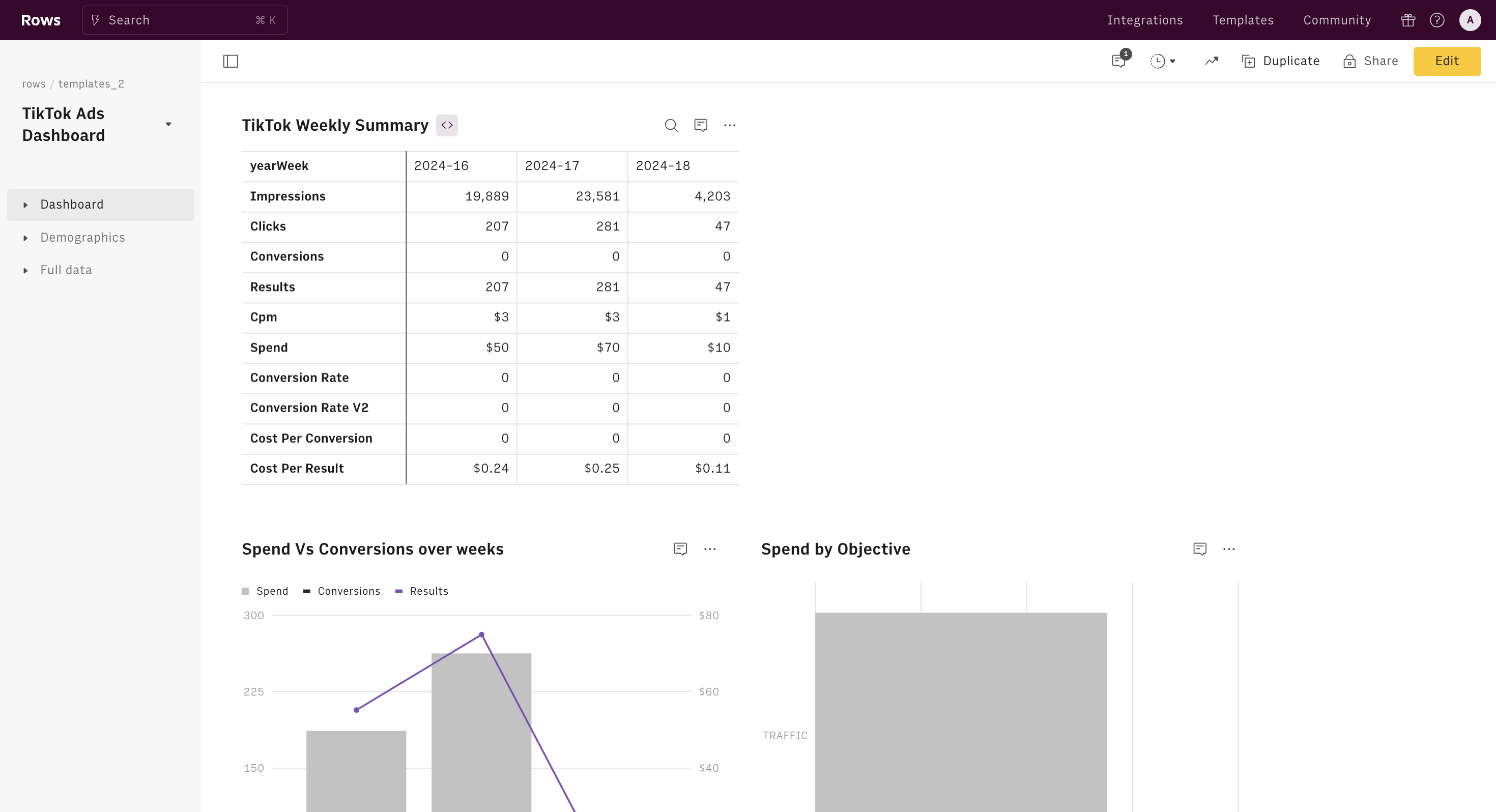
TikTok ad reports are detailed analytics that show how your ads are performing across various metrics. These reports include information on impressions, clicks, engagement rates, conversion rates, and more. They help you understand which aspects of your campaigns are working and which need improvement.
Key Components of TikTok Ad Reports
- Impressions: The number of times your ad was shown.
- Clicks: The number of times users clicked on your ad.
- Engagement Rate: The percentage of users who interacted with your ad (likes, comments, shares).
- Conversion Rate: The percentage of users who completed a desired action after clicking on your ad (e.g., making a purchase, signing up for a newsletter).
- Cost Per Click (CPC): The average cost you pay for each click on your ad.
- Return on Ad Spend (ROAS): The revenue generated for every dollar spent on your ad.
Why Understanding TikTok Ad Reports Matters
Understanding your TikTok ad reports allows you to: - Identify what’s working and what’s not in your campaigns. - Optimize your ad spend by focusing on high-performing ads. - Improve your targeting strategies based on audience behavior. - Make informed decisions about future ad campaigns.
Benefits of Analyzing TikTok Ad Reports
- Improved ROI: By identifying high-performing ads, you can allocate your budget more effectively.
- Better Audience Insights: Understanding which demographics engage most with your ads helps you tailor your content.
- Enhanced Campaign Performance: Regularly reviewing your reports enables you to refine your strategies and boost overall performance.
How to Access and Navigate TikTok Ad Reports
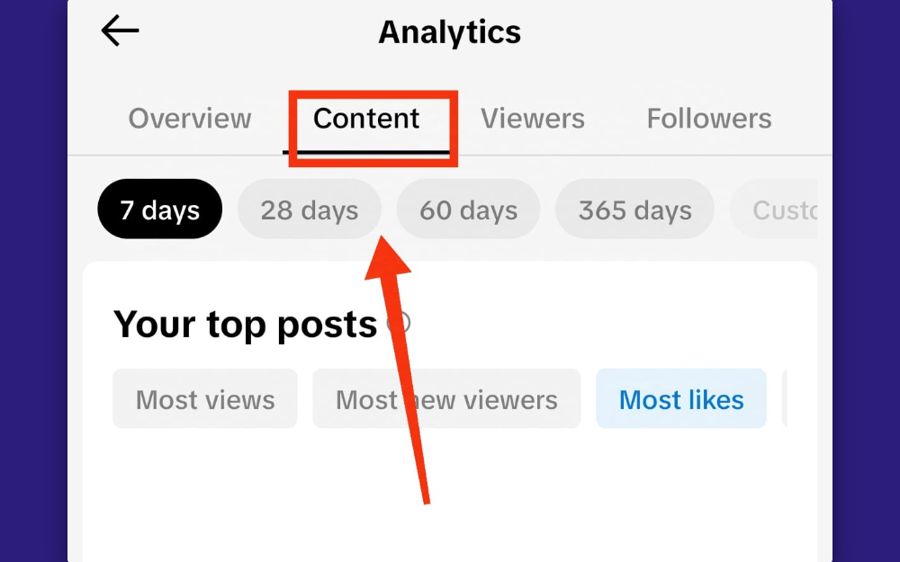
To access your TikTok ad reports, follow these steps: 1. Log in to your TikTok Ads Manager account. 2. Navigate to the "Reports" section. 3. Select the specific campaign or ad group you want to analyze. 4. Choose the time frame for your report (daily, weekly, monthly, etc.). 5. Review the metrics and insights provided.
Tips for Navigating TikTok Ad Reports
- Use Filters: Apply filters to focus on specific metrics or time periods.
- Compare Campaigns: Compare the performance of different campaigns to identify trends.
- Track KPIs: Monitor key performance indicators (KPIs) such as CTR, CPC, and ROAS.
Interpreting TikTok Ad Reports
Interpreting TikTok ad reports requires a good understanding of the metrics and how they relate to your campaign goals. Here are some key points to consider:
1. Impressions vs. Clicks
- High Impressions, Low Clicks: This could indicate that your ad is not engaging enough. Consider testing different visuals or headlines.
- Low Impressions, High Clicks: Your ad may be targeting the wrong audience. Adjust your targeting settings to reach the right people.
2. Engagement Rate
- High Engagement: Indicates that your content resonates with your audience. Continue creating similar content.
- Low Engagement: Consider revising your ad creative or messaging to better capture attention.
3. Conversion Rate
- High Conversion Rate: Your ad is effective at driving conversions. Focus on scaling these campaigns.
- Low Conversion Rate: Evaluate your landing page or checkout process to ensure it's user-friendly and optimized for conversions.
4. Cost Per Click (CPC)
- High CPC: May indicate that your ad is competing in a crowded space. Consider adjusting your bid or targeting.
- Low CPC: Your ad is performing well in terms of cost. Continue optimizing to maintain this advantage.
5. Return on Ad Spend (ROAS)
- High ROAS: Your ad is generating significant revenue. Consider increasing your budget for these campaigns.
- Low ROAS: Re-evaluate your ad strategy to improve profitability.
Best Practices for Using TikTok Ad Reports

To get the most out of your TikTok ad reports, follow these best practices:
1. Regularly Review Your Reports
Set aside time each week to review your ad reports and make necessary adjustments.
2. Test and Iterate
Use A/B testing to experiment with different ad creatives, headlines, and targeting options. Use your reports to determine what works best.
3. Set Clear Goals
Define clear objectives for your ad campaigns, such as increasing brand awareness, driving traffic, or boosting sales. Use your reports to track progress toward these goals.
4. Leverage TikTok SEO
Optimize your ad content with relevant keywords to improve visibility and attract the right audience.
5. Stay Updated on Trends
Keep an eye on trending topics and adjust your ad strategy accordingly. TikTok's algorithm favors content that aligns with current trends.
Conclusion
Understanding TikTok ad reports is crucial for any brand looking to succeed on the platform. By analyzing these reports, you can gain valuable insights into your ad performance, optimize your campaigns, and achieve better results. With the right approach and tools, you can turn your TikTok ad reports into a powerful asset for your marketing strategy.

Posting Komentar untuk "How to Fully Understand TikTok Ad Reports: A Complete Guide"
Posting Komentar