
How to Analyze TikTok Ad Performance Data Like a Pro
TikTok has become one of the most influential digital advertising platforms, offering brands a unique opportunity to connect with a massive and engaged audience. However, simply uploading content and hoping for the best won’t cut it. To truly succeed on TikTok, you need to understand how to analyze TikTok ad performance data effectively. This involves tracking key metrics, using attribution tools, and leveraging analytics to optimize future campaigns.

Understanding TikTok Metrics and KPIs

Before diving into the specifics of analyzing TikTok ad performance, it's essential to understand the different categories of metrics that TikTok provides. These are grouped into four main categories: Overview, Content, Followers, and Live.
1. Overview (General Analytics)
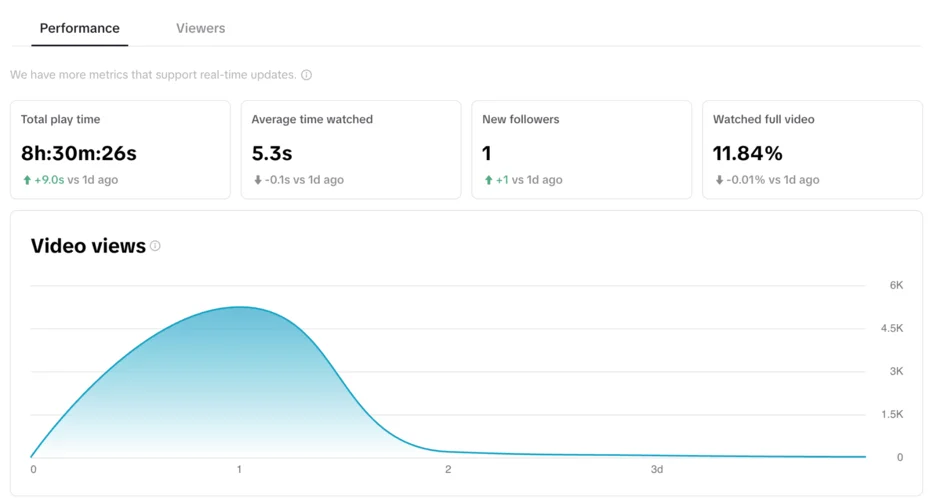
This section gives you a broad view of your account’s performance over a selected period. Key metrics include:
- Video Views: Total number of times videos on your account have been viewed.
- Profile Visits: Number of times your profile has been visited.
- Likes, Comments, Shares: Indicators of user engagement.
- Followers: Total number of users following your account and changes over time.
- Content Analysis: Number of videos posted, live videos published, etc.
These metrics help you gauge overall visibility and engagement levels.
2. Content Analysis
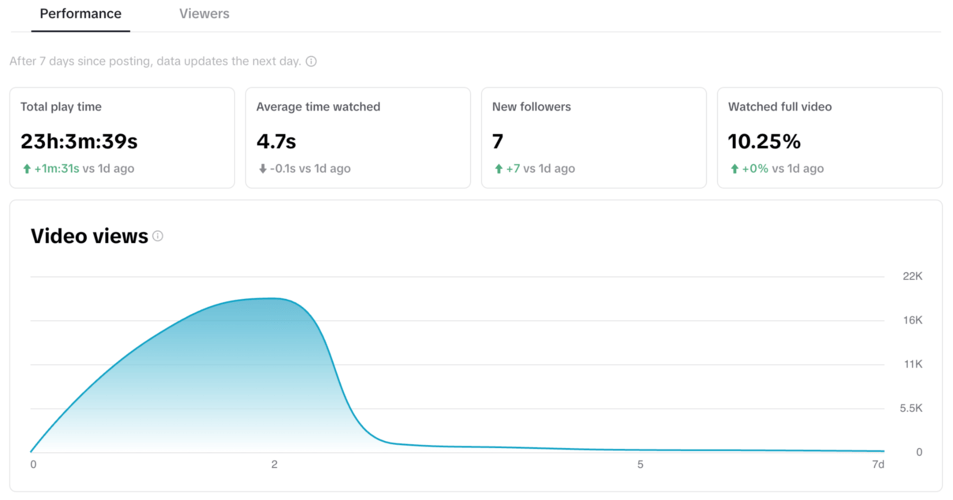
This section focuses on individual video performance. You can see which videos have been the most popular within a given timeframe. Key metrics include:
- Total Video Views
- Likes, Comments, Shares
- Playback Time, Average Viewing Time
- Complete Views
- Audience Reached
- Video Views by Source and Region
Understanding which content resonates with your audience helps you refine your strategy and create more engaging material.
3. Follower Analytics
This section provides insights into your followers, including their demographics and activity patterns. It includes:
- Gender and Location Breakdown
- Most Active Times
- Videos Watched, Audios Listened To
Knowing when your audience is most active allows you to schedule posts at optimal times for maximum engagement.
4. Live Analytics
For those who stream live, this section tracks metrics such as:
- Number of Live Videos
- Total Time Streamed
- New Followers Gained
- Top Viewers
- Diamonds Received (Virtual Gifts)
Live analytics can help you improve your streaming strategy and engage with your audience in real-time.
Key KPIs to Track Based on Campaign Objectives

Depending on your campaign goals, certain KPIs will be more relevant than others. Here are some of the most important ones:
Branding Campaigns
- Impressions: How often your ad is shown.
- Reach: Number of unique users who saw your ad.
- CPM (Cost per Thousand Impressions)
- Frequency: How many times a user saw your ad.
- Video Views (6 seconds, 50%, 100%)
- Cost per Thru Lay (100%)
These metrics help you measure brand awareness and ad exposure.
Traffic Campaigns
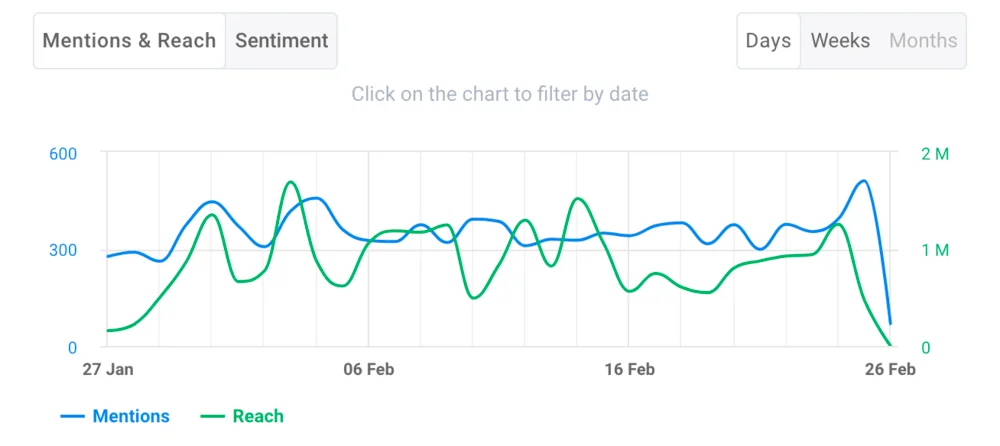
- CPC (Cost per Click)
- CTR (Click-Through Rate)
- Landing Page Views
- Cost per LPV (Landing Page Visit)
These metrics are crucial for campaigns aimed at driving traffic to your website or app.
Conversion Campaigns
- Conversions: Number of times your ad achieved a desired action (e.g., purchase, sign-up).
- CPA (Cost per Conversion)
- ROAS (Return on Ad Spend)
These metrics help you measure the effectiveness of your ads in driving actual business outcomes.
Tools to Analyze TikTok Ad Performance
TikTok offers several built-in tools to help you track and analyze your ad performance:
1. TikTok Analytics
This tool provides insights into your content’s performance, including video views, likes, comments, and follower growth.
2. TikTok Ads Manager
Used for managing and optimizing ad campaigns, this tool allows you to set objectives, manage creatives, and analyze performance data.
3. TikTok Pixel
This tool tracks events on your website, such as page visits, purchases, and form submissions, helping you measure the impact of your TikTok ads.
4. TikTok Events API
This server-side tracking solution complements the Pixel, allowing for more accurate tracking of conversions and user behavior.
5. Adsmurai One Tag
An innovative solution for configuring the Conversion API (CAPI) across multiple platforms, including TikTok, this tool helps ensure accurate tracking and optimization.
Tips for Optimizing TikTok Metrics

To get the most out of your TikTok ad campaigns, consider the following tips:
- Use Relevant Hashtags: Increase the visibility of your content by using trending and niche-specific hashtags.
- Create Visually Appealing Content: High-quality, engaging videos are more likely to capture attention and drive interaction.
- Engage with Your Audience: Respond to comments, ask questions, and encourage participation to build a loyal following.
- Experiment with Different Formats: Test various video formats, such as short clips, music videos, and challenges, to find what works best for your brand.
Conclusion
Analyzing TikTok ad performance data is essential for maximizing the effectiveness of your campaigns. By understanding the key metrics, using the right tools, and implementing effective strategies, you can turn your TikTok ads into powerful marketing assets. Whether you're aiming to increase brand awareness, drive traffic, or boost conversions, a data-driven approach will help you achieve your goals and stay ahead of the competition.

Posting Komentar untuk "How to Analyze TikTok Ad Performance Data Like a Pro"
Posting Komentar